

🔥 TV Black Friday Deals 2026: picks worth watching →
You have invested in a Sony A7III, a mirrorless powerhouse that demands storage as fast as its autofocus. Whether you are shooting bursts of fast action or recording 4K video at 100 Mbps, a slow SD card can cause buffer locks and missed moments. This guide focuses on the best SD cards for Sony A7III in 2026, covering UHS-II and UHS-I options that deliver the read and write speeds your camera needs. We have evaluated top picks from Sandisk and Lexar to help you choose the right balance of speed and capacity. For a broader look at compatible storage, check out our top SD cards for sony cameras guide.


Buying Guide for Sony A7III SD Cards
Choosing the right SD card for your Sony A7III involves more than just capacity. The camera supports UHS-II cards, which can significantly improve buffer clearing and transfer speeds. Below are the key factors to consider before making your purchase.
Speed Class: UHS-II vs. UHS-I
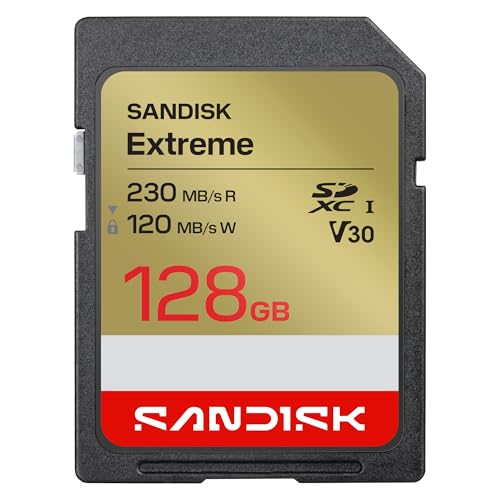
The Sony A7III has a UHS-II compatible slot, meaning it can take full advantage of the higher transfer rates of UHS-II cards. UHS-II cards like the Sandisk Extreme PRO and Lexar Silver PRO offer read speeds over 280 MB/s and write speeds above 120 MB/s. This translates to faster buffer clearing during continuous shooting and quicker file transfers to your computer. UHS-I cards, such as the Sandisk Extreme, are still very capable for most users, with write speeds up to 160 MB/s, and they are more budget friendly. For professional video work or high speed burst photography, UHS-II is a worthwhile upgrade. For a comparison with other camera systems, see our best SD cards for canon R5 guide.
Capacity and Video Requirements
The A7III can shoot 4K video at up to 30 fps (100 Mbps) and full HD at 120 fps. A 128 GB card provides roughly 2 to 3 hours of 4K footage, which is sufficient for most shoots. If you record longer events or high bitrate formats, consider 256 GB or 512 GB cards. The Sandisk Extreme PRO offers up to 512 GB, while the Lexar Silver PRO is available in 128 GB and 256 GB options. Always check the card’s video speed class: V30 is adequate for 4K at 30 fps, but V60 or V90 ensures compatibility with higher bitrates and 8K if you upgrade later. For more on capacity planning, read our best SD cards for panasonic cameras article.
Durability and Reliability
When you are out in the field, your SD card must withstand drops, water, and extreme temperatures. The Sandisk Extreme PRO is IP68 rated for water and dust resistance and can survive a 6 meter drop. The Sandisk Extreme also offers robust protection against shocks and temperature swings. Lexar cards undergo rigorous validation to ensure long term reliability. A durable card protects your precious footage and photos, giving you peace of mind during outdoor shoots. For similar rugged options, see our best SD cards for fujifilm cameras guide.
Compatibility with the Sony A7III
All SD cards listed here are fully compatible with the Sony A7III. The camera supports SDHC and SDXC formats, so cards up to 512 GB work without issue. UHS-II cards will operate at UHS-I speeds if inserted into a UHS-I slot, but the A7III’s UHS-II slot unlocks their full potential. Always format the card in the camera before first use to ensure optimal performance. For a comprehensive list of compatible cards, refer to our best SD cards for nikon cameras guide, which covers similar technology.
Final Thoughts
After evaluating the top contenders, the SANDISK 128GB Extreme PRO SD Memory Card stands out for professionals who need maximum speed and durability, with write speeds up to 300 MB/s and IP68 protection. For a more affordable yet highly capable UHS-II option, the Lexar 128GB Silver PRO SD Memory Card delivers excellent read speeds and reliable performance for 4K video and burst shooting. Both cards are validated for the Sony A7III and will ensure you never miss a critical shot.
Frequently Asked Questions
Is UHS-II worth it for the Sony A7III?
Yes, if you shoot continuous bursts or record high bitrate 4K video, UHS-II cards like the Sandisk Extreme PRO clear the buffer much faster than UHS-I cards. The A7III’s UHS-II slot can fully utilize these speeds, making it a worthwhile upgrade for demanding workflows.
What speed class do I need for 4K video on the A7III?
For standard 4K at 30 fps (100 Mbps), a V30 card is sufficient. However, if you plan to shoot in higher bitrate modes or 8K in the future, choose a V60 or V90 card. The Lexar Silver PRO is V60 rated and provides extra headroom.
Can I use UHS-I cards in the Sony A7III?
Absolutely. The A7III is backward compatible with UHS-I cards. They work perfectly for casual shooting and full HD video. The Sandisk Extreme UHS-I card is a great budget option that still offers fast write speeds up to 160 MB/s.
How much storage do I need for the A7III?
For most users, 128 GB is a sweet spot, offering several hours of 4K footage and thousands of raw photos. If you shoot long events or travel without offloading, consider 256 GB or 512 GB. The Sandisk Extreme PRO comes in capacities up to 512 GB. For more guidance, see our top SD cards for sony cameras article.
