

🔥 TV Black Friday Deals 2026: picks worth watching →
Introduction
Imagine you are deep in a creative session with FL Studio, crafting a beat that you know is fire, but you keep hunting for the right shortcut key. That moment of hesitation can break your flow and slow down your entire music production process. For producers, speed is everything. Whether you are making beats for a client or just jamming for fun, having the right tools on your laptop can make a huge difference. This guide reviews the best accessories that can help you navigate FL Studio faster and more intuitively, from simple decals to a sleek backlit keyboard.
We have evaluated a range of products designed specifically for FL Studio users, focusing on how each can enhance your workflow. These accessories transform a standard laptop keyboard into a dedicated music production powerhouse. Whether you are using a MacBook, a PC laptop, or a portable studio setup, the right shortcuts can save you hours. For more context on overall laptop performance for music production, check out our guide on the best laptops for music production in 2026.



Buying Guide: Choosing the Right FL Studio Keyboard Accessory
When picking an accessory to boost your FL Studio workflow, consider a few key factors. The right choice depends on your budget, your laptop type, and how often you rely on keyboard shortcuts. Here are the most important criteria to evaluate.
Laptop Compatibility
First and foremost, ensure the accessory fits your laptop. The XSKN keyboard cover, for example, is meticulously designed for specific MacBook models with M-series chips. Check the model number on the underside of your laptop before buying. Stickers and decals, like the Online-Welcome and Logickeyboard options, are more universal, fitting any standard keyboard layout. If you use a PC laptop for beat making, our guide to beat making laptops can help you find a compatible machine.
Durability and Build Quality
Music production can be messy, with coffee spills, grimy fingers, and constant key presses. Look for accessories made from high-quality materials. The XSKN silicone keyboard cover offers excellent protection against liquid spills and dust, while the laminated Matt vinyl stickers from Online-Welcome are designed to withstand wear without peeling. The Logickeyboard Astra 2 backlit keyboard is built like a premium peripheral, offering long-term reliability for daily studio use.
Shortcut Density and Organization
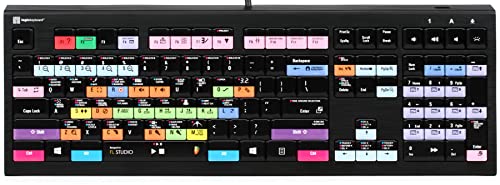
The main goal is to speed up your workflow. Some accessories, like the FL Studio Reference Keyboard Hotkeys Decals from 4Keyboard, organize shortcuts into sections, making them easy to locate without memorization. Others, such as the Logickeyboard Astra 2, offer a full backlit keyboard with dedicated FL Studio labels, which is ideal for producers who work in low-light environments. Think about how many shortcuts you need and how quickly you need to access them. For DJs who rely on fast access to controls, our best laptops for DJs guide might also be useful.
Additionally, consider how much space you have on your studio desk. A full-size backlit keyboard takes up more room than a set of stickers. For minimalist home studios, decals or a slim keyboard cover might be better. If you are setting up a home recording space, our home studio recording laptops recommendation can help you choose the right laptop for your setup.
Final Thoughts
Choosing the right accessory can transform how you interact with FL Studio, making your workflow faster and more intuitive. For producers on a tight budget who want an immediate upgrade, the FL Studio Reference Keyboard Hotkeys Decals offer a cost-effective way to learn shortcuts without changing your keyboard. If you prefer a premium, immersive experience with a dedicated workspace, the Logickeyboard Astra 2 PC Backlit Keyboard is a fantastic investment that combines backlighting with custom FL Studio labels, ideal for late-night studio sessions. Both options will help you focus more on your music and less on the keyboard.
Related Guides
Frequently Asked Questions
Will these keyboard decals work on a laptop with a non-standard layout?
Most decals, like those from Online-Welcome, are designed for standard US keyboard layouts. However, some laptop keys have odd sizes, so check the dimensions (11.5x13mm) to ensure a good fit. If your laptop has a non-standard layout, a silicone keyboard cover that molds to the exact keys is usually a safer choice.
How do I install a silicone keyboard cover without damaging my laptop?
Installation is simple: gently stretch the cover over the keyboard, starting from the top row and pressing each key pocket down with your fingertips. Ensure no air bubbles are trapped. High-quality silicone covers, like the XSKN model, are designed for a snug fit without sliding, and they can be washed easily.
Can a backlit keyboard like the Logickeyboard Astra 2 be used for other software?
Yes, the Logickeyboard Astra 2 is a fully functional PC keyboard that supports all software. While its labels are optimized for FL Studio, the standard keys remain fully usable for typing or any other application. The backlighting also helps in dimly lit studios for any task. For more about laptop performance in audio, see our audio production laptop guide.
Are these stickers and decals easy to remove without leaving residue?
High-quality options, such as the laminated Matt vinyl stickers from Online-Welcome, are designed for clean removal without residue. However, prolonged exposure to heat or direct sunlight might affect adhesion. Always test a small corner first, especially on painted keycaps.
For more guidance on laptop performance for recording, check our recording music laptops overview. And if you need a powerful machine for other creative tasks, our coding laptops review might also be useful.



