🔥 TV Black Friday Deals 2026: picks worth watching →
You have your laptop loaded with slides, the projector is ready, and the room is full of expectant faces. But without a reliable way to advance slides while moving around, you are stuck behind the desk. A quality presentation clicker frees you to engage your audience, point out key data, and control your flow from anywhere in the room. In this guide, we evaluate ten of the best presentation remotes that work seamlessly with your laptop, covering everything from budget-friendly options to professional-grade systems. Whether you are a teacher, a business professional, or a keynote speaker, the right clicker makes your presentation smoother and more impactful.




Buying Guide: What to Look for in a Presentation Clicker
Connectivity: USB-A, USB-C, or Bluetooth
Your laptop likely has USB-A or USB-C ports, and many newer models only include USB-C. A clicker with a dual USB-A and USB-C receiver works with any laptop without an adapter. Bluetooth clickers like the Lenovo Portable Rechargeable Presentation Remote eliminate the need for a dongle altogether, pairing directly via Bluetooth 5.3. For compatibility, check that the clicker supports your operating system (Windows, macOS, Linux) and presentation software such as PowerPoint, Keynote, or Google Slides.
Laser Pointer: Red vs. Green Light
A laser pointer helps you highlight specific slide elements. Red lasers are common and affordable, but they can be hard to see on bright projectors or LED screens. Green lasers (like the TITIANCOOL model) are more visible in well-lit rooms and over longer distances. If you often present in large lecture halls or bright conference rooms, a green light pointer is worth the extra investment.
Wireless Range and Battery Life
Most clickers offer a range of 30 to 50 feet, which is enough to move around a standard room. For larger venues, look for models with up to 100 feet of range. Battery life varies: some use AAA batteries, while others have rechargeable lithium-ion cells via USB-C. Rechargeable options save money over time and are more convenient for frequent presenters.
Extra Controls: Volume, Hyperlink, and Screen Modes
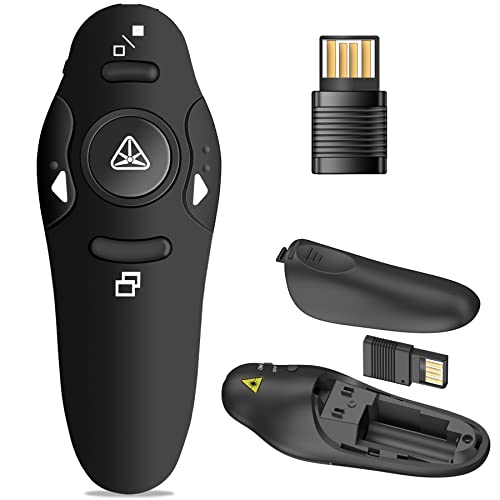
Beyond basic slide navigation, many clickers offer volume control, window switching, full-screen/black-screen toggles, and hyperlink activation. These functions let you control your entire presentation without touching your laptop. For example, the DinoFire USB Type C Wireless Presenter Remote includes dedicated volume buttons and a window switch, ideal for multitasking during a talk.
If you are also looking for a laptop that handles presentations smoothly, check out our guide to best laptops for screenwriters, many of those models offer long battery life and crisp displays perfect for presenting. For writers who present their work, see best laptops for writers. And for data-heavy presentations, best laptops for financial modeling provides powerful specs.
Final Thoughts
Choosing the right presentation clicker comes down to your typical environment and device setup. For most users, the DinoFire USB Type C Wireless Presenter Remote offers an unbeatable combination of dual connectivity, full control, and a bright red laser at a very accessible price. If you need a green laser for high-visibility settings and prefer rechargeable convenience, the Green Light Presentation Clicker for Teachers from TITIANCOOL is a fantastic choice. Both will elevate your laptop presentations and help you connect with your audience.
Related Guides
Frequently Asked Questions
Do presentation clickers work with any laptop?
Most clickers support Windows, macOS, and Linux. USB-A receivers work with older laptops, while USB-C receivers are needed for newer MacBooks and PCs. Bluetooth clickers work with any laptop that supports Bluetooth. Always verify compatibility with your operating system version before buying.
Can I use a presentation clicker with Google Slides or Keynote?
Yes, the vast majority of clickers work with Google Slides, Keynote, Prezi, and PowerPoint. They emulate keyboard shortcuts like Page Up and Page Down. Some models require a simple setup on Mac to recognize the clicker, but it is usually a one-time process.
How far away can I stand from my laptop with a wireless clicker?
Typical wireless range is 30 to 50 feet using 2.4GHz RF. Some high-end models reach up to 100 feet. Bluetooth clickers may have slightly less range but are still sufficient for most rooms. For large auditoriums, consider a model with a longer range or a wireless presentation system like the ClearClick Present+Share.
Are rechargeable clickers better than battery-powered ones?
Rechargeable clickers save money on batteries and are more eco-friendly. They charge via USB-C and often last for weeks on a single charge. Battery-powered clickers are cheaper upfront and you can keep spare AAA batteries handy. Both are reliable; choose based on your preference for convenience versus cost.
For more laptop buying advice, visit our laptops category. If you need accessories for your car or outdoor gear, see best automotive for beginners.