

🔥 TV Black Friday Deals 2026: picks worth watching →
You are a busy professional who needs a laptop that adapts to your dynamic workday. Whether you are presenting in meetings, taking notes in tablet mode, or crunching numbers at your desk, a 2 in 1 business laptop offers the flexibility you need. In this guide, we have evaluated the best 2 in 1 business laptops for 2026 to help you find a device that balances performance, portability, and versatility. We have selected models from top brands like Dell, HP, and Exilapsire, ensuring there is an option for every budget and workflow. For more context on touchscreen capabilities in professional devices, check out our curated list of best business laptops with touchscreen.



Buying Guide: What to Look For in a 2 in 1 Business Laptop
Performance: Processor and Memory
Your business laptop needs to handle multitasking, data analysis, and video conferencing without lag. Look for at least an Intel Core i5 or AMD Ryzen 5 processor, paired with 8 GB to 16 GB of RAM. The HP OmniBook 7 X Flip goes further with an Intel Core Ultra 7 and 32 GB LPDDR5 RAM, making it ideal for heavy workloads. For a more budget-friendly option, the Exilapsire 15.6″ Yoga uses an AMD A9 processor with 8 GB RAM, sufficient for everyday office tasks. If you need extreme multitasking, explore our roundup of best business laptops with 64GB RAM.
Display Quality and Touch Responsiveness
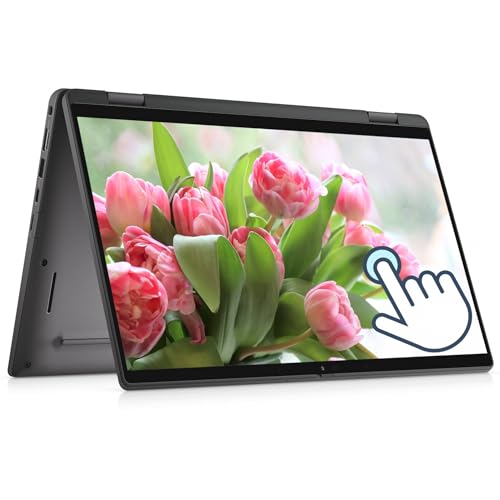
A crisp, vibrant display is crucial for presentations, spreadsheets, and creative work. Full HD (1920×1080) is the baseline, but the HP OmniBook 7 Flip models offer 3K OLED touchscreens with 120 Hz refresh rates and 100% DCI-P3 color gamut. The Dell Latitude 7420 features a 14-inch FHD touchscreen, while the Dell 14 2-in-1 provides a 16:10 aspect ratio for more vertical screen space. Always confirm that the touchscreen is responsive and supports active pens for note-taking.
Build Quality and Portability
A 2 in 1 business laptop must survive frequent travel and mode switching. Look for a 360-degree hinge, aluminum chassis, and a weight under 4 pounds. The HP OmniBook 7 X Flip is built from sandblasted aluminum and features a drop-hinge design for durability. The Dell Latitude 7420, though renewed, retains its premium magnesium alloy construction. For users who prioritize SSD storage speed, see our guide on best business laptops with SSD.
Connectivity and Expandability
Business laptops need versatile ports for docking stations, external monitors, and peripherals. Thunderbolt 4, USB-C, and HDMI 2.1 are valuable. The HP OmniBook 7 X Flip includes Thunderbolt 4, HDMI 2.1, and Wi-Fi 7. The QikPulse 15.6″ model offers WiFi 6 and a full-function USB-C port. If you plan to use a docking station, a Thunderbolt 4 port is a must for high-speed data and video output.
Final Thoughts
After evaluating the best 2 in 1 business laptops for 2026, our top recommendation for power users is the HP OmniBook 7 X Flip 16″ 2 in 1 Laptop Copilot+ AI, which delivers exceptional performance, a stunning 3K OLED display, and enterprise-grade security. For professionals on a tighter budget or those who need a reliable daily driver, the Exilapsire 15.6″ Yoga 2-in-1 Touchscreen Laptop offers solid performance and a responsive touchscreen at a very accessible price point. Whichever you choose, a convertible laptop will streamline your workflow and adapt to wherever your business takes you.
Related Guides
Frequently Asked Questions
What is the best 2 in 1 business laptop for remote work?
For remote professionals, the HP OmniBook 7 Flip 16″ (2-in-1) with its 5MP IR camera, AI noise cancellation, and long battery life is an excellent choice. Its 3K OLED display also reduces eye strain during long hours.
Are 2 in 1 laptops powerful enough for business tasks?
Yes, modern 2 in 1 laptops like the Dell Latitude 7420 with an Intel Core i7 or the Dell 14 with AMD Ryzen 7 can handle demanding business applications, video editing, and data analysis. For more on performance, see our best business laptops with SSD guide.
How much RAM do I need in a business 2 in 1 laptop?
We recommend at least 8 GB for basic office tasks and 16 GB for multitasking and creative work. The HP OmniBook 7 X Flip offers 32 GB, which is ideal for heavy workloads and future-proofing.
Is a touchscreen necessary for a business laptop?
Not strictly necessary, but a touchscreen enhances note-taking, presentations, and navigation. If you frequently use tablet mode or annotate documents, a responsive touchscreen with active pen support is a valuable feature.



