

🔥 Camera Black Friday Deals for 2026: picks worth watching →
You have your lighting dialed in, your microphone positioned perfectly, and a clean backdrop ready for your next live stream. But when you hit “go live”, your laptop webcam delivers soft, grainy footage that makes you look like you are broadcasting from 2010. Upgrading to a dedicated mirrorless camera instantly transforms your stream quality with sharp detail, beautiful background blur, and smooth autofocus that follows your every move.
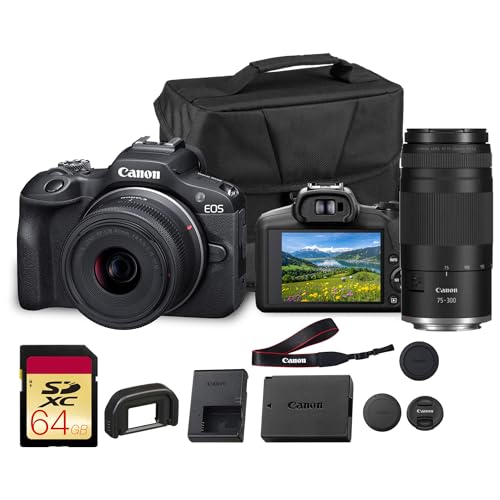
This guide focuses on one of the most affordable ways to step into professional streaming: the Canon EOS R100 double lens bundle. Whether you are a beginner streamer, a vlogger, or a small business owner presenting products live, this compact mirrorless system gives you the image quality and flexibility you need without overwhelming complexity. For more compact options, check out our roundup of best compact mirrorless cameras for creative work.



Buying Guide: What to Look for in a Streaming Mirrorless Camera
Choosing the right camera for streaming means balancing video performance, autofocus reliability, and ease of use. Here are the four most important criteria to evaluate before you buy.
Autofocus Speed and Accuracy
Streamers move. You gesture, lean forward to read chat, or pick up a product to show the audience. A camera with slow autofocus will constantly hunt, pulling viewers out of the moment. Canon’s Dual Pixel CMOS AF, found in the EOS R100, covers the entire frame with phase detection pixels. It locks onto eyes and faces instantly and keeps tracking even when you turn your head. For weighing portability alongside AF performance, see our guide on best lightweight mirrorless cameras that balance travel-friendliness with reliable focusing.
Lens Versatility for Different Streaming Scenarios
Not all streams look the same. A gaming streamer might want a tighter close up of their face, while a cooking show host needs a wider angle that captures the whole counter. A camera bundle with multiple lenses lets you switch between perspectives without buying extra glass. The Canon EOS R100 bundle includes the RF-S 18-45mm lens for standard wide to mid-range shots and the RF 75-300mm telephoto lens for distant subjects. This combination works for desk setups, product close ups, and even outdoor streaming events. If you prefer an even more compact body, explore our best small mirrorless cameras list.
Low Light Performance
Streaming often happens in controlled but imperfect lighting. A camera that struggles in low light will introduce noise, making your skin tones look muddy and your background distracting. The EOS R100’s 24.2MP APS-C sensor captures more light than smaller sensors found in point and shoots or webcams. Combined with the wide aperture available on the kit lenses, you can keep your shots clean even when you rely on a single key light. Canon’s DIGIC 8 processor also helps manage noise at higher ISO settings, so you can push exposure without ruining details.
Ease of Setup and Connectivity
A streaming camera should not require a degree in filmmaking to get online. The EOS R100 keeps things simple with intuitive controls and a comfortable grip. It connects to your computer via USB or HDMI for use with OBS, Streamlabs, or Zoom. The compact body fits easily on a desk mount or tripod. For a deeper look at how mirrorless cameras fit into a broader streaming workflow, visit our main Cameras resource page.
Final Thoughts
If you are ready to leave behind fuzzy webcam footage and step into professional quality streaming, the Canon EOS R100 double lens bundle offers an unbeatable entry point. Its fast Dual Pixel autofocus keeps you sharp even when you move, the two included lenses cover everything from wide shots to distant subjects, and the APS-C sensor ensures clean low light performance. For streamers who value portability and flexibility without sacrificing image quality, this bundle is a smart choice. Check the Canon EOS R100 Mirrorless Camera with 18-45mm for your desk setup, and if you need an alternate lens option, the same bundle also includes the Canon RF 75-300mm lens for when you want to zoom in on details or stream outdoors.
Frequently Asked Questions
Is the Canon EOS R100 good for live streaming?
Yes, the EOS R100 works well for live streaming when connected to a computer via HDMI or USB. Its Dual Pixel autofocus and 4K video capability (at 24 fps) deliver clean, detailed footage. You will need a capture card for the best HDMI performance, but the camera’s compact size makes it easy to position on your desk.
Can I use the Canon EOS R100 as a webcam?
Absolutely. Canon provides EOS Webcam Utility software that lets you connect the R100 to your computer via USB and use it as a high quality webcam in Zoom, OBS, and other apps. The camera’s large sensor gives you that professional blurred background look that standard webcams cannot achieve.
What lenses come in the Canon EOS R100 double lens bundle?
The bundle includes the RF-S 18-45mm f/4.5-6.3 IS STM lens, which is ideal for wide shots and everyday recording, plus the RF 75-300mm f/4-5.6 telephoto lens for capturing distant subjects. This two lens system gives you flexibility for both streaming close ups and shooting B-roll or outdoor content.
Does the Canon EOS R100 have image stabilization for handheld streaming?
The RF-S 18-45mm kit lens includes optical Image Stabilization (IS), which helps reduce shakiness when you are holding the camera. For stationary streaming, you will likely mount the camera on a tripod or desk stand, so stabilization is less critical than for run and gun style content.


