

🔥 TV Black Friday Deals 2026: picks worth watching →
You are staring at your desk, cursor lagging during a critical moment in a game, or maybe your wrist aches after a long day of spreadsheets. The choice between a gaming mouse vs regular mouse can feel overwhelming, but it does not have to be. This guide breaks down the essential differences in DPI, button customization, and ergonomic design so you can decide which type suits your workflow or play style in 2026.
Whether you are a competitive gamer, a creative professional, or someone who just wants a more comfortable daily driver, understanding what sets these devices apart is key. We have evaluated seven top-rated models from brands like Redragon, Razer, and BENGOO to help you make an informed choice. For more context, check out our guide on best gaming mouse brands for additional insights.




Buying Guide
DPI and Sensor Performance
DPI (dots per inch) determines how fast your cursor moves across the screen. Gaming mice typically offer adjustable DPI settings ranging from 800 to over 12,000, allowing you to switch between precise aiming and quick flicks. Regular office mice usually have a fixed, lower DPI that is adequate for basic tasks but lacks the responsiveness needed for fast-paced gaming.
Consider a mouse with a high-DPI optical sensor if you play first-person shooters or do graphic design work that demands pixel-perfect accuracy. The Razer Basilisk V3 Customizable RGB Wired Ergonomic features a focus plus 26K DPI optical sensor for crisp, lag-free tracking.
Button Customization and Macros
Gaming mice often come with extra programmable buttons that you can map to in-game commands, media controls, or productivity shortcuts. Regular mice usually only have left, right, and scroll wheel buttons. If you rely on complex key combinations or want to streamline your workflow, a gaming mouse with macro support can save you time and effort.
For example, the Redragon Gaming Mouse, MMO Mouse Gaming UP 12400 offers 19 programmable buttons with five memory profiles. This level of customization is overkill for simple office tasks but invaluable for MMO or MOBA games. For more on finding the right model, see our best gaming mouse for PC roundup.
Ergonomics and Comfort
Ergonomics can make or break your experience, especially during long sessions. Gaming mice are often designed with contoured shapes, thumb rests, and textured grips to reduce fatigue. Regular mice may have a simpler, symmetrical shape that works fine for short use but can lead to discomfort over hours.
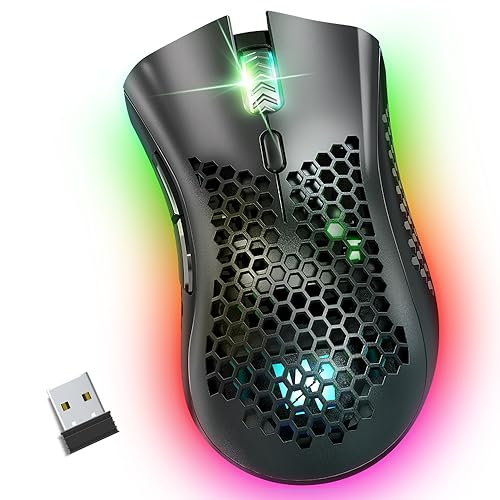
Look for features like honeycomb shells (for lightweight feel) or adjustable weights to balance the mouse to your hand. The Redragon M617 Ultralight Honeycomb Shell Wired weighs only 41 grams, making it ideal for marathon gaming or all-day office work without strain.
Wired vs. Wireless Connectivity
Wired gaming mice offer zero latency and never need charging, making them a reliable choice for competitive gaming. Wireless options, like the WolfLawS KM-1 RGB Wireless Gaming Mouse, provide freedom of movement but require occasional recharging and may introduce a slight delay.
If you prioritize absolute responsiveness and do not mind a cable, a wired mouse is the safer bet. For a clutter-free desk or if you switch between devices often, a wireless model with a 2.4GHz connection (like the WolfLawS) offers convenience without significant lag.
Final Thoughts
Choosing between a gaming mouse and a regular mouse ultimately comes down to your priorities: if you demand high DPI, extensive button customization, and superior ergonomics for gaming or creative work, a gaming mouse like the Redragon Gaming Mouse, MMO Mouse Gaming UP 12400 is a powerful investment that adapts to your needs. On the other hand, if you want a budget-friendly, wireless option that handles daily tasks and casual gaming with ease, the WolfLawS KM-1 RGB Wireless Gaming Mouse offers great value without sacrificing essential features. No matter your choice, both categories have evolved to deliver comfort and performance for any user.
Frequently Asked Questions
Can I use a gaming mouse for office work?
Absolutely. Gaming mice often have adjustable DPI and programmable buttons that can be set to productivity shortcuts, making them excellent for office tasks. Their ergonomic designs also help reduce wrist strain during long work sessions.
Is a higher DPI always better?
Not necessarily. Higher DPI means faster cursor movement, which can be great for gaming but may feel too twitchy for precise work like photo editing. Look for a mouse with adjustable DPI so you can tune it to your preferred speed.
Do I need a wired or wireless gaming mouse?
It depends on your setup. Wired mice offer zero latency and no battery worries, ideal for competitive gaming. Wireless mice provide desk freedom and are convenient for travel, but require charging and may have slight input delay. For most users, a reliable wireless model with 2.4GHz is sufficient.
What does a programmable button do on a gaming mouse?
Programmable buttons let you assign custom commands, macros, or media controls to specific mouse keys. In games, you can map weapon swaps or ability combos; in work, you can set copy, paste, or volume controls. This saves time and reduces hand movement.


