Imagine arriving home with your hands full of groceries, only to fumble for keys. Or worrying if you locked the door after leaving. A smart lock with Apple HomeKit eliminates these hassles, letting you unlock with your iPhone, Apple Watch, or even a simple tap. In this guide, we review the best smart locks with Apple HomeKit for 2026, covering models from Aqara, ThorBolt, and ULTRALOQ. Whether you need a deadbolt, knob, or a lock with Thread support, we have you covered. For more ways to secure your entry, check out our best smart lock with camera recommendations.

Pros
- Apple Home Key support for effortless iPhone and Apple Watch unlocking
- Multiple unlock methods, including fingerprint, code, NFC, and key
- Auto-lock and Do Not Disturb mode enhance daily convenience
- Rugged weather-resistant design with high security compliance
- Long battery life with USB-C backup charging
Cons
- Requires a separate Aqara Zigbee 3.0 hub for remote and third-party features
- NFC card is sold separately, not included in the box
- No built-in Wi-Fi, so the hub is essential for full smart home integration
The Aqara Smart Lock U100 is a full-featured smart deadbolt designed for homeowners who want flexible, secure access without sacrificing convenience. It is especially appealing to Apple users because of built-in Apple Home Key support and seamless integration into the Apple Home ecosystem.
With a high-precision fingerprint reader that stores up to 50 fingerprints, the U100 makes keyless entry fast and reliable. It also supports remote passcodes, one-time visitor codes, NFC cards (sold separately), and a physical key. When paired with an Aqara Zigbee 3.0 hub, you can manage access from the Aqara Home app and create automations with Alexa, Google Home, and IFTTT.
The lock features a sturdy zinc alloy body with an IP65 weather resistance rating and BHMA Level 3 security compliance. It operates in temperatures from -31°F to 151°F, making it suitable for various climates. Four AA batteries deliver up to eight months of use, and a USB-C port provides emergency backup power.
One notable limitation is that some features, including remote passcode management and third-party integrations, require a separate Aqara Zigbee 3.0 hub. Additionally, the NFC card is not included, and the lock has no built-in Wi-Fi, so the hub is necessary for full smart functionality.
Overall, the Aqara Smart Lock U100 is a solid choice for those looking to upgrade to a smart lock with multiple entry methods. Its Apple Home Key support and durable construction make it a reliable, future-ready addition to any connected home. Just factor in the cost of the hub if you plan to use its advanced features.

Pros
- Apple Home Key and Thread integration for seamless smart home control.
- Multiple unlocking methods including fingerprint and Apple Watch.
- Long battery life up to one year with common AA batteries.
- Easy DIY installation compatible with most standard door preparations.
Cons
- Remote access requires a compatible Thread-enabled Apple home hub within 33 feet.
- No built-in support for Alexa or Google Assistant as of product data.
- Zero reviews available at launch, so real-world performance is unverified.
The ThorBolt X1 is a smart deadbolt designed specifically for Apple users who want to integrate their door lock into the HomeKit ecosystem. With support for Apple Home Key and Thread, this lock offers a smooth, fast, and secure way to unlock your door using your iPhone or Apple Watch, even when the devices are out of power or offline. It is best suited for homeowners who already use Apple products and seek a reliable, keyless entry solution that does not sacrifice security.
The standout features of the ThorBolt X1 include its lightning-fast fingerprint sensor with adaptive learning, which becomes more accurate over time while keeping your biometric data encrypted on the device. The Thread protocol ensures low-latency communication and energy efficiency, delivering instant responses from the Apple Home app. Additionally, the lock supports up to 50 users with 100 passcodes and 100 fingerprints, making it easy to grant temporary or permanent access to family, guests, or service providers.
Build quality is solid with a sleek black finish and dimensions that fit standard US and Canada door preparations. The lock uses 8 AA alkaline batteries for up to one year of typical use, and installation is straightforward with no professional help required. The adjustable latch backset and compatibility with 2-1/8 inch and 1-1/2 inch door holes make it versatile for most home entry doors.
However, there are a few drawbacks to consider. Remote access is only possible if you already own a Thread-enabled Apple Home hub (such as an Apple TV or HomePod) placed within 33 feet of the lock. The lock does not offer native support for Alexa or Google Assistant, so if you are not fully invested in the Apple ecosystem, this might be limiting. Also, the product has no customer reviews yet, so long-term reliability is unconfirmed.
Overall, the ThorBolt X1 is a compelling choice for Apple smart home enthusiasts who want a responsive, feature-rich deadbolt with multiple unlock methods and impressive battery life. If you are already using HomeKit and Thread devices, this lock will fit right in. For others, the lack of multi-platform compatibility and the requirement for an Apple hub may be dealbreakers.

Pros
- Seamless integration with Apple HomeKit and Apple Home Key for an effortless smart lock experience
- Fingerprint reader is fast and accurate, supporting up to 50 fingerprints for family and frequent guests
- Auto-lock and Do Not Disturb modes enhance convenience and comfort
- Long battery life of up to 8 months with USB-C emergency charging backup
- Data encryption and local storage keep your fingerprints and codes secure
Cons
- Requires an Aqara Zigbee 3.0 hub for full smart features and remote access (sold separately)
- NFC card for unlocking is not included and must be purchased separately
- No Wi-Fi built-in; relies on Zigbee hub for internet connectivity
The Aqara Smart Lock U100 is a feature-packed deadbolt designed primarily for Apple users who want a seamless smart home experience. With Apple Home Key support, you can unlock your door by simply tapping your iPhone or Apple Watch, even if the device's battery is dead. This lock also offers a high-precision fingerprint reader, customizable passcodes, and a traditional key backup, making it versatile for any household.
Performance-wise, the fingerprint sensor is responsive and stores up to 50 prints, ideal for families. The auto-lock feature uses a gyroscope to detect when the door is closed and locks it automatically, which adds peace of mind. The Do Not Disturb mode is a thoughtful addition, muting sounds during nighttime hours. However, to access remote features and automations, you must pair the lock with an Aqara Zigbee 3.0 hub (sold separately), which is a consideration for those without an existing Aqara ecosystem.
Build quality is excellent: the zinc alloy body is rated IP65 for weather resistance and meets BHMA Level 3 safety standards. The lock operates in extreme temperatures from -31°F to 151°F, making it suitable for various climates. Battery life is rated up to 8 months on four AA alkaline batteries, with a USB-C port for emergency charging if needed.
A few drawbacks include the mandatory hub for full functionality and the separate purchase of an NFC card for alternative tap access. Also, the lock doesn't have built-in Wi-Fi, so internet connectivity depends on the hub. Despite these, for Apple HomeKit users, the U100 offers a compelling mix of convenience, security, and smart integration.
Overall, the Aqara Smart Lock U100 is a solid choice for anyone invested in the Apple ecosystem who wants a reliable, multi-method smart lock with robust build quality. Its auto-lock, fingerprint reader, and Home Key support make daily entry effortless. Just factor in the hub purchase for the best experience.

Pros
- Multiple access methods: fingerprint, passcode, app, web portal, eKey sharing, voice control, and mechanical keys
- Remote access via built-in Wi-Fi and Matter over Thread, with no separate hub needed for Wi-Fi control
- Long battery life up to 18 months with low-energy Thread mesh
- Solid zinc alloy construction, IP65 weather resistance, and ANSI BHMA certification
- Easy 10-minute DIY installation with clear instructions
Cons
- Matter over Thread requires a compatible Thread Border Router or hub
- Wi-Fi supports 2.4 GHz only, and the router should be within 70 feet for best connectivity
- Door sensor is not included, so auto lock uses a timer rather than detecting an open door
The ULTRALOQ Bolt SE is a 7-in-1 smart deadbolt that combines fingerprint recognition, passcodes, smartphone app control, web portal access, eKey sharing, voice assistant support, and two mechanical keys. It is designed for homeowners, renters, and Airbnb hosts who want flexible keyless entry and remote management without needing a separate Wi-Fi hub.
Setup is straightforward for most users, and the built-in Wi-Fi allows you to lock, unlock, share temporary or scheduled eKeys, and view activity history from anywhere. Matter over Thread support adds seamless integration with Apple Home, Alexa, Google Assistant, and other Matter ecosystems, while the self-healing mesh network helps keep connections stable. Real-world performance is strong, with many users praising the convenience of fingerprint entry and the responsive mobile app.
The lock is built with solid zinc alloy materials, carries ANSI BHMA certification, and has an IP65 weather-resistant design for exterior doors. Installation is DIY-friendly and typically takes about 10 minutes, though a few users note that the bolt can feel tight if the backplate is over-tightened. The long 18-month battery life is a major plus, and low battery alerts help you avoid being locked out.
There are a few drawbacks to consider. Matter over Thread requires a compatible Thread Border Router, Wi-Fi control is limited to 2.4 GHz networks with a recommended 70-foot range, and the door sensor is not included, so auto lock relies on a timer rather than door position. Some users have reported occasional electronic glitches, but the company's customer service is frequently praised for being responsive and helpful.
Overall, the ULTRALOQ Bolt SE is a well-rounded smart lock that delivers excellent value for the price. It combines multiple entry methods, strong build quality, and broad smart home compatibility in a package that most DIYers can install quickly. If you want a reliable, feature-rich deadbolt with flexible remote access, this is a solid choice.
Brand: ULTRALOQ
Model: Bolt SE
Lock Type: Biometric, Deadbolt, Keypad
Connectivity: Bluetooth, Matter, Wi-Fi
Material: Zinc Alloy
Color: Black
Included Components: 2 Emergency Keys, Installation Kit, User Guide, Smart Deadbolt
Warranty: Lifetime Mechanical, 18-Month Electronic
Before purchasing, confirm your door prep matches a standard deadbolt and that your router is within 70 feet for the best Wi-Fi experience. Matter over Thread features require a compatible Thread Border Router, such as an Apple Home hub or other Matter hub.
If you plan to use auto lock, remember the door sensor is not included, so the lock uses a preset timer instead of detecting whether the door is open. The lock supports 2.4 GHz Wi-Fi only, so make sure your network broadcasts that band.
With 50 fingerprint slots and 50 passcodes, the Bolt SE can handle a large household, frequent guests, or rental property turnover. The included installation kit and guide make DIY setup straightforward for most standard doors.

Pros
- Seamless integration with Apple Home and Home Key for effortless unlocking.
- Multiple unlocking methods provide flexibility and convenience for all users.
- Auto-lock and Do Not Disturb modes enhance security and comfort.
- Durable build with weather resistance suitable for outdoor use.
- Remote code management and guest access via app (hub required).
Cons
- Requires a separate Aqara Zigbee 3.0 hub for full remote features and Matter support.
- NFC card is sold separately, limiting some convenience options.
- No built-in Wi-Fi; hub dependency may add cost and complexity.
The Aqara Smart Lock U50 is a feature-packed deadbolt designed for Apple users who want a seamless smart home experience. With Apple Home Key support, you can unlock your door simply by tapping your iPhone or Apple Watch, even if the device's battery has died. This lock is ideal for homeowners looking to upgrade to a keyless entry system that integrates deeply with Apple Home, as well as with Google Home, Alexa, and IFTTT when paired with an Aqara hub.
Standout features include multiple unlocking methods: a backlit keypad for codes, physical keys, temporary one-time passwords (even offline), and remote code generation via the Aqara Home app. The auto-lock function uses a gyroscope to detect when the door is closed and automatically locks it, while the Do Not Disturb mode silences the lock during late hours. Real-world performance is reliable, though full remote functionality requires a separate Aqara Zigbee 3.0 hub.
Build quality is solid with a zinc alloy body that carries an IPX5 weather resistance rating, making it suitable for covered outdoor installations. It meets BHMA Level 3 security standards, and all sensitive data is stored locally with AES encryption. The lock runs on 4 AA batteries (included) with up to 6 months of life, plus a USB-C emergency charging port. Rekeying to match your existing key is straightforward.
A potential drawback is the need for an Aqara hub (not included) to access remote features and Matter compatibility. Additionally, the NFC card for tap-to-unlock is sold separately, and the lock does not support third-party USB dongles like Zigbee2MQTT. For those already invested in the Aqara ecosystem, these are minor inconveniences, but new users should factor in the hub cost.
Overall, the Aqara U50 offers excellent value for Apple Home users seeking a secure, versatile smart lock. Its combination of Home Key support, auto-lock, and multiple access methods makes it a strong contender in the smart deadbolt market. Recommended for anyone wanting a reliable, feature-rich lock that integrates smoothly with their Apple devices.
Color: Black
Dimensions: 5.31 x 2.91 x 3.46 inches
Weight: 11.02 pounds
Power: 4 AA batteries (6V, included), USB-C emergency charge port
Battery Life: Up to 6 months
Material: Zinc alloy body
Weather Resistance: IPX5
Security Standard: BHMA Level 3
Temperature Range: -31°F to 150.8°F
Connectivity: Zigbee 3.0 (hub required for remote features), Apple Home Key, NFC (sold separately), Bluetooth
Compatibility: Apple Home, Google Home, Alexa, IFTTT (with Aqara hub)
Pros
- Apple Home certification ensures native iOS integration without extra hubs
- Multiple unlock options suit different preferences and guest access scenarios
- Included door sensor provides accurate open/close monitoring
- BHMA Grade 2 certification offers solid residential security
- Long battery life up to one year with 8 AA batteries
Cons
- Requires 2.4 GHz WiFi and router within 70 feet for optimal connectivity
- No existing customer reviews yet, making real-world performance unverified
- Geofence auto unlock may be less reliable for users with inconsistent GPS signals
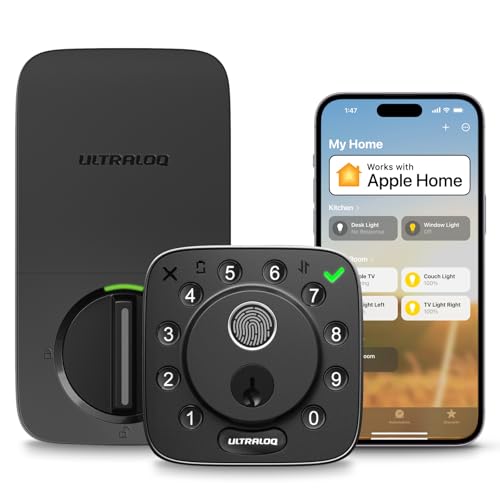
The ULTRALOQ Bolt is a feature-rich smart lock designed for modern homes and rental properties. With Apple Home certification, it integrates seamlessly into iOS ecosystems, allowing control via iPhone, Apple Watch, or Siri. This lock is ideal for tech-savvy homeowners, Airbnb hosts, and anyone seeking keyless convenience with robust security.
Standout features include seven unlock methods, from fingerprint scanning and passcodes to smartphone app control and voice commands via Alexa or Google Assistant. The included door sensor provides real-time open/close status, while remote access lets you check and share entry from anywhere. Auto lock and geofence auto unlock add hands-free convenience, though geofence reliability may vary based on phone settings.
Build quality is solid with a BHMA Grade 2 certification and IP65 weather resistance, suitable for exterior doors. The lock uses 8 AA batteries for up to a year of typical use, avoiding the need for hardwiring. Installation is straightforward with just a screwdriver, making it a DIY-friendly upgrade for front doors, back doors, and garage entries.
Potential drawbacks include the requirement for a strong 2.4 GHz WiFi signal within 70 feet of the router, which may be an issue in larger homes. Additionally, the product currently has no customer reviews, so long-term reliability is unproven. The lockout mode is a nice security addition but may be inconvenient if you need to grant emergency access while away.
Overall, the ULTRALOQ Bolt offers an impressive array of features at a competitive price point. Its Apple Home integration and multiple unlock methods make it a strong contender for anyone upgrading to a smart lock. If you have a compatible WiFi setup and value flexibility, this lock is worth considering.

Pros
- Apple Home Key support for effortless tap-to-unlock even on dead devices
- Thread technology ensures low-latency, reliable communication within the Apple ecosystem
- Fingerprint sensor with adaptive learning for quick, secure entry
- Long battery life of up to one year with standard AA batteries
- Simple DIY installation compatible with most standard door preparations
Cons
- Remote access requires a Thread-enabled Apple home hub placed within 33 feet (sold separately)
- No reviews yet on the platform, so real-world performance is unverified
- Battery life may vary significantly based on usage frequency and environmental factors
The ThorBolt X1 is a smart deadbolt that brings Apple HomeKit integration to a new level with support for Home Key and Thread. Designed for Apple enthusiasts, this lock offers a tap-to-unlock experience using your iPhone or Apple Watch, even when the device is out of power. It also provides five other unlocking methods including fingerprint, passcode, Siri, app, and traditional key, making it versatile for any household.
The standout feature is the lightning-fast fingerprint recognition. The sensor uses AI learning to improve accuracy over time, and all biometric data is stored locally for privacy. Combined with Thread support, the lock communicates with the Apple Home app with minimal latency and excellent energy efficiency, though remote access requires a compatible Apple home hub within 33 feet.
Installation is straightforward for DIYers, fitting standard US and Canadian doors with thicknesses from 1-3/8 to 1-3/4 inches. The lock runs on 8 AA alkaline batteries, with a claimed battery life of up to one year, which is impressive for a smart lock. The Sleekpoint app allows management of up to 50 users, customizing auto-lock timers, and viewing activity logs.
One potential drawback is the reliance on a Thread-enabled home hub for remote access, which may be an additional cost for some users. Additionally, as of this writing, there are no customer reviews available, so long-term reliability is not yet confirmed. The lock is also relatively heavy at over 2 pounds, which is typical for a robust smart deadbolt.
Overall, the ThorBolt X1 is a compelling choice for Apple users who want a seamless, secure, and feature-rich smart lock. Its combination of Home Key, Thread, and multiple unlock methods makes it a future-proof investment, provided you have the necessary home hub. With a strong set of features and a competitive price, it deserves serious consideration for any smart home upgrade.
Brand: ThorBolt
Model: X1
Color: Silver
Product Dimensions: 6.18 x 2.73 x 1.34 inches
Weight: 2.25 pounds
Compatibility: Apple HomeKit, Thread, Home Key
Unlock Methods: Fingerprint, Home Key (NFC), Siri, App, Passcode, Traditional Key
Battery: 8 AA alkaline batteries (up to 1 year life)
Door Thickness: 1-3/8 to 1-3/4 inches (35-55mm)
Backset: Adjustable 2-3/8 or 2-3/4 inches (60-70mm)
Door Hole Size: 2-1/8 or 1-1/2 inches (54mm or 38mm)
User Capacity: Up to 50 users (100 passcodes, 100 fingerprints)
Connectivity: Thread (for Home app), Bluetooth for app setup
Warranty: Not specified
Buying Guide: What to Look for in an Apple HomeKit Smart Lock
Apple Home Key & Thread Support
The most seamless Apple HomeKit locks support Apple Home Key, which lets you tap your iPhone or Apple Watch to unlock even when the device is out of power. Pair that with Thread technology for faster, more reliable communication. Thread-enabled locks like the ThorBolt X1 and ULTRALOQ Bolt SE offer ultra‑responsive control through the Home app. If you already own a Thread border router (like a HomePod mini), these locks integrate effortlessly. For a deeper dive into fingerprint‑based locks, read our best fingerprint smart lock guide.
Number of Unlock Methods
Beyond Apple Home Key, consider how many ways you can unlock the door. Fingerprint readers, passcodes, Siri voice commands, app control, and mechanical keys offer flexibility for family members, guests, or emergencies. The Aqara U100 provides up to 50 fingerprints and remote passwords, while the ULTRALOQ Bolt offers seven methods including geofence Auto Unlock. More options mean you are never locked out.
Battery Life & Emergency Power
Smart locks rely on batteries, so longevity matters. ThorBolt X1 boasts up to one year on eight AA batteries, while the ULTRALOQ Bolt SE with Thread can last 18 months. Most models include a USB‑C emergency port or backup keys. Look for low‑battery alerts in the companion app to avoid surprises. For renters or frequent travelers, we also recommend reviewing best smart lock for apartment options.
Build Quality & Weather Resistance
A smart lock must withstand daily use and outdoor elements. Zinc alloy construction, IP65 or IPX5 ratings, and BHMA Grade 2 or 3 certification indicate durability. The Aqara U100 is rated IP65 and works in temperatures from -31°F to 151°F. The ULTRALOQ Bolt is also IP65‑rated and ANSI/BHMA Grade 2 certified. For high‑traffic entries like Airbnb properties, see our best smart lock for Airbnb selections.
Final Thoughts
After evaluating eight top‑rated models, we believe the Aqara Smart Lock U100, Apple Home Key is the best all‑around choice for most homeowners, thanks to its robust feature set, Home Key support, and strong build quality. For those who prefer a budget‑friendly yet feature‑rich option, the ThorBolt X1 Smart HomeKit Keyless Entry delivers excellent value with Thread compatibility and a one‑year battery life. Both locks integrate seamlessly with Apple Home and provide peace of mind every day.
Related Guides
Frequently Asked Questions
Do I need a Home hub to use Apple Home Key on a smart lock?
Yes, to share Home Keys with guests or access your lock remotely, you need an Apple Home hub such as a HomePod, HomePod mini, or Apple TV. Without a hub, you can still unlock via Home Key by tapping your device, but remote control and automations require a hub.
What is the difference between Thread and Wi‑Fi in smart locks?
Thread is a low‑power, mesh networking protocol that provides faster response times and longer battery life compared to Wi‑Fi. Thread‑enabled locks like the ULTRALOQ Bolt SE can last up to 18 months on a set of batteries. Wi‑Fi locks offer direct remote access without a hub but consume more power.
Can I still use my physical key with an Apple HomeKit smart lock?
Most Apple HomeKit smart locks include backup mechanical keys. The Aqara U100, ThorBolt X1, and ULTRALOQ Bolt all come with physical keys for emergency entry. This ensures you are never locked out even if the batteries die or electronics fail.
Are Apple HomeKit smart locks easy to install myself?
Yes, most models are designed for DIY installation with just a screwdriver. The ThorBolt X1 fits standard US deadbolt holes, and the Aqara U100 includes a step‑by‑step guide. Installation typically takes 10 to 30 minutes. For detailed setup tips, browse our Home & Living category.