

When you are ready to upgrade your display in 2026, choosing among the best OLED gaming monitor options can feel overwhelming. Between WOLED and QD-OLED panels, refresh rate differences, and variable brightness features, the details matter more than ever. If your game room also needs a space-saving cleanup, our guide to compact cleaning solutions for small apartments can help you reclaim the area around your desk.
This guide covers five top-rated OLED gaming displays from ASUS, LG, AOC, and Samsung. Whether you need a 4K flagship for immersive single-player titles or a compact 27-inch QHD panel for fast esports action, we help you identify the right fit.



How to Choose the Best OLED Gaming Monitor
Focus on a few core specs that define the OLED experience. These criteria shaped our recommendations below.
Panel Type: WOLED vs QD-OLED
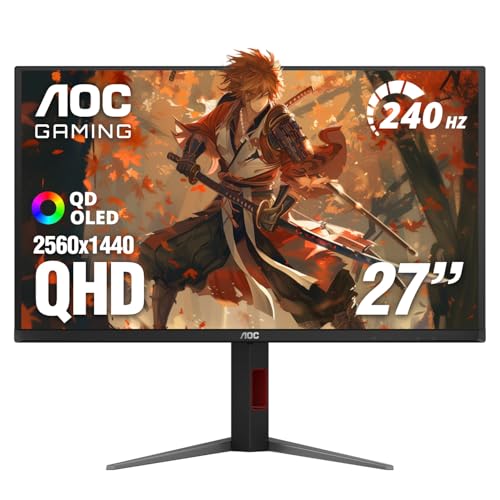
The ASUS ROG PG32UCDP 32 Inch 4K 240Hz OLED uses a 4K WOLED panel with a dual-mode display design. The AOC 27″ Gaming Monitor QHD 240Hz QD OLED NVIDIA brings quantum dot color to a 1440p size.
QD-OLED screens like the Samsung 27″ Odyssey OLED G6 (G61SH) QD-OLED tend to show more saturated colors and higher peak brightness. WOLED panels still provide incredible contrast with true blacks, so your choice comes down to color punch versus raw flexibility.
Refresh Rate and Response Time
A 240 Hz refresh rate is the sweet spot for most gamers. The LG 27GX704A-B 27-inch Ultragear QHD (2650×1440) offers 240 Hz with a 0.03 ms response time, while the Samsung 27″ Odyssey OLED G5 (G50SF) steps in with 180 Hz for a balanced approach.
For esports, the ASUS ROG PG32UCDP 32 Inch 4K 240Hz OLED takes the crown with up to 480 Hz in FHD mode. Combined with near-instant response times, you get motion clarity that keeps up with the fastest mouse flicks.
Brightness and HDR Performance
Brightness matters more on OLED than many people expect. The LG 27GX704A-B 27-inch Ultragear QHD (2650×1440) reaches 1300 nits peak, and the Samsung 27″ Odyssey OLED G6 (G61SH) QD-OLED offers Glare Free technology for consistent visibility in bright rooms.
VESA DisplayHDR True Black 400 certification on the LG model confirms deep blacks and controlled highlights. Pair your display with a set of quality microfiber cleaning cloths to keep the panel free of fingerprints and dust.
Ergonomics and Connectivity
Height-adjustable stands, USB hubs, and HDMI 2.1 connections separate a comfortable daily driver from a basic monitor. The AOC 27″ Gaming Monitor QHD 240Hz QD OLED NVIDIA includes a full ergonomic stand, while the ASUS ROG PG32UCDP 32 Inch 4K 240Hz OLED adds DisplayWidget Center software for quick settings.
Long gaming sessions can strain your wrists, so consider a supportive wrist brace if you play for hours. A clean desk area also helps you stay focused, and an electric cleaning brush can keep keyboard crevices fresh.
Final Thoughts
For the best overall OLED gaming monitor, the ASUS ROG PG32UCDP 32 Inch 4K 240Hz OLED stands out with its dual-mode 4K and stunning color, while the LG 27GX704A-B 27-inch Ultragear QHD (2650×1440) is a fantastic companion for competitive play.
Frequently Asked Questions
Are OLED gaming monitors worth buying in 2026?
Yes, OLED panels deliver perfect blacks, rapid response times, and vibrant color that traditional LCDs cannot match. The models in this roundup provide excellent choices whether you play on PC, PS5, or Xbox Series X. The technology has also become more accessible, making OLED a strong upgrade path.
What is the difference between QD-OLED and WOLED?
QD-OLED uses a blue OLED layer with quantum dot color filters for brighter, more saturated colors. WOLED uses a white OLED layer with color filters, which often delivers better uniformity. Both are excellent for gaming, so the choice depends on your preference for peak brightness versus panel characteristics.
Can an OLED gaming monitor get burn-in?
Burn-in is a potential risk, but modern OLED monitors are far more resilient. The Samsung 27″ Odyssey OLED G6 (G61SH) QD-OLED features OLED Safeguard with a thermal modulation system, and the ASUS ROG PG32UCDP 32 Inch 4K 240Hz OLED includes a custom heatsink and protective OLED Care software. To extend panel life, use built-in pixel refresh features and avoid leaving static images on screen for long periods. Keep a pack of reusable paper towels handy for quick cleanups around the desk.
Is HDMI 2.1 necessary for an OLED gaming monitor?
For 4K at high refresh rates, HDMI 2.1 is important. The LG 27GX704A-B 27-inch Ultragear QHD (2650×1440) and the ASUS ROG PG32UCDP 32 Inch 4K 240Hz OLED include HDMI 2.1 ports, while the AOC 27″ Gaming Monitor QHD 240Hz QD OLED NVIDIA provides HDMI 2.1 with 1440p support. If you play on PS5 or Xbox Series X, HDMI 2.1 ensures you get the best refresh rate and VRR performance.




