

When you are in the middle of editing a 4K or 8K project, every second counts. A slow hard drive can turn your creative flow into a waiting game, disrupting your focus and wasting precious time. That is why choosing the best external SSD for video editing is a critical decision for any content creator, videographer, or editor. This guide evaluates three top-tier portable SSDs that deliver the speed, durability, and capacity you need to handle large media files with confidence. Whether you work in the field or from a studio, we have you covered.



Buying Guide: What to Look for in an External SSD for Video Editing
Read and Write Speeds
Video editing demands fast data transfer rates to handle large files without lag. Look for SSDs with sequential read speeds of at least 1,000 MB/s, as this ensures smooth playback and quick file transfers. For high-resolution workflows, consider Thunderbolt 3 drives that can reach up to 3,000 MB/s for maximum efficiency.
Durability and Ruggedness
As a video editor, you often work in unpredictable environments, from outdoor shoots to busy studios. An SSD with IP rating for water and dust resistance, plus drop protection, gives you peace of mind. A rugged design like IP68 or IP65 ensures your data stays safe even if the drive takes a tumble or gets splashed.
Capacity
Video files are huge, so you need ample storage. Options range from 1TB to 4TB, depending on your project size and workflow. A 2TB drive is a solid starting point, while professionals handling multiple projects may prefer 4TB to avoid juggling multiple drives. For tips on organizing your workspace, check out our guide on best microfiber cleaning cloths to keep your gear spotless.
Connectivity and Compatibility
Ensure the SSD supports modern interfaces like USB 3.2 Gen 2 or Thunderbolt 3 for optimal performance. Compatibility with both Mac and PC is essential, and some drives work with Android devices and gaming consoles. Dual-mode compatibility is a bonus if you switch between systems often.
Final Thoughts
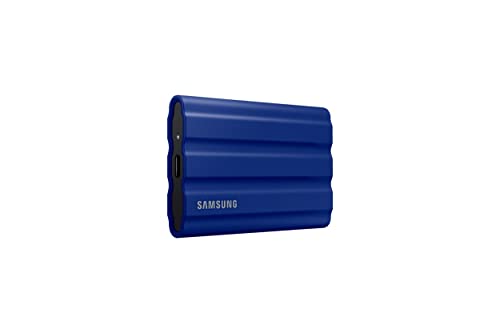
Choosing the best external SSD for video editing comes down to your specific needs. For a balanced blend of speed, ruggedness, and reliability, the Samsung T7 Shield Portable SSD 2TB, USB 3.2 Gen 2 is an excellent all-rounder that handles demanding workflows with ease. If you require top-tier performance for the most intensive projects, the SANDISK Professional 4TB PRO-G40 SSD offers blazing Thunderbolt 3 speeds and extreme durability, making it a worthy investment for professionals. Both drives provide the speed and reliability you need to keep your editing sessions productive and stress free.
Frequently Asked Questions
What is the best external SSD for video editing?
The best external SSD for video editing in 2026 depends on your workflow. For most editors, the Samsung T7 Shield offers a great mix of speed and durability. For professionals, the SanDisk Professional PRO-G40 delivers ultra fast Thunderbolt 3 performance for 4K and 8K projects.
Do I need a Thunderbolt 3 SSD for video editing?
Thunderbolt 3 SSDs provide the highest transfer speeds, ideal for editing high resolution video directly from the drive. If you work with 4K or 8K footage regularly, a Thunderbolt 3 drive like the PRO-G40 can significantly speed up your workflow. For most users, a USB 3.2 Gen 2 drive is still very capable.
Can I use an external SSD for video editing on a Mac?
Yes, modern external SSDs like the ones we reviewed are compatible with Mac. The SanDisk Professional PRO-G40 comes formatted as APFS, while others work with both Mac and PC after a quick format. Always check for compatibility with your specific Mac model.
How much storage do I need for video editing?
For most projects, a 2TB SSD offers ample space for multiple video files and edits. If you handle large 4K or 8K projects or work with raw footage, consider a 4TB drive to avoid running out of space. For keeping your editing space tidy, see our recommendations on best grout cleaning brush for cleaning your studio.


