

🔥 TV Black Friday Deals 2026: picks worth watching →
You have spent hours perfecting your CAD model, only to have your current laptop stutter on a complex assembly or crash during a render. For architects, engineers, and product designers, a machine that can handle demanding parametric modeling and real-time visualization is not a luxury; it is a necessity. In this guide, we evaluate three professional-grade workstations from Dell and HP that deliver the ISV-certified performance, powerful GPUs, and robust build quality required for serious CAD work. Whether you work with AutoCAD, SolidWorks, Revit, or Fusion 360, these laptops are built to keep your workflow smooth and your creativity unconstrained. For more insights on choosing a capable machine for technical roles, check our roundup of best laptops for network engineers.


Buying Guide: What to Look for in a CAD Laptop
Graphics Performance: The Heart of CAD
CAD software relies heavily on GPU acceleration for rendering, real-time shading, and simulation. A professional-grade NVIDIA RTX or RTX PRO series card with dedicated VRAM is essential. For complex assemblies and ray tracing, aim for at least 8GB of VRAM. Consumer gaming GPUs lack the ISV certifications that ensure stability in apps like SolidWorks and AutoCAD. The models we reviewed feature NVIDIA RTX Ada and RTX PRO Blackwell GPUs, which are certified for 99% of professional CAD applications.
Processor and Memory: Multitasking Without Lag
CAD tasks are CPU-intensive, especially when running simulations or generating toolpaths. An Intel Core i9 or Core Ultra 7 processor with high clock speeds and multiple cores handles parametric changes and background rendering efficiently. Pair it with at least 32GB of DDR5 RAM to keep large assemblies responsive. For heavy multitasking between CAD, rendering, and analysis tools, 64GB is a safer bet.
Display: Precision and Color Accuracy
A high-resolution, anti-glare display with wide color gamut (99% DCI-P3 or sRGB) is critical for spotting design flaws and ensuring color consistency. Look for 1920×1200 or higher resolution with at least 300 nits brightness for comfortable use in various lighting. A 16:10 aspect ratio gives extra vertical space for toolbars and palettes. All three picks offer excellent IPS panels with anti-glare coating.
Build Quality, Portability, and Connectivity
CAD professionals often work on-site or in collaborative environments. A MIL-STD-810H certified chassis ensures durability against drops and vibrations. Thunderbolt 4 ports enable fast data transfer to external drives and multi-monitor setups without a docking station. Wi-Fi 6E or Wi-Fi 7 keeps large file transfers and cloud collaboration smooth. For more on selecting a secure and reliable machine, read our guide on best laptops for ethical hacking.
Final Thoughts
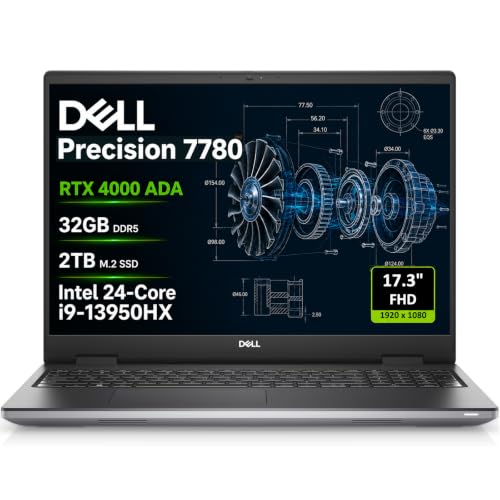
After reviewing the specifications and intended use cases, the Dell Precision 7780 Laptop stands out for professionals who need maximum GPU power and expandability for heavy 3D rendering and simulation; its NVIDIA RTX 4000 Ada with 12GB VRAM and 32GB DDR5 CAMM RAM make it a true desktop replacement. For those who balance CAD work with AI-driven tasks and prefer a lighter, more portable package, the HP ZBook X G1i Laptop, NVIDIA RTX PRO 1000 offers a compelling mix of 64GB RAM, a cutting-edge Blackwell GPU, and Wi-Fi 7 connectivity at a lower price point. Both machines are ISV certified and built to handle the most demanding engineering workflows.
Frequently Asked Questions
What is the best laptop for AutoCAD in 2026?
For AutoCAD, the Dell Precision 7780 with its NVIDIA RTX 4000 Ada GPU and Intel Core i9 processor provides certified stability and fast 2D/3D rendering. Its 17.3-inch FHD display with 99% DCI-P3 color gamut ensures accurate line work and shading.
Do I need a workstation laptop for SolidWorks?
Yes, SolidWorks recommends ISV-certified hardware for reliable performance. The HP ZBook X G1i and Dell Precision 7780 both carry certifications for SolidWorks, ensuring no crashes during complex assemblies and simulations. For a more budget-friendly option, the HP ZBook 8 G1i also offers certified stability.
How much RAM is needed for CAD and 3D rendering?
For basic CAD, 16GB is sufficient, but for large assemblies, rendering, and multitasking with analysis tools, 32GB is the minimum. The HP ZBook X G1i comes with 64GB, making it ideal for complex simulations. If you work with point clouds or virtual reality, 64GB or more is recommended.
Are gaming laptops good for CAD?
Gaming laptops often lack ISV certifications and may have driver issues with professional CAD software. Workstation laptops like the Dell Precision and HP ZBook series are built and validated for 24/7 reliability. For more on choosing the right hardware for technical tasks, see our laptops category page.


