

Rendering complex 3D scenes, animations, or high-resolution video requires a laptop that can sustain heavy compute loads without throttling. You need a machine with a powerful GPU, ample RAM, and efficient cooling. In 2026, HP’s ZBook series stands out as a top choice for professionals who demand reliability and performance on the go. We have reviewed three standout models: the HP ZBook X G1i, the HP ZBook Ultra G1a, and the HP ZBook 8 G1i. Each is designed to handle rendering, simulation, and AI development with ISV certifications and enterprise-grade security. Whether you are an architect using AutoCAD, a video editor in DaVinci Resolve, or a data scientist running AI models, this guide will help you pick the best laptop for your rendering needs. For more insights on mobile workstations, check out our best laptops for 3D modeling guide.



Buying Guide: What to Look for in a Rendering Laptop
GPU Performance for Rendering
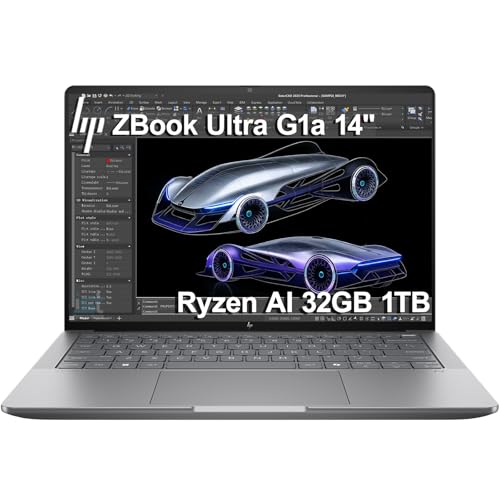
The graphics card is the heart of any rendering laptop. For 3D modeling and video rendering, you need a dedicated GPU with ample VRAM. The HP ZBook X G1i features the NVIDIA RTX PRO 1000 Blackwell with 8GB GDDR7, ideal for demanding ray tracing and AI workflows. The HP ZBook 8 G1i offers the NVIDIA RTX 500 Ada with 4GB, suitable for lighter projects. Meanwhile, the HP ZBook Ultra G1a uses integrated AMD Radeon 8050S graphics, which handle moderate tasks but may lag behind in heavy scenes. Prioritize models with professional GPUs that are ISV certified for apps like SolidWorks and Revit.
CPU, RAM, and Storage Speed
Rendering software benefits from multi-core processors and fast memory. The Intel Core Ultra 7 265H in the ZBook X G1i (16 cores) and the 255H in the ZBook 8 G1i (16 cores) deliver strong multi-threaded performance. The AMD Ryzen AI Max PRO 385 in the Ultra G1a also provides 8 cores with a dedicated NPU for AI acceleration. All three come with at least 32GB of DDR5 RAM and a 1TB NVMe SSD, ensuring quick file access and multitasking. For large scenes, the ZBook X G1i offers 64GB, making it a standout choice. Learn more about content creation setups in our best laptops for content creation.
Display Quality and Color Accuracy
A high-resolution, color-accurate display is essential for previewing renders. All three ZBooks feature 16-inch WUXGA (1920×1200) IPS panels with anti-glare and 300 to 400 nits brightness. The Ultra G1a covers 100% sRGB, ideal for photo editing. The ZBook X G1i and ZBook 8 G1i support external monitors via Thunderbolt 4 or HDMI 2.1 up to 4K@60Hz, so you can work on a calibrated external display. For graphic designers, we recommend reading our top laptops for graphic design.
Portability and Build Quality
If you frequently move between studios or job sites, portability matters. The HP ZBook Ultra G1a is the most compact at 14 inches and weighs less, with a 74.5Wh battery. The ZBook X G1i and ZBook 8 G1i are 16-inch models with larger batteries (83Wh and similar) but still fit in backpacks. All are MIL-STD 810H rated for durability. The ZBook X G1i includes a 5MP IR webcam and fingerprint reader for security. For a broader look at mobile workstations, visit our laptops category page.
Final Thoughts
Choosing the right rendering laptop comes down to your workload and budget. For professionals who need uncompromising GPU power and 64GB of RAM, the HP ZBook X G1i Laptop, NVIDIA RTX PRO 1000 is the top contender. If portability is your priority and you work mainly with moderate scenes, the HP ZBook Ultra G1a Laptop, 14″ FHD offers a great balance of performance and mobility with AI acceleration. Both are backed by HP’s three-year warranty and ISV certifications, giving you confidence for years of rendering work.
Frequently Asked Questions
What GPU do I need for 3D rendering in 2026? For heavy 3D rendering, choose a laptop with at least 8GB of dedicated VRAM, like the NVIDIA RTX PRO 1000 in the HP ZBook X G1i. For lighter tasks, 4GB models such as the RTX 500 Ada can suffice. Integrated graphics may struggle with complex scenes.
How much RAM is recommended for video rendering? We recommend 32GB as a minimum for multitasking and rendering larger projects. The HP ZBook X G1i with 64GB is ideal for 4K video editing and 3D simulation. All three models reviewed have at least 32GB DDR5.
Can these HP ZBooks run AutoCAD and SolidWorks? Yes, all three are ISV certified for AutoCAD, SolidWorks, Revit, and other professional applications. They include HP Wolf Pro Security for enterprise data protection. Check our best laptops for content creators for more software compatibility.
Are HP ZBooks upgradeable after purchase? The HP ZBook 8 G1i and Ultra G1a may have resealed units for upgraded memory or storage from the seller, but the warranty covers remaining components. The ZBook X G1i comes with original configuration. Always verify upgrade options with the seller.






