

🔥 TV Black Friday Deals 2026: picks worth watching →
You have a deadline looming, a 4K video timeline that is overflowing with layers, and your current machine is struggling to keep up. Every render takes forever, and the fan noise is driving you crazy. You need a laptop that can handle Adobe Premiere, DaVinci Resolve, Blender, or Photoshop without breaking a sweat. This guide covers the best laptops for content creation in 2026, focusing on models that deliver real performance for video editing, 3D animation, and graphic design. Whether you are a freelance filmmaker, a digital artist, or a YouTuber, we have options for every budget. If you are also exploring specialized workflows, check out our roundup of best laptops for 3D animation for more tailored picks.



Buying Guide: What to Look for in a Content Creation Laptop
Choosing a laptop for content creation is different from picking a general-use machine. You need a combination of processing power, graphics capability, display quality, and storage speed. Here are the key criteria we used to evaluate these models.
Processor and Graphics Performance
The heart of any creative laptop is its CPU and GPU. For video editing and 3D rendering, a multi-core processor like the AMD Ryzen 7 or Intel Core Ultra 9 is essential. A dedicated graphics card, such as the NVIDIA GeForce RTX series, accelerates rendering and real-time playback. Integrated graphics can handle basic photo editing but will struggle with 4K timelines or complex 3D scenes. Look for at least a mid-range discrete GPU for serious work.
For those focused on video production, we recommend checking our guide on best laptops for 4K video editing for deeper insights.
RAM and Storage
Content creation applications are memory hungry. We recommend a minimum of 16GB of RAM, with 32GB or more being ideal for multitasking and large projects. Storage speed matters too: a PCIe NVMe SSD dramatically reduces load times and file transfer waits. A 512GB drive is a good starting point, but 1TB or more is better if you work with large video files or photo libraries.
Display Quality and Color Accuracy
You cannot edit what you cannot see clearly. Look for a high-resolution display with at least 1080p, but ideally QHD or 4K. Color accuracy is critical: an IPS panel with wide color gamut (sRGB or DCI-P3) ensures your edits look correct on other screens. Brightness of 300 nits or more helps in varied lighting. Touchscreens can be useful for photo retouching or navigating timelines.
Portability and Build Quality
Creators often work in multiple locations: studios, coffee shops, client sites. A laptop that is lightweight yet durable is valuable. Look for aluminum chassis, good cooling systems, and a battery that lasts through a work session. Connectivity matters too: USB-C with Thunderbolt or DisplayPort, HDMI for external monitors, and a reliable webcam for video calls.
For more general advice on choosing a laptop, visit our laptops category page for additional resources.
Final Thoughts
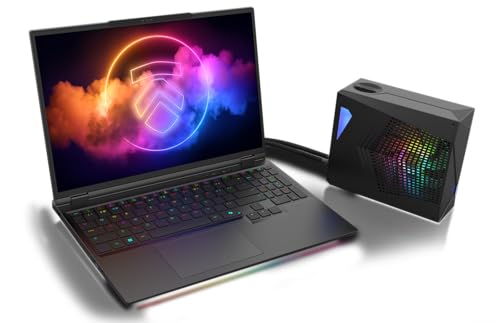
After evaluating these three models, we believe the Eluktronics HYDROC 16 Flagship Gaming Laptop is the ultimate choice for professionals who need desktop-class performance in a mobile form, especially for heavy 3D rendering and 8K video editing. For those on a tighter budget who still require strong multitasking and a large touchscreen, the Dell 16″ Touchscreen Laptop 2026, AMD Ryzen 7 170 offers excellent value with its ample RAM and vibrant display. The Lenovo Gaming Laptop is a capable entry-level option for light creative work, but for serious content creation, the Dell or Eluktronics will serve you better.
Related Guides
Frequently Asked Questions
What is the best laptop for video editing in 2026?
For professional video editing, the Eluktronics HYDROC 16 with its RTX 5090 and Intel Core Ultra 9 is the top performer. It handles 4K and 8K timelines smoothly. If you need a more affordable option, the Dell 16″ Touchscreen Laptop with Ryzen 7 is a solid choice for 1080p and light 4K editing.
How much RAM do I need for content creation?
We recommend 16GB as the minimum, 32GB for comfortable multitasking with large projects, and 64GB for heavy 3D rendering or virtual machines. The Eluktronics model comes with 64GB, while the Dell has 16GB, which is sufficient for most users.
Is a gaming laptop good for content creation?
Yes, many gaming laptops have powerful CPUs and dedicated GPUs that excel at rendering and video editing. The Eluktronics HYDROC 16 is a gaming laptop that doubles as a content creation powerhouse. However, ensure the display has good color accuracy for creative work.
Should I get a touchscreen laptop for content creation?
Touchscreens can be helpful for photo editing, drawing, or navigating timelines with gestures. The Dell 16″ Touchscreen Laptop offers this feature. For pure video editing or 3D work, a non-touch high-resolution display is often preferred for color accuracy.


