

If you need a compact desktop for everyday tasks like web browsing, document editing, or streaming media, a mini PC offers a space-saving solution without sacrificing performance. But finding one that fits a tight budget can be challenging with so many options on the market. In this guide, we review two of the best mini PCs available at an affordable price point, focusing on models from Bmax and GMKtec that deliver reliable performance for home and office use. Whether you are setting up a home office or upgrading an older system, our evaluation will help you choose the right device for your needs. For more context, check out our roundup of the best mini PCs for everyday use.



What to Look for in a Budget Mini PC
Processor Performance
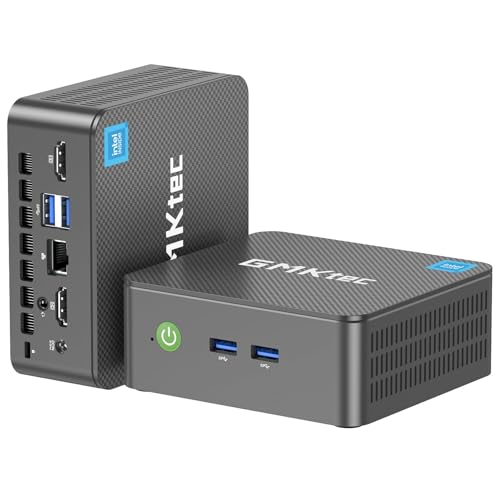
The CPU is the heart of any mini PC. For budget models, you will typically find Intel Celeron or Pentium processors, or newer N-series chips like the Intel N95. The Celeron J3355 in the Bmax B1 Plus handles basic tasks smoothly, while the GMKtec G3S features a 12th Gen Intel N95 that offers a noticeable boost in multitasking and media playback. If you plan to run multiple applications or use demanding software, a processor like the N95 is a better choice. For a deeper look at performance requirements, see our guide on the best mini PC for programming.
Memory and Storage
RAM and storage directly affect how many tasks you can run simultaneously and how quickly your files load. The Bmax B1 Plus comes with 6GB of RAM and 128GB of eMMC storage, plus dual M.2 slots for expansion up to 2TB. The GMKtec G3S offers 8GB of DDR4 RAM and a 256GB SSD, which is faster and more responsive out of the box. For most users, 8GB of RAM and an SSD provide the best balance of speed and capacity. If you need to store large media libraries, consider a model with expandable storage.
Connectivity and Display Output
Modern mini PCs should support dual monitors for increased productivity. Both reviewed models offer dual HDMI ports with 4K output at 60Hz, making them suitable for stock trading, design work, or media consumption. Wireless connectivity is also important: look for dual-band WiFi and Bluetooth 5.0 for reliable peripherals. The GMKtec G3S includes USB 3.2 ports for fast data transfer, while the Bmax B1 Plus features Gigabit Ethernet for stable wired connections. For home server applications, reliable networking is crucial, refer to our best mini PC for home server recommendations.
Form Factor and Cooling
Size and noise levels matter when placing a mini PC on a desk or behind a monitor. The Bmax B1 Plus is palm-sized and weighs under half a pound, with a VESA mount included for a clean setup. Its smart silent fan keeps noise to a minimum during 24/7 operation. The GMKtec G3S is similarly compact but includes a more robust cooling system to handle the higher performance N95 processor. Both are designed for quiet, efficient operation, but if you plan to run intensive workloads, the G3S may have a slight edge in thermal management.
Final Thoughts
Choosing the right mini PC depends on your specific needs. If your primary tasks are web browsing, email, and light office work, the Bmax Mini PC B1 Plus, Intel Celeron J3355 offers excellent value with its expandable storage and compact design. For users who need more processing power for multitasking, media editing, or running multiple applications, the GMKtec G3S Mini PC Computers Intel N95 Processor delivers a noticeable performance boost with its faster processor and solid-state drive. Both models are backed by reliable warranties and support, making them safe investments for anyone seeking an affordable desktop replacement. For additional options, explore our Electronics category for more reviews.
Frequently Asked Questions
Is a Celeron processor enough for daily use in 2026?
Yes, an Intel Celeron processor like the J3355 is sufficient for basic tasks such as web browsing, document editing, and video streaming. However, if you plan to run more demanding software or multitask heavily, a newer chip like the Intel N95 found in the GMKtec G3S will provide a smoother experience.
Can I use a mini PC for 4K video playback?
Absolutely. Both the Bmax B1 Plus and GMKtec G3S support 4K output at 60Hz via HDMI, thanks to their integrated graphics. They can handle 4K streaming and media playback without issues, making them ideal for home theater setups. For more on media server use, see our best mini PC for Plex guide.
How much RAM do I need in a budget mini PC?
For basic use, 4GB to 6GB of RAM is adequate, but 8GB is recommended for smoother multitasking and running modern applications. The GMKtec G3S comes with 8GB, while the Bmax B1 Plus has 6GB, which is still sufficient for most everyday tasks. If you plan to use virtual machines or heavy software, consider models with at least 8GB.
What is the difference between eMMC and SSD storage?
eMMC is a slower, more affordable storage type often used in budget devices, while SSDs (Solid State Drives) are faster and more reliable. The Bmax B1 Plus uses eMMC but allows expansion via M.2 slots, whereas the GMKtec G3S comes with a built-in SSD for quicker boot times and file transfers. For best performance, an SSD is preferable.



