

You have accumulated years of photos, videos, documents, and media files, and your external drives are overflowing. Building a dedicated home server or NAS (Network Attached Storage) system is the logical next step, but the foundation of any reliable build is the case. Choosing the right NAS PC case determines not only how many drives you can install but also how well they stay cool and how easily you can expand in the future. This guide covers the best NAS PC cases for 2026, evaluating top contenders from DARKROCK, Jonsbo, Rosewill, and RGEEK to help you find the perfect chassis for your storage needs. For more budget-friendly options, check out our roundup of best PC cases under $200.


Buying Guide: What to Look for in a NAS PC Case
Drive Bays and Storage Flexibility
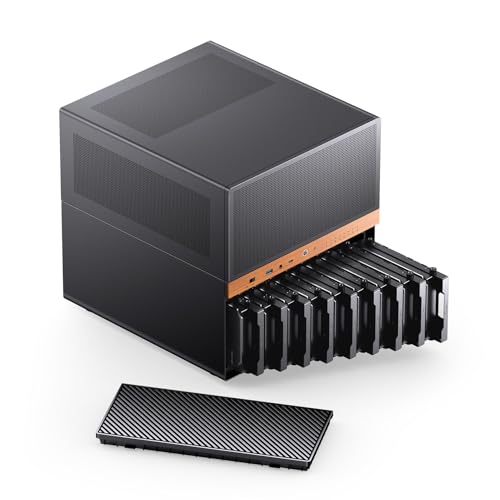
The primary purpose of a NAS case is to house multiple hard drives. Look for cases that offer a mix of hot-swap 3.5-inch bays for HDDs and dedicated 2.5-inch slots for SSDs. Hot-swap functionality allows you to replace drives without powering down the system, which is crucial for data redundancy and uptime. Consider how many drives you need now and in the next few years. Models like the JONSBO N5 can handle up to 12 HDDs plus 4 SSDs, while compact cases like the RGEEK Mini ITX NAS Case offer 4 hot-swap bays for smaller setups.
Motherboard and Power Supply Compatibility
Your NAS case must support your chosen motherboard form factor, whether it is Mini-ITX, Micro-ATX, ATX, or even E-ATX for high-end builds. Also, verify power supply compatibility. Some cases accept standard ATX PSUs, while others require SFX or FLEX units. The Rosewill Helium NAS Max supports ATX motherboards and ATX PSUs, making it straightforward for most builders. For more advice on case compatibility, see our best PC cases under $150 guide.
Cooling and Airflow
Multiple hard drives generate significant heat, especially during continuous operation. Look for cases with multiple fan mounting points, mesh panels, and support for larger radiators if you plan to use liquid cooling. The DARKROCK Classico Storage Master includes four 120mm fans and a mesh front and side panel for excellent airflow. Efficient cooling extends the lifespan of your drives and keeps your system stable.
Expansion and Build Quality
Consider future expansion for graphics cards, network cards, or RAID controllers. Cases with multiple PCIe slots and vertical GPU mounts offer flexibility. Build quality matters too; a sturdy steel frame with a durable finish ensures your case lasts for years. The JONSBO N6 features a solid wood veneer and robust construction, while the Rosewill Thor NAS Pro offers a full-tower form factor with hot-swap bays for enterprise-level expansion. If you are building a home theater PC, our best PC cases for home theater guide may also be helpful.
Final Thoughts
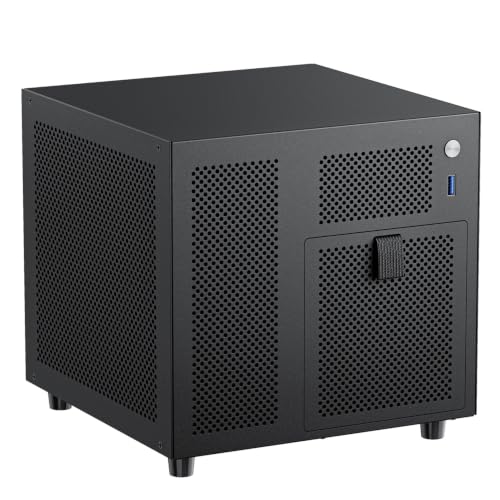
Selecting the right NAS PC case is about balancing storage capacity, cooling, and compatibility with your existing hardware. For a compact yet powerful home server, the 8 Bay NAS Case, Support MATX ITX Motherboard & ATX from RGEEK offers 8 hot-swap bays and a dual-chamber design for efficient cooling. If you need massive storage for a media server or small business, the Rosewill Helium NAS Max supports up to 11 hard drives and includes four 140mm PWM fans for superior airflow, all at a great value. Whichever you choose, you will be well on your way to a reliable, high-capacity storage solution that grows with your needs. Explore our full PC Cases category for more options.
Frequently Asked Questions
What is the difference between a NAS case and a regular PC case? NAS cases are specifically designed to house multiple hard drives, often with hot-swap bays, better cooling for drives, and a compact form factor. Regular PC cases prioritize GPU and cooling for gaming, while NAS cases focus on storage density and reliability.
Do I need a hot-swap backplane in a NAS case? Hot-swap backplanes allow you to replace drives without powering down the system, which is essential for RAID arrays and uptime. They also simplify cabling and improve airflow. For home use, it is a convenient feature, but not strictly required if you can power down for drive changes.
Can I use a standard ATX power supply in a NAS case? Many NAS cases support ATX PSUs, but always check the specifications. Some compact cases require SFX or FLEX power supplies. The Rosewill Helium NAS Duo and DARKROCK Classico Storage Master both accept standard ATX PSUs for easy building.
How many drives should my NAS case support for 2026? For a typical home server, 4 to 8 drive bays are sufficient. For media servers or small businesses, consider cases with 8 to 12 bays. The JONSBO N5 supports up to 12 HDDs plus 4 SSDs, offering room for future expansion.


