

You have all the components for your dream build, but when you look inside the case, cables are everywhere. A PSU shroud hides the power supply and its wiring, giving you a clean, professional look. It also improves airflow by separating the PSU compartment from the main chamber. If you want a tidy interior without sacrificing cooling, a case with a dedicated PSU shroud is essential. In this guide, we have evaluated seven of the best PC cases with PSU shroud for 2026, covering compact micro-ATX designs, mid-tower workhorses, and bundles that include fans and cooling. Whether you are building a minimalist showpiece or a high-performance gaming rig, there is an option here for you. For more inspiration on clean builds, see our roundup of minimalist PC cases.




Buying Guide: What to Look for in a PSU Shroud Case
Cable Management and Shroud Design
A PSU shroud is only effective if it hides cables properly. Look for cases with cutouts that route cables cleanly behind the motherboard tray or through the shroud itself. Some shrouds have removable panels or slots for cable combs. The JONSBO D32 PRO goes a step further with an adjustable motherboard cable management cover that blocks visible wiring. For a deep dive into airflow, check our guide on best PC cases with fans.
Airflow and Cooling Support
A solid shroud can restrict airflow if not designed properly. Ensure the front panel has vents or mesh to allow fresh air to reach the GPU. Many cases, like the RAIDMAX V ARGB bundle, use a mesh front panel for maximum intake. The Cooler Master MasterBox MB600L V2 also features a breathable PSU shroud with optional ventilation slots for inverted or passive cooling. If airflow is your priority, you may also like our picks for best PC cases with USB-C.
Compatibility and Internal Space
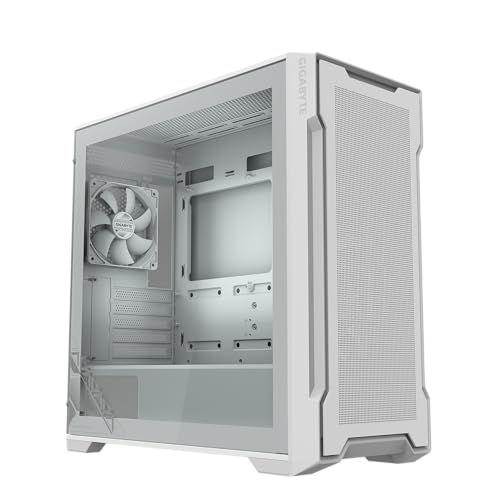
Even with a shroud, you need room for a large graphics card, tall CPU cooler, and long PSU. The GIGABYTE C102 Glass supports radiators up to 360mm on top and front, while the MSI MAG Vampiric 100R handles 240mm liquid coolers. The AZZA CSAZ-500 Neo has a full mesh front and space for up to nine fans. For unique styles, explore our best aesthetic PC cases.
Build Quality and Aesthetics
The shroud should feel sturdy and match the case material. Tempered glass side panels let you show off the interior. The GIGABYTE C102 Glass ICE has a white finish for a clean look, while the RAIDMAX V features ARGB fans and a digital temperature display. If you want a truly understated design, see our best sleeper PC cases.
Final Thoughts
After reviewing these seven cases, we believe the JONSBO D32 PRO Micro-ATX PC Case offers the best value for compact builds with its innovative A/B motherboard mode and high compatibility, while the Cooler Master MasterBox MB600L V2 is a superb mid-tower option for those who want excellent cable management and ventilation at an accessible price. Choose the first if you need a small footprint and BTF motherboard support; choose the second for a classic ATX build with plenty of room.
Frequently Asked Questions
What is a PSU shroud and why is it important?
A PSU shroud is a cover that hides the power supply and its cables from view. It also creates a separate compartment to improve airflow and make cable management easier. In 2026, most mid-tower and full-tower cases include a shroud as standard.
Does a PSU shroud affect cooling?
It can if the shroud blocks intake fans. However, many modern cases, like the AZZA CSAZ-500 Neo, have vents above the shroud or open areas to allow airflow to the GPU. Some shrouds are also removable for better fan placement. For more cooling tips, read our best PC cases with fans guide.
Are all PSU shrouds removable?
Not all. Some are riveted or welded in place. The Cooler Master MasterBox MB600L V2 has a breathable shroud that can be removed for inverted or passive builds. Always check the specification before buying if you need to remove it for large components.
Can I install a large GPU with a PSU shroud?
Yes, but ensure the case has enough clearance. The RAIDMAX V supports GPUs up to 305mm, while the JONSBO D32 PRO handles up to 365mm. Measure your graphics card length and compare with the case specs to avoid clearance issues.


