

If you are serious about music on your PC, the onboard audio chip simply will not deliver the clarity, detail, and dynamic range you deserve. Whether you are producing tracks, mixing stems, or simply enjoying high-resolution streaming, a dedicated sound card can transform your listening experience. This guide reviews three of the best PC sound cards for music in 2026: the powerful Creative Sound Blaster Audigy Fx Pro Hi-Res PCIe, the ultra-portable SABRENT USB External Stereo Sound Card Adapter, and the budget-friendly Padarsey PCIe 5.1 Internal Sound Card. Each serves a different audience, from audiophiles to casual listeners. For a broader look at audio upgrades, check out our best PC sound cards for 2026 roundup.




Buying Guide: What to Look for in a Music Sound Card
Audio Quality and Resolution
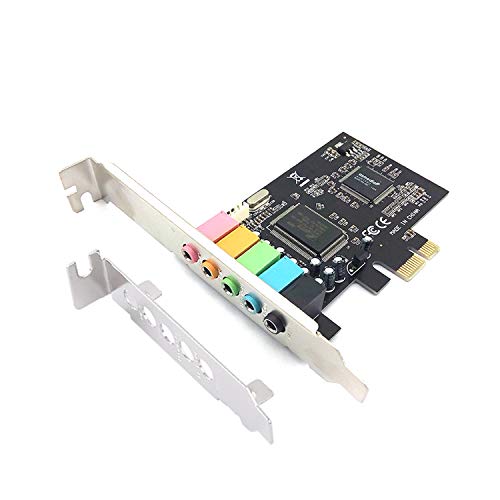
For music, the most critical factor is audio fidelity. Look for a high signal-to-noise ratio (SNR) above 110 dB and support for high bit depths (24-bit or 32-bit) and sample rates (192 kHz or higher). The Creative Sound Blaster Audigy Fx Pro delivers 32-bit/384 kHz playback with a 120 dB SNR, making it ideal for lossless audio and studio monitoring. The SABRENT USB adapter offers standard 16-bit/48 kHz stereo, which is sufficient for casual listening but not for critical work. The Padarsey internal card supports 32/64-bit processing, though its real-world performance is more modest.
Connectivity and Form Factor
Consider how the card connects to your system. Internal PCIe cards like the Creative and Padarsey require a free slot inside your desktop, while external USB adapters like the SABRENT work with any laptop or desktop. If you need multiple outputs for surround sound or separate headphone and microphone jacks, the Creative offers discrete 7.1 analog outputs, SPDIF, and dedicated mic/line inputs. The SABRENT provides only stereo output and mono mic input, which is fine for basic communication. For gaming and immersive audio, you might also want to read our best sound cards for gaming guide.
Compatibility and Software
Ensure the sound card works with your operating system. The Creative card includes the new Creative Nexus app with AutoEQ headphone customization, giving you tailored frequency response curves. The SABRENT is driverless and works on Windows, macOS, and Linux out of the box. The Padarsey card is designed for Windows 7 and later, but its older CMI8738 chip may lack modern driver support. Always check compatibility before buying. For more options in the Cards category, browse our other reviews.
Additional Features
Extra features can enhance your music experience. The Creative card supports discrete 7.1 surround sound and comes with a low-profile bracket for small cases. The SABRENT is plug-and-play with no external power needed, perfect for on-the-go use. The Padarsey includes a low-profile bracket for 2U cases and claims 5.1 3D stereo surround, though its actual performance is basic. Decide which features matter most for your setup.
Final Thoughts
After reviewing the top contenders, we recommend the Creative Sound Blaster Audigy Fx Pro Hi-Res PCIe for anyone who demands pristine audio quality and advanced features like high-resolution playback and AutoEQ headphone tuning. It is the clear choice for music producers and audiophiles. For budget-conscious listeners or those needing a quick fix for a dead audio jack, the SABRENT USB External Stereo Sound Card Adapter delivers reliable, driverless stereo sound at an unbeatable value. Both products serve distinct needs, and either will elevate your music listening experience in 2026.
Related Guides
Frequently Asked Questions
What is the best PC sound card for music production in 2026?
For music production, the Creative Sound Blaster Audigy Fx Pro is our top pick. Its high 120 dB SNR and 32-bit/384 kHz resolution ensure accurate monitoring, while the Creative Nexus app allows you to simulate headphone frequency responses for consistent mixing. If you need portability, consider a USB interface, but for internal cards, the Creative excels.
Do I need a dedicated sound card for music listening?
If your motherboard audio produces noticeable noise or lacks the power to drive high-impedance headphones, a dedicated sound card can improve clarity and dynamic range. Even a simple USB adapter like the SABRENT can eliminate onboard static. For high-resolution audio, the Creative card unlocks formats up to 384 kHz, which many built-in chips cannot handle.
Can an external USB sound card improve audio quality?
Yes, an external USB sound card can bypass the noisy electrical environment inside your PC, reducing interference and improving signal clarity. The SABRENT adapter is a cost-effective way to add a clean headphone output and microphone input to a laptop or desktop. It will not match the resolution of a high-end internal card, but it is a noticeable upgrade over many integrated codecs.
What is the difference between internal and external sound cards for music?
Internal sound cards like the Creative and Padarsey connect directly to the PCIe bus, offering lower latency and higher bandwidth for multi-channel audio and high sample rates. External USB sound cards are easier to install, portable, and often include dedicated headphone amplifiers. For stationary music production, an internal card is preferable; for laptops or shared setups, an external adapter is more flexible.

