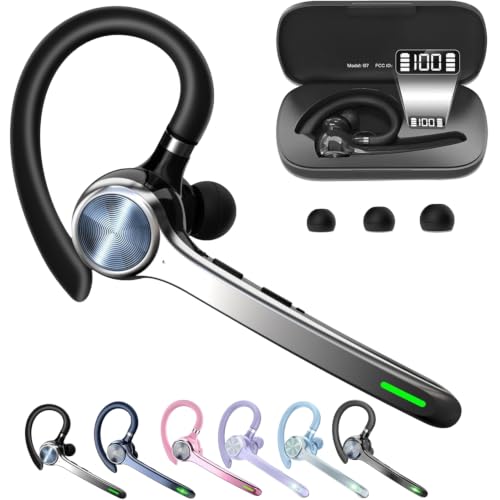
You know the struggle: you’re on an important call, but the person on the other end can barely hear you over the office chatter, or you’re constantly tilting your head to keep the handset in place. That’s where a reliable telephone headset becomes a game-changer. This guide is designed for anyone who spends hours on the phone, whether you’re a receptionist, call center agent, or busy professional. We’ll walk you through the key features to look for and review four top-performing models to help you find the perfect match for your office setup.
We’ve evaluated these headsets based on sound quality, comfort, and compatibility with popular desk phone brands. No matter if you need a budget-friendly mono option or a versatile headset that works with multiple devices, our picks have you covered. Let’s dive in and find the best telephone headset to boost your productivity and make every call feel effortless.
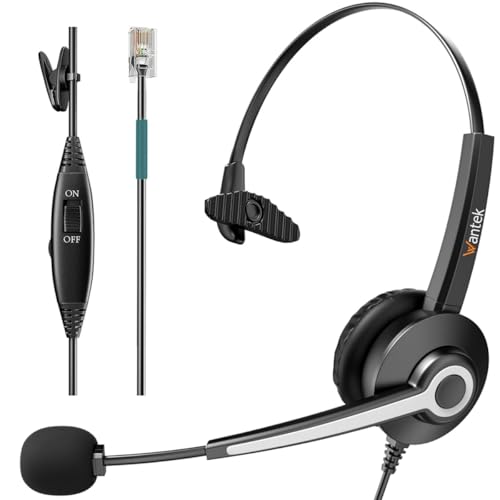



Buying Guide for Telephone Headsets
Before you make a purchase, there are a few essential factors to consider. The right headset will depend on your specific phone system, your work environment, and your personal comfort preferences. Here’s what to keep in mind.
Compatibility with Your Desk Phone
This is the most critical factor. Not all headsets work with all phones. The connector type (usually RJ9 or a 4-pin plug) must match your desk phone’s jack. Additionally, many headsets are only compatible with specific phone models from brands like Polycom, Avaya, or Cisco.
Always check the product description for a list of compatible phone models. If your phone isn’t listed, it’s safer to contact the manufacturer for a compatibility guide. For more insights on choosing the right gear, you might find our guide on best conference headsets helpful.
Noise-Canceling Microphone
In a busy office, a noise-canceling microphone is a must-have. It filters out background noise like keyboard clicks, chatter, and air conditioning hum, ensuring your caller hears only your voice clearly. This feature is especially important for call center agents and anyone working in open-plan spaces.
Look for a unidirectional boom mic that you can position close to your mouth. This focuses on your voice while minimizing ambient sounds. The result is more professional and effective communication, which can reduce misunderstandings and improve customer satisfaction.
Comfort for All-Day Wear
If you’re on the phone for hours, comfort is non-negotiable. Look for a lightweight design with a soft, breathable ear cushion and an adjustable headband. Some headsets offer a single-ear (mono) design, which keeps one ear free so you can stay aware of your surroundings, which is great for collaborative environments.
Consider the weight and clamping force. A headset that’s too tight can cause headaches, while one that’s too loose may not stay in place. For more tips on comfortable options, check our roundup of best headsets for conference calls.
Wired vs. Wireless and Connectivity
While this guide focuses on corded telephone headsets, you should still consider the cable length and connectivity. Some headsets come with a quick-disconnect feature that lets you unplug the headset from the base without removing it from your head, so you can move around while on a call. Others offer dual jacks (RJ9 and 3.5mm) for use with both desk phones and computers.
Decide whether you need a headset that works exclusively with your desk phone or one that offers more flexibility. If you often switch between your phone and PC, a model with multiple connection options is a smart choice. For a broader look at versatile options, see our recommendations for best wireless headsets for conference calls.
Final Thoughts
Choosing the right telephone headset comes down to understanding your phone’s compatibility and your comfort needs. For a reliable and affordable option that works with a wide range of office phones, the Phone Headsets for Office Phones is an excellent choice. If you need a more versatile headset that can also connect to your computer or mobile device, the MAIRDI Phone Headset with RJ9 & 3.5mm Jacks offers that flexibility, making it a great all-around pick for any professional.
Frequently Asked Questions
How do I know if a telephone headset is compatible with my office phone?
Most headsets use an RJ9 connector, but the wiring can vary by phone brand. Always check the product description for a list of compatible phone models. If your phone isn’t listed, contact the manufacturer with your phone’s model number to confirm compatibility before buying.
Can I use a telephone headset with my computer or smartphone?
Some telephone headsets are designed exclusively for desk phones and won’t work with computers or smartphones. However, many models come with a 3.5mm jack or a USB adapter that allows connection to other devices. Look for a headset with multiple connection options if you need that flexibility.
What is the difference between mono and binaural headsets?
A mono headset has one ear speaker, leaving your other ear free to hear your surroundings, which is ideal for office environments where you need to interact with colleagues. A binaural headset covers both ears, providing better sound isolation and immersion, which can be beneficial in noisy call centers. Your choice depends on your work environment and personal preference.
How do I clean and maintain my telephone headset?
Regular cleaning helps maintain hygiene and extend the life of your headset. Use a soft, slightly damp cloth to wipe down the ear cushions and headband. For the microphone, gently remove any dust with a dry cotton swab. Avoid using harsh chemicals or submerging the headset in water.