

🔥 TV Black Friday Deals 2026: picks worth watching →
You sit down in a lecture hall, ready to take notes, but your old laptop lags when you open a PDF and a browser tab. The professor pulls up a diagram, and you wish you could just tap the screen to zoom in. That is the moment a touchscreen student laptop becomes a game-changer. In 2026, the market offers everything from budget Chromebooks to powerful Windows machines designed for note-taking, drawing, and multitasking. Whether you study engineering, graphic design, or business, this guide evaluates the top models to help you make a confident choice.
We have assessed seven leading touchscreen laptops from Dell, HP, Lenovo, Samsung, and QikPulse. Our analysis focuses on performance, display quality, portability, and value. If you are also exploring devices for creative work, check out our guide to student laptops for drawing for additional insights.


Buying Guide
Processor and Performance for Student Workloads
A touchscreen laptop must handle multitasking, research, and occasional creative projects. For heavy users like engineering or video editing students, an AMD Ryzen 7 or Intel Core i3 processor paired with 16GB RAM ensures smooth operation. Budget-conscious students can rely on Intel N100 or MediaTek Kompanio 520 chips for web browsing, office apps, and streaming. Chromebooks with 4GB RAM suffice for cloud-based tasks, but Windows users benefit from more memory.
If you plan to run music production software, our recommended student laptops for music offer additional guidance on processor and audio requirements.
Display Quality and Touch Responsiveness
The screen is your primary interface. Look for Full HD (1920×1080) or higher resolution with IPS technology for wide viewing angles. A 16:10 aspect ratio, like the Dell 16-inch model, provides extra vertical space for reading documents and coding. Touch responsiveness should be accurate for note-taking with a stylus or fingers. Chromebooks with 360-degree hinges allow tablet mode for sketching and presentations.
For artists, a high-quality touch display is critical. Refer to our top picks for drawing laptops to find models with excellent stylus support.
Battery Life and Portability
Students are constantly on the move. A lightweight laptop under 3.5 pounds with at least 8 hours of battery life is ideal for a full day of classes. Chromebooks like the Lenovo Flagship Chromebook and Samsung 2-in-1 often excel in battery efficiency. Convertible designs add versatility but may add slight weight. Consider a slim protective sleeve; our minimalist laptop backpack recommendations can help you carry your device comfortably.
Operating System: Windows vs Chrome OS
Your choice of OS affects software compatibility and workflow. Windows laptops like the Dell 16-inch and QikPulse 15.6-inch support full desktop applications, which is essential for specialized programs like AutoCAD or Adobe Creative Suite. Chromebooks (Lenovo, Samsung, HP) offer a lightweight, secure environment with Google apps and Android compatibility, perfect for cloud-based learning and general productivity. Evaluate your course requirements before deciding.
For a broader overview of laptop categories, visit our laptops hub for more comparisons.
Final Thoughts
After evaluating each model, we recommend the Dell 16″ Touchscreen Laptop 2026, AMD Ryzen 7 170 for students who need desktop-class power for demanding coursework, and the Lenovo Flagship Chromebook for budget-conscious learners who prioritize battery life and simplicity. Both offer excellent touchscreen experiences tailored to different student lifestyles.
Frequently Asked Questions
What is the best touchscreen student laptop for 2026?
The Dell 16-inch with AMD Ryzen 7 stands out for performance, while the Lenovo Flagship Chromebook offers unbeatable value. Your choice depends on your budget and software needs. For a deeper dive, browse our full laptop category.
Are Chromebooks good for college students?
Yes, Chromebooks are excellent for students who rely on web-based tools, Google Workspace, and lightweight apps. They are affordable, secure, and often have long battery life. However, if you need specialized software like MATLAB or Adobe Premiere, a Windows laptop is preferable.
Can I use a touchscreen laptop for note-taking?
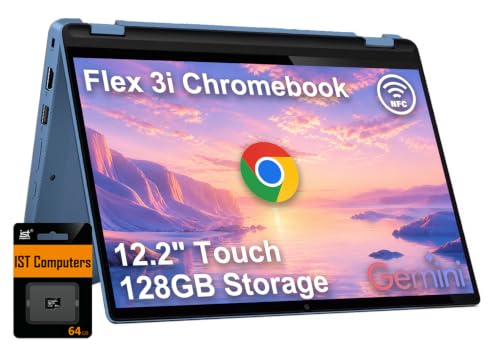
Absolutely. Models with 360-degree hinges, like the HP 2-in-1 Chromebook or Lenovo IdeaPad Flex 3i, allow you to fold the screen back into tablet mode. Pair them with a stylus for handwritten notes, diagrams, and annotations. Most Chromebooks support stylus input, while Windows laptops often require a separate pen.
How much RAM do I need for a student laptop?
For basic tasks, 4GB is sufficient on Chrome OS, but 8GB or 16GB is recommended for Windows users who multitask heavily. The Dell 16-inch and QikPulse 15.6-inch offer 16GB, ensuring smooth performance across multiple apps and browser tabs.


