

🔥 TV Black Friday Deals 2026: picks worth watching →
You are on a video call, trying to focus, but the fan hum and your colleague’s keyboard clicks bleed through your laptop’s built-in mic. Or maybe you are deep into a late-night gaming session, and every footstep matters. A quality wireless headset for your laptop can transform these experiences. In this guide, we have evaluated six top models from Logitech, Ozeino, Soothielec, and Angteela, covering everything from budget wired options to premium noise-canceling Bluetooth headsets. Whether you need a headset for remote work, daily office calls, or immersive gaming, we have got you covered. For more context on choosing the right headset for your home office, check out our guide to Bluetooth headsets for working from home.




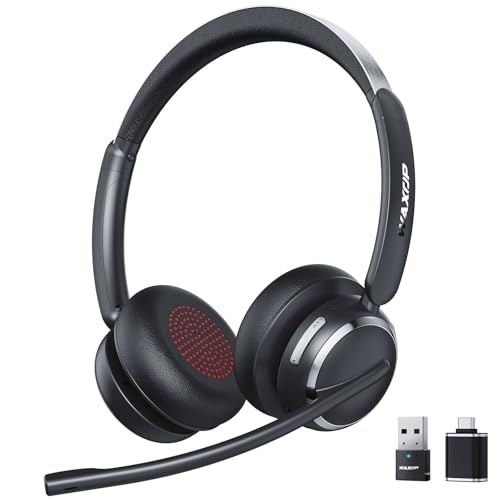
Buying Guide: What to Look for in a Wireless Headset for Your Laptop
Noise Cancellation for Distraction-Free Calls
Environmental noise cancellation (ENC) and active noise cancellation (ANC) are critical if you work in a busy home or shared office. ENC focuses on filtering background noise from your microphone so your voice stays clear. ANC, on the other hand, reduces ambient sounds like air conditioners or traffic for your own listening. Models like the Upgrade ANC & ENC Wireless Headset with Mic combine both technologies, giving you a quiet zone on both ends of the call. If you frequently take calls in noisy environments, prioritize headsets with dedicated noise-canceling mics and multiple ANC modes.
Connectivity: Bluetooth vs. USB Dongle
Most modern laptops support Bluetooth, but older models or office computers may restrict Bluetooth access. A headset that includes a USB dongle ensures plug-and-play compatibility without driver installations. Dual connectivity (Bluetooth + dongle) lets you switch between your laptop and phone seamlessly. For gamers, low-latency 2.4GHz wireless (like the Ozeino model) is essential for real-time audio. Business users often prefer a dedicated dongle for stable connections during important calls. Check out our top bluetooth headsets for business for more on connectivity options.
Battery Life and Charging Convenience
All-day headsets should offer at least 20 hours of talk time. Some models now support wireless charging bases or fast charging (5 minutes for an hour of use). If you work long shifts or travel, a headset with 40+ hours of battery and a charging stand can be a game-changer. Look for features like dual charging (USB-C + wireless) and auto-reconnection to save time. The Wireless Headset with Mic for Work from Angteela, for example, boasts up to 80 hours of music playback and a convenient charging base.
Comfort and Build Quality
Comfort matters when you wear a headset for hours. Look for adjustable headbands, memory foam earpads, and lightweight designs (under 150 grams). Breathable protein leather ear cushions reduce heat buildup. Rotatable microphones and earmuffs allow you to wear the headset on either ear. For call center workers or remote employees, all-day comfort is non-negotiable. For more tips on finding comfortable office headsets, visit our best bluetooth headsets for office page.
Final Thoughts
Choosing the best wireless headset for your laptop depends on your primary use case: if you need a reliable, affordable option for daily calls and meetings, the Logitech Zone 301 Wireless Bluetooth Headset offers solid audio quality, a noise-canceling mic, and lightweight comfort at a reasonable price. For gamers or those who demand ultra-low latency, the Ozeino Wireless Gaming Headset for PS5, PC delivers lossless 2.4GHz audio and a 40-hour battery, making it a versatile pick for both work and play. Whichever you choose, a quality headset will elevate your laptop experience.
Frequently Asked Questions
Can I use a Bluetooth headset with any laptop?
Most laptops built in the last few years support Bluetooth natively. If your laptop lacks Bluetooth, you can use a USB Bluetooth adapter (not always included) or choose a headset that comes with a dedicated USB dongle. Many modern headsets include both Bluetooth and a dongle for maximum compatibility.
What is the difference between ANC and ENC in a headset?
Active Noise Cancellation (ANC) reduces ambient noise for the wearer using microphones and speakers, ideal for focusing in noisy environments. Environmental Noise Cancellation (ENC) uses beamforming microphones to filter background noise from your voice during calls. Some headsets combine both for a complete experience.
How long should the battery last on a wireless laptop headset?
For all-day use, look for at least 20 hours of talk time or 40 hours of music playback. Many models in 2026 offer fast charging (e.g., 5 minutes for 1 hour of use) and even wireless charging bases. Battery life varies by volume level and features like ANC.
Are wireless gaming headsets good for work calls?
Some gaming headsets, like the Ozeino model, have good microphones and can be used for calls, but they often lack dedicated noise cancellation for microphones. For professional calls, a headset designed for work with ENC and mute functions is usually a better fit. See our top wireless phone headsets for more work-focused options.



