🔥 TV Black Friday Deals 2026: picks worth watching →
Picture this: you are in the middle of an important Zoom call with your team, but your kids are playing in the next room, the dog is barking, and the neighbor is mowing the lawn. Your current headset picks up every background noise, making it hard for you to hear and for others to hear you clearly. That is where a dedicated Bluetooth headset for Zoom can transform your workday. Whether you are a remote worker, a frequent meeting participant, or a call center agent, the right headset ensures your voice comes through crisp and clear while blocking out distractions. In this guide, we have reviewed five top-rated wireless headsets that excel on Zoom, Microsoft Teams, and other conferencing platforms. We focused on noise cancellation, battery life, comfort, and connectivity to help you find the perfect match for your workflow.




Buying Guide: What to Look for in a Bluetooth Headset for Zoom
Noise Cancellation Quality
Background noise is the number one enemy of productive Zoom calls. Look for headsets with Environmental Noise Cancellation (ENC) or Active Noise Cancellation (ANC) that filter out office chatter, keyboard clatter, and household sounds. The best models use multiple microphones and advanced algorithms to isolate your voice. For a deeper dive into top picks for professional communication, check out our roundup of best wireless call center headsets.
Battery Life and Charging Speed
Long meetings and back-to-back calls demand a headset that lasts all day. Aim for at least 30 hours of talk time. Fast charging is a bonus: a 10-minute charge that gives you hours of use can save you in a pinch. Some models even include a charging stand for effortless top-ups.
Comfort for Extended Wear
You might wear your headset for six or more hours a day. Lightweight construction, plush ear cushions, and an adjustable headband prevent fatigue. Memory foam and breathable leather are ideal. A flexible boom mic that rotates allows you to position the microphone perfectly and wear the headset on either ear.
Connectivity and Compatibility
Most Bluetooth headsets pair easily with your smartphone, but for computer use, a USB dongle provides a more stable, low-latency connection. Ensure the headset works with your operating system (Windows, Mac, Chromebook) and platforms like Zoom, Teams, and Webex. Dual-device pairing lets you switch between your laptop and phone without reconnecting. For more insights on headsets that shine in sales environments, see our guide on top headsets for sales calls.
Final Thoughts
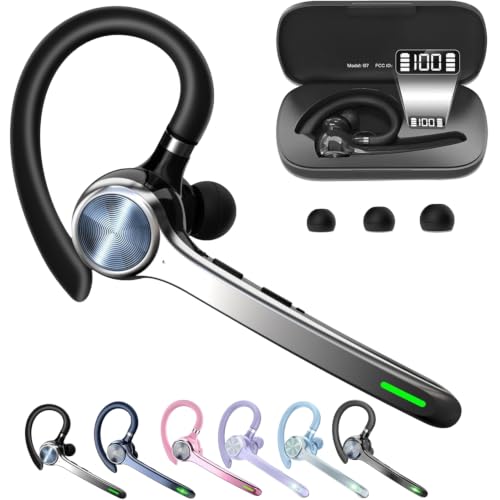
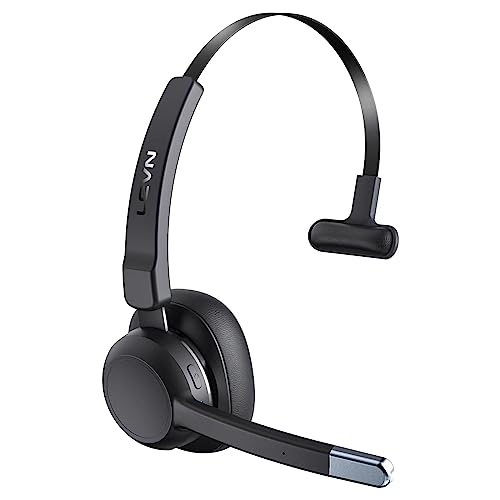
After evaluating these five Bluetooth headsets, two stand out for different needs. If you prioritize premium noise cancellation and a dedicated dongle for seamless computer use, the PrancyBt Wireless Headset with Noise Cancelling delivers outstanding audio clarity and a 35-hour battery. For those who need ultra-long battery life and wireless charging convenience, the Wireless Headset with Mic for Work from Angteela offers up to 50 hours of talk time and a versatile charging base. Both models will keep you heard and comfortable on every Zoom call.
Frequently Asked Questions
Can I use a Bluetooth headset with Zoom on my computer?
Yes, most Bluetooth headsets pair directly with your computer. However, for the most reliable connection and lowest latency, many models include a USB dongle that works plug-and-play with Windows and Mac. This is especially useful if your computer lacks built-in Bluetooth or if you experience audio dropouts.
What is the difference between ENC and ANC noise cancellation?
Environmental Noise Cancellation (ENC) uses microphones to filter out background noise from your surroundings so your voice comes through clearly to the listener. Active Noise Cancellation (ANC) uses speakers to cancel ambient noise for the wearer, helping you focus. Some headsets combine both for the best experience.
How long should a Bluetooth headset battery last for Zoom meetings?
For a full workday of meetings, look for at least 30 hours of talk time. Many top models in 2026 offer 35 to 50 hours, with fast charging that gives you several hours of use from a short charge. Battery life can vary based on volume and features like ANC.
Can I mute my microphone directly on the headset during a Zoom call?
Yes, most Bluetooth headsets with a boom microphone include a dedicated mute button or a flip-to-mute feature. This lets you instantly silence your mic without fumbling with the Zoom app. It is a must-have for privacy during sensitive discussions. For more tips on choosing the right headset, browse our complete headsets category.