🔥 TV Black Friday Deals 2026: picks worth watching →
Is your PC’s onboard audio leaving you underwhelmed? Whether you’re a gamer craving precise footsteps, a music lover chasing studio-quality detail, or someone tired of hiss and static from a laptop’s headphone jack, a dedicated sound card can transform your experience. This guide reviews the top Windows 10 sound cards available in 2026, covering both internal PCIe cards and convenient external USB adapters. We’ll help you navigate the options to find the perfect match for your needs and budget, without getting bogged down in technical jargon.
We’ve evaluated a range of models, from budget-friendly basics to feature-rich audiophile options, to see which ones actually deliver on their promises. Our picks are based on real-world performance, build quality, and compatibility with Windows 10. If you’re also considering a Mac setup, check out our top sound cards for Mac for a different perspective. Let’s dive in and find the audio upgrade that’s right for you.


Buying Guide
Internal vs. External: Which Form Factor Fits You?
The first major decision is whether to go with an internal PCIe card or an external USB adapter. Internal cards, like the Creative Sound Blaster Audigy Fx Pro Hi-Res PCIe, slot directly into your motherboard and often offer lower latency and more advanced processing. They’re great for desktop users who want a permanent, high-performance solution and don’t mind opening up their case.
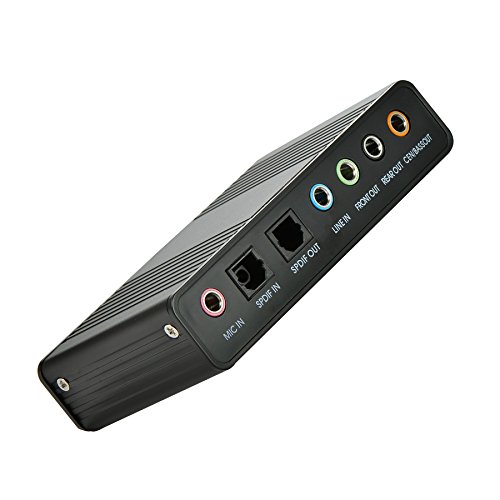
External USB sound cards, such as the StarTech 7.1 USB Audio Adapter, are perfect for laptops or anyone who values portability and easy setup. They plug into any USB port, require no driver installation (usually), and are ideal for quickly upgrading sound quality on the go. Consider your workspace and whether you need to move your audio solution between devices.
Channel Output: Stereo, 5.1, or 7.1?
Think about your speaker or headphone setup. If you’re using a simple stereo headset, a basic 2-channel card will suffice. However, if you have a 5.1 or 7.1 surround sound speaker system, you’ll need a card that can output those channels. The Cubilux 7.1 USB Surround Sound Card explicitly supports 7.1 and 5.1 output, making it a solid choice for immersive gaming and movies.
For most gamers, virtual surround sound on headphones is a key feature, which many modern cards handle through software processing. If you’re building a multi-channel speaker setup for a home theater feel, ensure the card has the necessary 3.5mm jacks or optical output to connect everything properly. Don’t forget to check if your speakers accept the connections your card provides.
Audio Quality and Sample Rate
Key specs like signal-to-noise ratio (SNR) and sample rate determine audio fidelity. A higher SNR (measured in dB) means less background hiss, while a higher sample rate (like 32-bit/384 kHz) allows for more detailed, high-resolution audio playback. The Creative Sound Blaster Audigy Fx Pro, for instance, offers up to 120 dB SNR, which is excellent for critical listening.
If you’re an audiophile with high-bitrate music files, look for a card that supports 24-bit/96kHz or better. For most users, a 24-bit/48kHz card is more than enough for gaming and streaming. Consider what you listen to and how much you value that extra bit of clarity before making a decision.
Connectivity and Ports
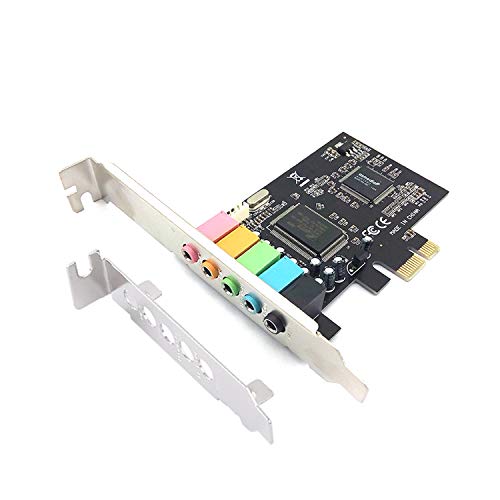
Examine the available inputs and outputs. Do you need a dedicated microphone input, line-in for recording, or multiple headphone jacks? The PCIe Sound Card 5.1 for PC offers line-in, line-out, mic-in, and surround outputs, providing flexibility for various peripherals. If you plan to record guitar or vocals, you’ll want a card with a clean, low-noise mic preamp.
Also, check for digital optical (SPDIF) outputs if you want to connect to a home theater receiver or a high-end DAC. Some external cards, like the Padarsey PCIe 5.1 Internal Sound Card for PC, include a low-profile bracket for smaller cases, which is a thoughtful touch. Make sure the card has the ports you need, not just the ones you think you’ll use.
Final Thoughts
Choosing the right sound card for your Windows 10 PC ultimately comes down to your specific needs and setup. For a high-end internal solution with superb audio fidelity, the Creative Sound Blaster Audigy Fx Pro Hi-Res PCIe is a fantastic choice for audiophiles and serious gamers. If you prefer a portable, plug-and-play option for a laptop or want to upgrade a basic desktop, the StarTech 7.1 USB Audio Adapter offers great value and versatility. Whatever you pick, you’ll notice a significant improvement over your motherboard’s built-in audio. For more specialized advice, explore our guides on sound cards for Linux, vocal recording, or guitar recording.
Frequently Asked Questions
Do I really need a sound card if my motherboard has audio?
While modern motherboards have decent onboard audio, a dedicated sound card offers better components, lower interference, and often more advanced software features. You’ll notice a cleaner signal, less static, and improved sound staging, especially with high-quality headphones or speakers. If you’re a casual listener, you might not need one, but for gaming or music production, the upgrade is worthwhile.
Can I use a USB sound card on a laptop?
Absolutely! USB sound cards are the easiest way to upgrade laptop audio, as they bypass the built-in sound chip and often provide better amplification. They’re plug-and-play, meaning you can connect them in seconds without any drivers. Many models are compact and bus-powered, so they don’t require an external power supply.
Will a sound card improve my gaming experience?
Yes, particularly for competitive gaming. Sound cards with surround sound processing can help you pinpoint directional cues like footsteps or gunfire more accurately. Low-latency audio also reduces audio lag, keeping sound in sync with what’s on screen. For an immersive experience, look for a card that supports 5.1 or 7.1 virtual surround on headphones.
Are all sound cards compatible with Windows 10?
Most modern sound cards are fully compatible with Windows 10, but it’s always a good idea to check the manufacturer’s specifications. Some budget cards may require driver downloads, while others are plug-and-play. In 2026, you’ll find that almost all cards support Windows 10, but for Windows 11, ensure you have the latest drivers for full functionality.