

If your laptop or desktop sounds muffled, or you hear static through your headset, it may be time to consider an external sound card. These compact devices bypass your computer’s built-in audio hardware to deliver clearer, richer sound for gaming, music, and video calls. In this guide, we review the best affordable external sound cards for 2026, focusing on models that offer reliable performance without stretching your budget. For a broader look at budget audio upgrades, check out our roundup of affordable sound cards.




Buying Guide: What to Look for in an Affordable External Sound Card
Audio Quality and Channel Support
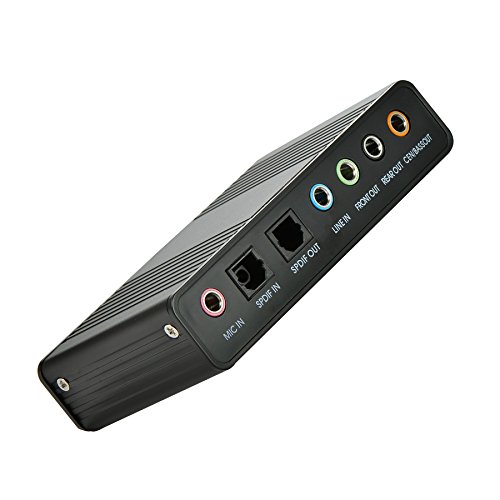
Not all external sound cards sound the same. Basic stereo adapters are fine for music and calls, but gamers and movie lovers benefit from 5.1 or 7.1 surround sound. Models like the StarTech 7.1 USB Audio Adapter deliver immersive positional audio, while simpler units such as the SABRENT USB External Stereo Sound Card focus on clear stereo output. If you value hi-res audio, look for sample rates above 48KHz, as featured on the Cubilux 7.1 USB Surround Sound Card.
Connectivity and Compatibility
Most affordable external sound cards use a standard USB‑A connection and are plug‑and‑play with Windows, macOS, and Linux. Some add extra ports like optical S/PDIF or line‑in for connecting studio gear. Before buying, check that the card works with your operating system, for example, the Cubilux model does not support Windows 7 or 8. For a list of current compatible models, see our guide to Windows 10 compatible sound cards.
Build Quality and Portability
If you travel with your gear, a compact design with a durable case matters. Several options in this roundup, such as the HUANGENG USB External Sound Card, use an aluminum alloy body to minimize interference and withstand daily use. Others, like the Micolindun External Sound Card, include a built‑in USB hub to save ports on your laptop. Weight and cable length also affect convenience, the Micolindun offers a 1.2‑meter cable, letting you place the card on your desk.
Extra Features: Volume Control, Mic Input, and Gaming Modes
Many affordable sound cards now include physical volume knobs, mute buttons, and even preset equalizer modes for games. The ULANSeN USB Sound Card Virtual 7.1, for instance, has dedicated PUBG sound effects and a microphone‑mute switch. If you need to connect a headset with a single 4‑pin plug, look for a card that supports combo jacks, the VENTION USB Sound Card handles both single and dual‑plug headsets. For more premium options, browse our top sound cards under $100.
Final Thoughts
Whether you need a simple fix for a broken headphone jack or a full surround‑sound upgrade, the best affordable external sound cards deliver noticeable improvements without complicated installation. For a budget‑friendly stereo solution, the VENTION USB Sound Card, External Stereo Sound Card offers reliable plug‑and‑play audio with a convenient volume knob. If you want true 7.1 surround for gaming and movies, the StarTech 7.1 USB Audio Adapter provides excellent channel separation and digital output, an investment that will elevate your setup for years.
Frequently Asked Questions
Do external sound cards really improve audio quality?
Yes, especially if your computer’s built‑in audio is noisy or limited. External sound cards have their own DAC and amplifier, which reduces electrical interference and can support higher sampling rates. For casual listening, even a $10 model may sound cleaner than integrated audio.
Can I use an external sound card with a gaming headset?
Absolutely. Most external sound cards include a 3.5mm headphone jack and a microphone input. Models with a combo jack let you use a single‑plug gaming headset. For example, the VENTION USB Sound Card works with both single and dual‑plug headsets, making it a flexible choice for gamers in 2026.
Do I need to install drivers for an external sound card?
Most modern external sound cards are class‑compliant and require no drivers, just plug them into a USB port and select the device in your sound settings. Some advanced models with 7.1 surround or optical output may offer optional software for control, but basic operation is always driver‑free on Windows, macOS, and Linux.
What is the difference between 5.1 and 7.1 surround sound?
5.1 surround uses five full‑range speakers plus a subwoofer, while 7.1 adds two extra rear speakers for more precise directional audio. For headphones, virtual 7.1 simulates this effect using stereo drivers. Cards like the StarTech USB Audio Adapter support both 5.1 and 7.1 output through multiple 3.5mm jacks.



