

If you are diving into motion graphics or compositing in Adobe After Effects, you already know the software demands serious hardware. Render times, real-ray playback, and complex particle simulations push even high-end laptops to their limits. The right laptop gives you smooth previews and faster exports, but there is another secret to efficient work: mastering keyboard shortcuts. In this guide, we review the best laptops for After Effects in 2026 and pairing them with top-tier shortcut accessories to elevate your workflow.
Whether you are a freelance motion designer or a video editor juggling multiple projects, your laptop choice matters. But equally important is how you interact with After Effects every day. That is why we have curated 10 products that help you memorize and execute shortcuts instantly. Let us begin with a quick comparison of these essential accessories.


Buying Guide: What to Look for in a Laptop for After Effects
Choosing the best laptop for After Effects means balancing raw power with portability. Below are four critical criteria to keep in mind. For more context, check out our guide to laptops for audio production which shares similar performance needs.
Graphics Card (GPU)
After Effects relies heavily on the GPU for effects like ray tracing, optical flow, and accelerated rendering. A dedicated NVIDIA GeForce RTX or AMD Radeon Pro with at least 4 GB VRAM is recommended for smooth 4K timelines. Integrated graphics can handle basic tasks but will choke on heavy projects.
RAM and Processor
After Effects is a RAM-hungry application. We recommend 16 GB minimum, but 32 GB or more is ideal for multi-layer compositions. Pair that with a high-core-count Intel Core i7/i9 or AMD Ryzen 7/9 processor to keep previews responsive. For a deep dive into performance laptops, read our Cinema 4D laptop recommendations——the same hardware criteria apply.
Storage and Display
Fast NVMe SSD storage is non-negotiable for quick file access and caching. Aim for at least 512 GB, with 1 TB preferred. For display, a high-resolution panel (at least 1080p, ideally 4K)with good color accuracy (100% sRGB or Adobe RGB) helps you see your grades and effects precisely. If you also record music, our home studio recording laptop picks cover many of the same display and storage needs.
Build Quality and Portability
As a creative professional, you may work on location or switch between studio and coffee shop. A lightweight (under 4.5 pounds) yet durable all-metal chassis is ideal. Look for good thermal management—laptop fans that stay quiet under load—so your workflow isn’t interrupted. For performance on the go, see our top picks for music production laptops which feature excellent build quality and battery life.
Final Thoughts
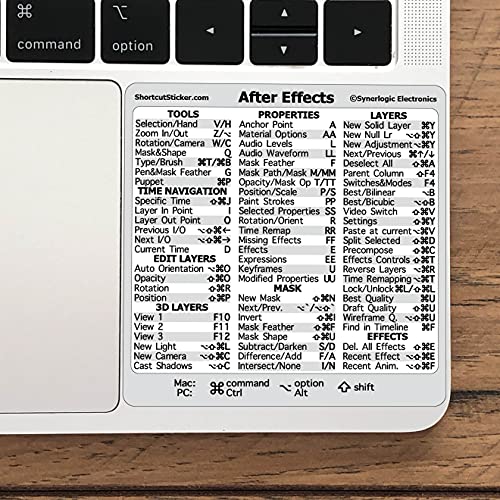
Pairing a powerful laptop with the right shortcut tools can transform your After Effects workflow. While a machine with a robust GPU, ample RAM, and fast storage handles the heavy lifting, accessories like the Synerlogic for Adobe After Effects Quick Reference sticker put essential commands right on your keys, and the XSKN Adobe After Effects Shortcuts Keyboard Skin adds a durable, washable layer with printed hotkeys. Together, they let you focus on creativity instead of hunting for tools. Whether you choose a MacBook Pro or a Windows laptop, these add-ons will accelerate your editing speed from day one.
Frequently Asked Questions
What are the best laptops for After Effects in 2026?
In 2026, top performers include the latest MacBook Pro with M3 Pro/Max chips, Dell XPS 16, and ASUS ROG Zephyrus G16. All offer dedicated GPUs, high‑speed RAM, and excellent displays. For budget options, look at the Lenovo Legion 5 series. Browse our full laptops category for more recommendations.
Do I need a dedicated GPU for After Effects?
Yes, a dedicated GPU is highly recommended. After Effects uses the GPU for effects like Ray‑traced 3D, Lumetri Scopes, and Optical Flow. Integrated graphics can cause slow previews and crashes on complex projects. A minimum of NVIDIA GeForce RTX 3060 or AMD Radeon Pro 5600M is wise.
How can keyboard shortcuts improve my After Effects workflow?
Keyboard shortcuts eliminate mouse clicks for frequent actions like keyframing, trimming, and applying effects. They can cut editing time by up to percentthirtypercent. Products like silicone skins or stickers place the cheat sheet directly on your keys, making muscle memory training effortless.
Are silicone keyboard covers safe for MacBooks?
High‑quality silicone covers, such as those from XSKN and HRH, are ultra‑thin (0.3 mm) and designed to close without screen marks. They protect against spills and dust, but ensure the cover is properly fitted to avoid any keyboard or screen damage over time.






