

When you’re setting up a home PC for media streaming, file storage, or everyday productivity, the case you choose can significantly impact your experience. A well-designed case not only protects your components but also affects cooling, noise, and how neatly everything fits into your living space. In this guide, we’ve evaluated the top PC cases for home use in 2026, focusing on compact form factors, efficient airflow, and practical storage options to suit different needs.
Whether you’re building a home theater PC (HTPC) to sit quietly under your TV or a network-attached storage (NAS) box for backing up family photos, the right case makes all the difference. We also consider ease of assembly and long-term reliability. If you’re new to PC building, our first-time buyer guide can help you understand basic case features before diving into specific models.



Buying Guide for Home PC Cases
Form Factor and Size
The first decision is the motherboard size, which dictates the case dimensions. For most home users, a Micro-ATX or Mini-ITX case offers a good balance between interior space and a small footprint. Larger towers can handle more drives and full-size graphics cards, but they take up precious floor or desk space.
Consider where you’ll place the PC. If it’s going inside an entertainment center, a slim HTPC case like the Silverstone GD09 is ideal. For a dedicated NAS or a compact workstation, a Mini-ITX chassis saves room. Check our PC Cases category page for a wider range of options.
Cooling and Airflow
Good airflow keeps your components cool and reduces fan noise, which is especially important in a living room or office. Look for cases with multiple fan mounts, front mesh panels, or positive air pressure designs to prevent dust buildup.
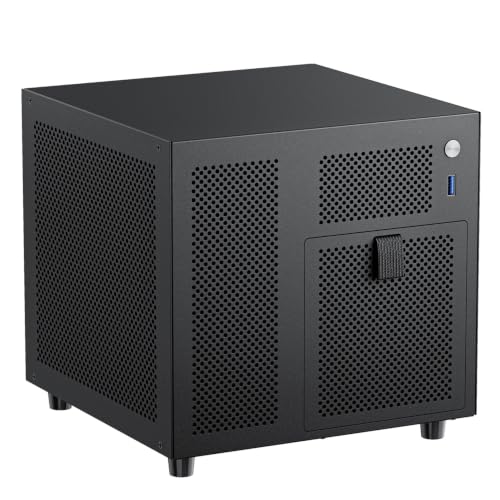
The Silverstone GD09 uses a positive air pressure layout, pushing air out through rear vents and reducing dust accumulation. The RGEEK NAS case includes a 120mm fan position and ventilated side panels to keep drives cool during long operations. Both prioritize quiet, efficient cooling for home environments.
Storage Capacity and Drive Bays
Your storage needs determine how many hard drives or SSDs the case must accommodate. For media libraries or backups, a NAS case with hot-swap bays is a game-changer. For a general home PC, a couple of internal 3.5″ bays plus an SSD slot might be enough.
The RGEEK Mini ITX NAS case stands out with four hot-swappable 3.5″ drive bays and a dedicated 2.5″ SSD slot, making it perfect for a home server. The Silverstone case supports up to eight drives in its compact frame, giving you flexibility for growth. If you plan to build a heavy-duty storage system, you might want to check our heavy-use cases guide.
Build Quality and Design
A well-built case should feel sturdy, have a clean interior for cable management, and offer easy access to filters and drive bays. Materials like galvanized or cold-rolled steel increase durability, while magnetic front panels simplify maintenance.
The Silverstone GD09 features a faux aluminum front panel that looks premium in any home theater setup. The RGEEK case uses a 1.0mm galvanized steel inner frame for structural rigidity and a magnetic steel front for quick access. Both designs reflect careful attention to everyday usability.
If you’re shopping for a case as a gift or want ideas for different use cases, don’t miss our gift guide or our roundup of budget-friendly cases.
Final Thoughts
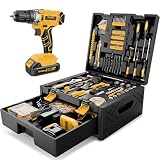
After careful evaluation, we recommend the Silverstone Technology GD09 Home Theater PC (HTPC) for those who want a sleek, large-capacity case that blends into a home entertainment system, and the Mini ITX NAS Case, 4 Hot-Swap 3.5 HDD Bay NAS PC for users prioritizing dense storage in a compact footprint. Both are excellent choices for home use, depending on whether you need a versatile HTPC or a dedicated NAS. Pair either with the Sundpey 267 Pcs Tool Kit to simplify assembly and upgrades.
Frequently Asked Questions
What is the best PC case for a home theater PC?
For an HTPC, look for a low-profile, horizontally oriented case that fits in an AV cabinet and has good ventilation. The Silverstone GD09 is a standout choice in 2026 due to its shallow depth and positive air pressure design, which keeps things quiet and cool.
How many hard drive bays do I need for a home NAS?
It depends on your storage capacity needs. A typical home NAS starts with 4 bays to support RAID configurations and future expansion. The RGEEK Mini ITX NAS Case offers exactly 4 hot-swap bays plus an SSD slot, making it easy to manage a large media library or backup archive.
Are mini-ITX cases suitable for everyday home computers?
Absolutely. Mini-ITX cases are compact, energy-efficient, and fit easily on a desk or shelf. They support standard power supplies and low-profile coolers, so you can still get solid performance. For general use, they’re an excellent space-saving option in 2026.
Should I buy a tool kit with my PC case?
Having the right tools makes building or upgrading your PC much easier. The Sundpey 267 Pcs Tool Kit Set is a practical companion, offering a cordless drill and assorted bits for mounting motherboards, drives, and fans. It’s useful for future maintenance as well.


