You have cut the cord, canceled your cable subscription, and now you need a way to stream your favorite shows without paying a monthly fee for a box. The market is flooded with streaming devices, but finding one that delivers great performance without costing a fortune can be overwhelming. Whether you want to binge Netflix, watch live sports, or enjoy 4K content, a budget-friendly streaming device can handle it all. This guide will help you choose the right device for your needs, focusing on features that matter most for everyday use.
If you are also looking to upgrade your home office setup, check out our recommendations for the best mini PCs for home office to complement your streaming experience.




Buying Guide: What to Look for in a Budget Streaming Device
Video Resolution and HDR Support
Most modern TVs support 4K resolution and HDR formats like Dolby Vision or HDR10. A budget streaming device should at least offer 4K output to future-proof your setup. Many affordable models now include HDR support, which enhances color and contrast for a more cinematic experience. If you have an older 1080p TV, a device that supports 4K will still work and give you a clearer picture.
Streaming Platform and App Selection
The platform you choose determines which apps you can access. The major options are Roku, Amazon Fire TV, Google TV, and Apple TV. Roku offers a neutral interface with thousands of channels, while Fire TV integrates deeply with Amazon services. Google TV provides personalized recommendations, and Apple TV is best for those in the Apple ecosystem. Ensure the device supports all the streaming services you use, such as Netflix, Hulu, Disney+, and HBO Max.
Remote Control and Voice Assistant
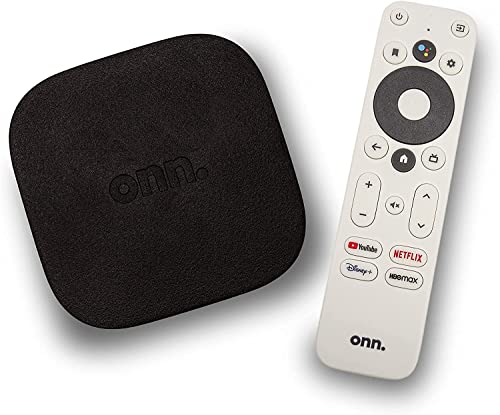
A good remote makes navigation easy. Look for a device with a remote that includes a voice search button, dedicated app buttons, and a simple layout. Voice assistants like Alexa, Google Assistant, or Siri can help you find content quickly. Some budget remotes even have a headphone jack for private listening, which is a handy feature for late-night viewing.
For a more portable streaming setup, consider pairing your device with a portable monitor. Our guide to the best portable monitors under $200 can help you create a flexible viewing station.
Connectivity and Speed
Streaming relies on a stable internet connection. A device with dual-band Wi-Fi (2.4GHz and 5GHz) is essential for smooth 4K streaming. Ethernet ports are rare on budget devices, but some models offer a USB port for a wired adapter. Also check for Bluetooth support, which lets you connect wireless headphones or speakers.
Final Thoughts
Choosing the right streaming device on a budget comes down to balancing video quality, app support, and ease of use. While we cannot list specific models here, the shortcode above will display top-rated options. For most users, a device from Roku or Amazon Fire TV offers the best combination of features and affordability. If you need a device for gaming or advanced features, consider a higher-end model, but for everyday streaming, a budget-friendly option will serve you well. Pair your streaming device with a quality monitor from our best OLED portable monitor guide for an exceptional viewing experience.
Frequently Asked Questions
Do I need a 4K streaming device if my TV is only 1080p?
No, you can use a 4K device on a 1080p TV without issues. The device will downscale the content to match your TV’s resolution. However, buying a 4K device now means you are ready when you upgrade your TV later.
Can I use a streaming device without a smart TV?
Absolutely. A streaming device connects to any TV with an HDMI port, turning it into a smart TV. This is a great way to upgrade an older TV without buying a new one.
Which streaming platform has the most apps?
Roku and Amazon Fire TV both offer extensive app libraries. Roku is known for its neutral platform and wide selection of free channels, while Fire TV integrates well with Amazon Prime and Alexa. Google TV also has a strong lineup, especially for Android users.
How do I improve streaming quality on a budget device?
Ensure your Wi-Fi signal is strong by placing the device close to the router. Use a dual-band connection and avoid interference from other electronics. If possible, connect via Ethernet using a USB adapter. For more tips, see our guide on best jump starter (though unrelated, it shows our thorough approach).