If you are building a new PC and want a case that blends sleek aesthetics with strong thermal performance, NZXT is a brand that consistently delivers. The H6 lineup, in particular, has drawn attention for its panoramic glass panels and dual-chamber architecture. In this guide, we evaluate the two standout models: the NZXT H6 Flow RGB and the NZXT H6 Compact. Whether you prioritize vivid RGB out of the box or a clean, customizable foundation, we will help you decide which case fits your build. For more case options, check out our PC Cases category.


Buying Guide: What to Look for in an NZXT PC Case
Airflow and Cooling
Airflow is the backbone of any PC case. NZXT designs prioritize directed airflow, with angled fan positions and high-perforation mesh panels. For example, the H6 Flow RGB ships with three pre-installed RGB fans placed at an optimal angle, while the H6 Compact relies on customizable fan slots. Consider your cooling needs: if you want immediate out-of-the-box airflow, the H6 Flow RGB is ready to go. If you prefer to pick your own fans, the H6 Compact gives you that freedom. Both cases support up to 10 x 120 mm fans for future expansion.
Design and Aesthetics
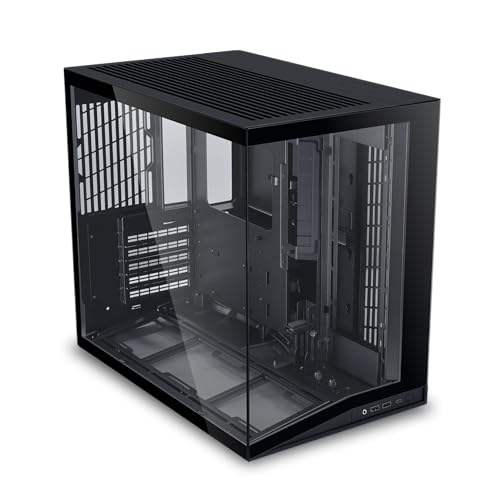
NZXT is known for clean, modern designs. The H6 Flow RGB features wraparound seamless curved glass that gives an unobstructed view of your components. Meanwhile, the H6 Compact uses a single-piece curved tempered glass panel that minimizes distortion. Both showcase your build beautifully, but the H6 Flow RGB includes integrated RGB fans for a vibrant look right away. If you prefer a minimalist black case that lets you control the lighting, the H6 Compact in black is a strong choice. For more inspiration, see our best RGB PC cases under $100 guide.
Cable Management
A clean interior is not just about looks; it improves airflow and simplifies maintenance. Both NZXT H6 cases feature dedicated cable management channels and straps. The H6 Flow RGB offers wide channels that make routing cables straightforward, while the H6 Compact uses a secondary chamber to isolate cables entirely. If you value a clutter-free interior with minimal effort, either model works well. The H6 Compact’s dual-chamber design takes it a step further by hiding the power supply and cables behind a separate compartment.
Form Factor and Compatibility
Both cases are mid-tower ATX designs, but size matters for component clearance. The H6 Flow RGB is slightly more spacious, with enough room for large GPUs and tall CPU coolers. The H6 Compact is more space-efficient, ideal for smaller desks. Check your GPU length and cooler height before purchasing. For a compact ATX case that still supports full-size components, the H6 Compact is a smart pick. If you need a bit more breathing room, the H6 Flow RGB is the way to go. For other form factors, browse our Best ASUS PC Cases article.
Final Thoughts
Choosing between these two NZXT PC cases comes down to your priorities. If you want a stunning white case with pre-installed RGB fans and immediate airflow, the NZXT H6 Flow RGB Mid-Tower Airflow Case with 3 RGB is the effortless choice. If you prefer a black, compact design that lets you customize every fan and emphasizes cable management, the NZXT H6 Compact Dual-Chamber ATX PC Case Black offers a clean foundation for your ideal build. Both deliver the quality and aesthetics NZXT is known for, so pick the one that matches your vision.
Related Guides
Frequently Asked Questions
Are NZXT H6 cases compatible with large graphics cards?
Yes, both the H6 Flow RGB and H6 Compact support modern GPUs up to around 400 mm in length. They also include an integrated anti-sag bracket in the H6 Compact to keep heavy cards aligned. Always verify your GPU dimensions, but most flagship cards fit easily.
Do these cases include fans?
The NZXT H6 Flow RGB includes three pre-installed 120 mm RGB fans. The NZXT H6 Compact ships without fans, allowing you to fully customize your cooling solution. If you want a case ready to go out of the box, the H6 Flow RGB is the better pick.
Which NZXT case is better for cable management?
Both cases excel in cable management. The H6 Flow RGB uses wide channels and straps for easy routing. The H6 Compact takes it a step further with a dedicated dual-chamber design that completely hides cables and the power supply. For the cleanest build, the H6 Compact has an edge.
Can I install a liquid cooler in these cases?
Absolutely. Both NZXT H6 cases support up to 360 mm radiators in the top and front positions. The H6 Flow RGB has a mesh top panel for optimal exhaust, while the H6 Compact offers standardized mounts. For water cooling builds, check our Top PC Cases for Water Cooling Under $100 guide.