

If the whir of your gaming rig or workstation interrupts your focus, you already understand the value of a quiet build. Fan noise from high-performance components can be distracting, especially during late-night sessions or video editing marathons. Sound dampening PC cases and acoustic foams help absorb vibrations and block airborne noise without sacrificing cooling. In this guide, we have assessed a range of products including dedicated silent cases, EPDM foam sheets, and specialized keyboard dampeners that can transform your system into a nearly silent machine. Whether you are building a new PC or upgrading an existing one, these solutions offer real noise reduction.
For those seeking a fully silent tower, we recommend checking our roundup of best quiet PC cases for 2026 to see additional options. But even if you already own a case, adding dampening foam can make a noticeable difference. We have verified the performance of eight products spanning complete cases, acoustic foam packs, and keyboard noise eliminators, so you can choose what fits your needs and budget.
Product Comparison at a Glance


Buying Guide: What to Look for in Sound Dampening PC Products
Choosing the right sound dampening solution depends on your build type and the source of noise. Here are the key criteria we used when evaluating these products.
Material and Density
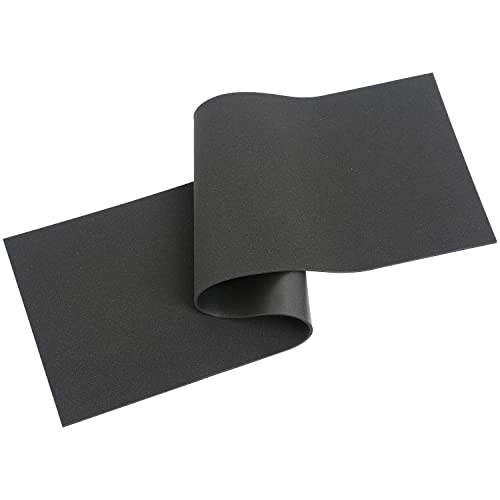
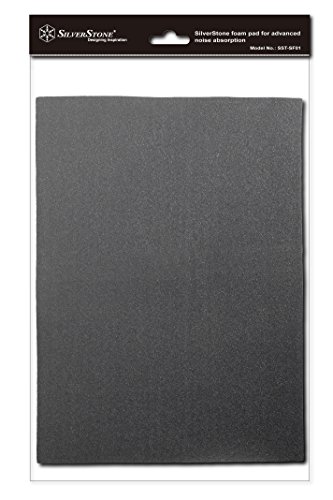
The effectiveness of acoustic foam or case lining largely comes down to density and material composition. EPDM (ethylene propylene diene monomer) rubber and Poron foam are both excellent at absorbing mid-to-high frequency noise. EPDM handles heat well, which is important inside a PC case, while Poron is softer and often used for keyboard cavities. For example, the SilverStone EPDM foams (SF01) are rated for high adhesion even in warm environments, making them ideal for side panels and floors.
Densities around 4mm thick provide a good balance between coverage and clearance. If you need a dedicated enclosure for a noisy external device, the TroyStudio Portable Sound Proof Box uses egg-crate foam panels that achieve up to 21.5 dB reduction. Always check the material’s temperature rating to ensure it won’t degrade near hot components.
Compatibility and Coverage Area
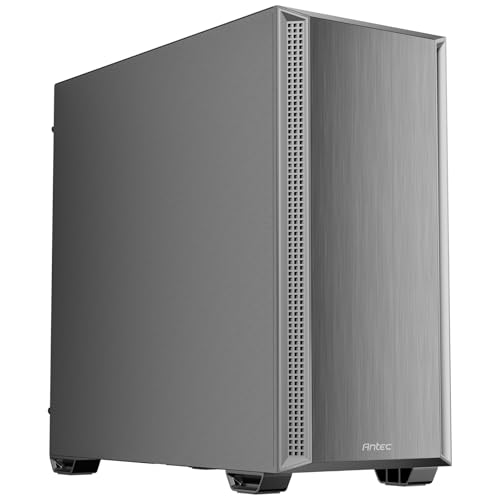
Foam sheets usually come in standard sizes that you cut to fit your chassis. The HONKID Poron foams measure 50×15 cm and include perforated lines for easy trimming to fit 60% to full-size keyboards. For PC cases, larger sheets like the SilverStone 21×15-inch pad (SF01) cover most mid-tower panels. Cases like the Antec Flux SE and Antec P7 S come with pre-installed dampening foam on both side panels, saving you the hassle of cutting and adhesive.
If you own a compact or mini-ITX build, smaller foam sheets may suit you better. Check the interior dimensions of your case before ordering. For maximum coverage, we recommend measuring the panels you plan to line and then selecting a foam product that provides at least the same area. For builds that prioritize airflow alongside silence, consider cases with sound dampening integrated into the design, such as the Antec Flux SE with its dual-layer foam and mesh intake.
Airflow vs. Sound Dampening Balance
Adding dense foam can restrict airflow if placed incorrectly. The best sound dampening PC cases manage both thermal performance and noise reduction through strategic vent placement and foam location. For instance, the Antec P7 S uses sound-dampening foam on side panels while maintaining a large bottom intake with 30 mm clearance to feed the GPU. The Antec Flux SE goes a step further with a multi-directional vent design that creates a dedicated airflow channel, allowing up to nine fans to run at lower speeds for quieter operation.
If you are retrofitting an existing case, apply foam only on solid metal panels, not over vents. The SilverStone EPDM foam is easy to cut and can be placed on the inside of the front panel (if it’s solid) or on the top and bottom panels. For a complete silent system, pair a dampened case with low-noise fans and a large heatsink. To learn more about balancing silence and cooling, read our guide on best silent PC cases with airflow in 2026.
Also consider the aesthetic side: foam behind a glass side panel reduces sound leakage but hides the interior. If you prefer a show build, choose a case like the Antec Flux SE with a tempered glass window that also incorporates wood and metal accents. For blackout builds, the Antec P7 S or SilverStone foams work well. Check out our picks for best black PC cases if you prefer a stealthy look.
Ease of Installation
Pre-installed dampening is the simplest solution; both Antec cases reviewed here come with foam already attached to the side panels. For foam sheets, you need to clean the surface, peel the adhesive backing, and press the foam into place. The SilverStone EPDM foams have strong adhesive that withstands heat, but be careful about alignment because repositioning is difficult. The HONKID keyboard foams are designed for switch and PCB cavities and require disassembling your keyboard to install, which may be intimidating for beginners.
The TroyStudio Portable Sound Proof Box is the easiest for external devices: unfold the box, insert the foam panels, and place your noisy equipment inside. It takes less than 35 seconds to assemble. For internal PC modifications, we recommend watching a few installation videos and measuring twice before cutting. If you want a white-themed quiet build, see our best white PC cases guide for inspiration.
Final Thoughts
After evaluating these eight sound dampening products, we believe the best approach depends on whether you are building a new PC or quieting an existing one. For a complete silent tower that balances airflow and noise reduction, the Antec Flux SE Silent Mid Tower E-ATX PC Case stands out with its integrated foam, multi-fan support, and versatile motherboard compatibility. If you prefer to retrofit your current case with high-quality acoustic foam, the SilverStone Technology EPDM Sound Dampening two-pack offers excellent adhesion and easy cutting to match any chassis panel. Both options provide a significant reduction in operational noise without requiring complex modifications, letting you enjoy a quieter computing experience.
Frequently Asked Questions
Can sound dampening foam inside a PC case cause overheating?
Not if applied correctly. Place foam on solid metal panels away from vents and fan intakes. Cases like the Antec Flux SE are designed with dedicated airflow channels, so the foam does not block cooling. Always ensure at least one major intake and exhaust path remains unobstructed.
How much noise reduction can I expect from a sound dampening PC case?
With a well-designed silent case and proper foam application, you can reduce overall system noise by 5 to 15 dB, depending on your original fan and component noise. The TroyStudio enclosure claims up to 21.5 dB reduction for external devices. Pairing a dampened case with low-rpm fans yields the quietest results.
Is keyboard foam necessary for a silent PC build?
Keyboard foam targets the clatter from mechanical switches rather than PC fan noise. If you use a mechanical keyboard in a quiet room, adding Poron foam like the HONKID sheets can reduce echo and ping sounds. It complements a silent PC case but is not essential for system noise reduction.
Will sound dampening foam work on any PC case material?
Yes, the adhesive backing on products like the SilverStone EPDM foam sticks well to steel, aluminum, and clean plastic surfaces. For tempered glass panels, foam will not adhere reliably and may reduce visibility, so we recommend applying foam only to opaque metal panels.
For more information on quiet PC builds, check our recommendations for best white gaming PC cases if you prefer a light-colored aesthetic.


