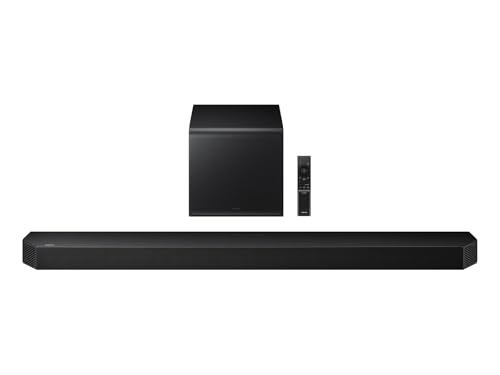
You just settled in to watch your favorite blockbuster on your Samsung TV, but the dialogue sounds muddled and the explosions lack punch. You need a soundbar that seamlessly pairs with your Samsung display to deliver clear voices and immersive audio without complexity. Whether you are a dedicated cinephile or a casual viewer, selecting the right soundbar can transform your home entertainment. This guide covers three excellent options that work brilliantly with Samsung TVs, from a compact all-in-one to a powerful multi-channel system.
If you are also tidying up your space for the ultimate movie night, you might appreciate our recommendations on the top mops for small apartments for quick cleanups before the show.


Buying Guide
Audio Channels and Immersion
Consider how many audio channels you need for a satisfying experience. A 5.1-channel system with separate drivers and a subwoofer delivers true surround sound, placing you in the middle of the action. For smaller rooms, a 5.0ch or 2.1ch soundbar can still provide excellent width and depth without overwhelming the space. Your Samsung TV will pair with any of these configurations, but the more channels you have, the more enveloping the sound will be for movies and games.
Connectivity and HDMI eARC
HDMI eARC is the gold standard for connecting a soundbar to your Samsung TV, as it supports high-bandwidth audio formats like Dolby Atmos. This single cable handles both audio and control, allowing your TV remote to adjust volume seamlessly. While optical and AUX connections work in a pinch, they lack the bandwidth for lossless, object-based audio. For the best experience, look for a soundbar with HDMI eARC to unlock the full potential of your Samsung TV’s audio output.
Dialogue Clarity and Voice Enhancement
One of the biggest complaints about modern TV audio is unintelligible dialogue, especially during action scenes. Soundbars with dedicated voice enhancement technologies use advanced processing to isolate and boost vocal frequencies. This ensures you catch every whisper and line of dialogue without constantly adjusting the volume. Features like Adaptive Sound on Samsung soundbars or VoiceMX on ULTIMEA models actively analyze content to keep speech crisp and clear.
For a pristine home theater environment, you might also explore microfiber cleaning cloths to keep your screen and soundbar smudge-free.
Room Calibration and Smart Features
Every room has unique acoustics, and a soundbar that automatically calibrates itself can save you hours of manual tuning. Look for features like SpaceFit Sound Pro that analyze your environment and optimize audio output for your specific space. Smart integration with voice assistants like Alexa also adds convenience, letting you control playback and volume hands-free. These features transform a good soundbar into a personalized audio hub that adapts to your lifestyle.
Final Thoughts
Choosing the right soundbar for your Samsung TV ultimately depends on your priorities: for a seamless, brand-integrated experience with smart features and compact design, the SAMSUNG S60D 5.0ch Soundbar w/Wireless Dolby Atmos is a stellar choice that works in perfect harmony with your TV. If raw, room-filling power and true surround immersion are what you crave, the ULTIMEA 5.1CH Surround Sound Bar System with Dolby delivers an incredible cinematic experience with dedicated drivers and a wired subwoofer. Both options elevate your entertainment without complication, bringing your content to life in every scene.
Related Guides
- Best Soundbar for LG TV
- Best Soundbar for TCL TV
- Best Soundbars for Sony TV
- Samsung Black Friday Deals 2026
- Best Soundbar for the Money?
Frequently Asked Questions
Will any soundbar work with my Samsung TV?
Yes, most soundbars with an HDMI (eARC) or optical input will work with modern Samsung TVs. However, to take full advantage of features like Q-Symphony or one-touch control, it is best to choose a soundbar from Samsung or a brand that supports HDMI-CEC. Compatibility is generally excellent across all three models reviewed here.
Do I need rear speakers for a good surround sound experience?
Not necessarily. Many modern soundbars use advanced processing and side-firing drivers to create a convincing surround field without separate rear speakers. Models like the ULTIMEA 5.1CH system use five built-in speakers and Dolby Atmos upfiring to achieve an immersive soundstage that fills the room, even without extra satellite speakers.
Can I use a soundbar with my Samsung TV remote?
Absolutely. When connected via HDMI ARC or eARC, your Samsung TV remote can control the soundbar’s volume and power. This feature is built into the HDMI standard, so you only need one remote for most operations. For setup, you may want to use a grout cleaning brush to tidy up any dusty corners before you place your new soundbar.
What is the minimum setup time for these soundbars?
These soundbars are designed for quick, hassle-free installation. The ULTIMEA system, for example, advertises setup in under a minute. Most models simply require plugging in the power, connecting to your TV via HDMI, and following a brief on-screen menu. With Bluetooth or wireless connectivity, cable clutter is minimized, so you can start enjoying better audio almost instantly.