Picture this: you are in a lecture hall, trying to capture a complex diagram your professor is drawing. A traditional laptop forces you to type notes and then sketch later, but a touch screen laptop lets you write directly on the screen, annotate slides, and switch to tablet mode in an instant. Whether you are a STEM major running simulations, an art student sketching ideas, or a business major managing spreadsheets, a touch screen laptop can transform your workflow. In this guide, we have evaluated seven of the best student touch screen laptops for 2026, ranging from budget-friendly Chromebooks to powerful Windows machines. We have focused on models that deliver responsive touchscreens, solid performance for school tasks, and portability. For more insight into high-resolution displays, check out our best 4K touch screen laptops guide.


Buying Guide: What to Look for in a Student Touch Screen Laptop
Touchscreen Versatility: 2-in-1 vs. Traditional Touch
Not all touch screen laptops are created equal. Some feature a 360-degree hinge that lets you fold the screen into tablet or tent mode, these are called 2-in-1 or convertible laptops. Others have a standard clamshell design with a touch screen but no full rotation. For students, a 2-in-1 is often more valuable because you can use it to take handwritten notes with a stylus, present projects in tent mode, or watch videos in tablet mode. Models like the Samsung 12.2″ FHD 2-in-1 Chromebook and the HP 14 2-in-1 Chromebook excel here. If you prefer a larger screen for multitasking, the Dell 16″ Touchscreen Laptop offers a responsive touch display without the hinge, ideal if you rarely need tablet functionality.
Performance for Schoolwork: Processor, RAM, and Storage
Your laptop needs to handle multiple browser tabs, office applications, video calls, and maybe light coding or creative software. For basic tasks, an Intel N100 or MediaTek Kompanio 520 processor with 4GB RAM is sufficient for Chromebooks. For heavier workloads, like running virtual machines, editing videos, or compiling code, look for at least 8GB RAM and a more powerful chip like the AMD Ryzen 7 or Intel Core i3. The Dell 16″ with its Ryzen 7 and 16GB DDR5 RAM is overkill for most students, but perfect for engineering or data science majors. Storage matters too: 64GB eMMC is fine for cloud-based Chromebooks, but Windows users should aim for 256GB SSD or more. Our best gaming laptops for computer science students guide covers high-performance options if you need extra power.
Battery Life and Portability
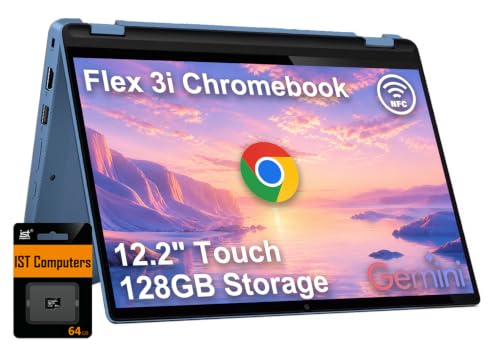
Long battery life is essential for a full day of classes. Chromebooks generally lead in endurance, with many offering 10 to 12 hours of real-world use. The Lenovo IdeaPad Flex 3i Chromebook promises up to 12 hours, while the Lenovo Flagship Chromebook also provides all-day power. Windows laptops like the HP 14-inch can last through a school day with moderate use. Weight and thickness matter too: you will be carrying this laptop between dorms, libraries, and lecture halls. Look for models under 3.5 pounds. The Samsung Chromebook weighs just 2.98 lbs, and the Lenovo Chromebook is 2.86 lbs, both are easy to slip into a backpack. For larger screens, the Dell 16″ is still relatively portable at 4.18 lbs.
Display Quality and Stylus Support
A crisp, bright display makes reading and writing comfortable. Full HD (1920×1080) or higher resolution is recommended for sharp text and images. Some models like the Lenovo IdeaPad Flex 3i offer a 12.2″ WUXGA (1920×1200) IPS touchscreen with 300 nits brightness and low blue light certification, great for long study sessions. Stylus support is another key feature for note-taking; many 2-in-1 laptops work with an active pen (sold separately or included). The Samsung Chromebook comes with a stylus pen, which is a bonus. If you prefer a larger canvas for annotating PDFs, the 15.6″ 2-in-1 Laptop from QikPulse gives you plenty of space. For more display options, see our best 17 inch touch screen laptops roundup.
Final Thoughts
Choosing the best student touch screen laptop depends on your budget, major, and how you plan to use it. For students who need raw power for demanding coursework, like engineering, video editing, or heavy multitasking, the Dell 16″ Touchscreen Laptop 2026, AMD Ryzen 7 170 delivers desktop-class performance with a large, responsive display. On the other hand, if you prioritize portability, battery life, and a budget-friendly price for note-taking and web-based assignments, the Lenovo Flagship Chromebook offers an excellent value with a 14″ FHD touchscreen and Chrome OS simplicity. Both are solid investments that will serve you well throughout your academic journey.
Frequently Asked Questions
Are touch screen laptops good for students?
Yes, touch screen laptops are excellent for students because they allow you to interact directly with the screen for note-taking, annotating slides, drawing diagrams, and navigating apps. The versatility of 2-in-1 models makes them especially useful for presentations and collaborative work. In 2026, many schools and universities have adopted digital note-taking tools, making a touch screen a practical upgrade.
What is the best operating system for a student touch screen laptop?
It depends on your needs. Chrome OS is lightweight, secure, and great for web-based tasks and Google apps, ideal for most general education students. Windows offers broader software compatibility, including full versions of Microsoft Office, Adobe Creative Suite, and specialized engineering programs. For students in creative fields, a Windows 2-in-1 is often a better choice. Check out our best gaming laptops for school guide for more Windows options.
How much RAM do I need in a student touch screen laptop?
For basic tasks like web browsing, note-taking, and video streaming, 4GB RAM is sufficient on a Chromebook. For Windows laptops, we recommend at least 8GB RAM to handle multiple applications and browser tabs smoothly. If you plan to run virtual machines, code in IDEs, or edit media, 16GB or more is advisable. The Dell 16″ with 16GB DDR5 is a future-proof choice.
Can I use a stylus with these touch screen laptops?
Most 2-in-1 touch screen laptops support active styluses, though compatibility varies. Some models, like the Samsung 12.2″ Chromebook, include a stylus in the box. Others require a separate purchase. For precise note-taking and drawing, look for a laptop that explicitly mentions stylus support or has a high-resolution touch digitizer. The Lenovo IdeaPad Flex 3i and HP 14 2-in-1 Chromebook are compatible with standard active pens.