🔥 TV Black Friday Deals 2026: picks worth watching →
Picture this: you’re settled on the couch, ready to binge your favorite show, but your Roku remote refuses to respond. You press buttons, check the batteries, and still nothing. If you’ve been asking yourself “why is my Roku remote not working,” you’re not alone. This guide covers the most common causes and solutions, plus the best replacement remotes to get you back in control. We’ve reviewed top options from Roku, Yimaut, and LOTEKOO to help you choose the right one for your setup. For more tech troubleshooting, check out our guide on the best WiFi router without subscription for a seamless streaming experience.



Buying Guide
Compatibility with Your Roku Device
Not all remotes work with every Roku device. Before purchasing a replacement, verify whether your device is a Roku TV, a Roku player (like Express, Premiere, or Ultra), or a Roku Stick. Official Roku remotes are designed for specific models, while third-party options often list compatible devices. For example, the Roku TV Replacement Remote Control works only with Roku TV models, not with streaming players. Check your device’s model number to avoid frustration.
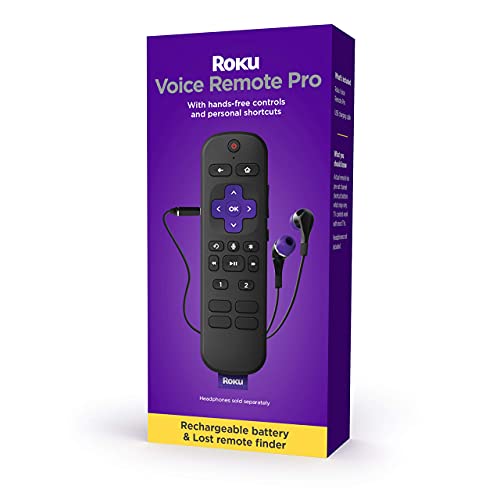
Some remotes use infrared (IR) signals, which require a clear line of sight to the device. If your Roku box is hidden behind a cabinet, an IR remote won’t work. In that case, consider a Bluetooth or Wi-Fi remote, like the Roku Voice Remote Pro, which communicates without direct line of sight. For more on TV tech, see our TCL vs samsung comparison.
Battery Life and Power Source
Battery issues are a top reason for remote failure. Standard remotes use AAA batteries, which can drain quickly. Rechargeable options like the Roku Voice Remote Pro offer months of use on a single charge and include USB-C charging. If you prefer not to replace batteries often, look for a remote with a rechargeable battery or one that supports hands-free voice control to reduce button wear.
Check if your remote has a low-battery indicator in the Roku settings. If the remote is unresponsive, try replacing the batteries or charging it fully. Some third-party remotes, like the 2 Pack Universal Remote from LOTEKOO, require AAA batteries but are affordable for backup use.
Features That Matter Most
Consider which features will enhance your viewing experience. Voice control is a game-changer for searching content or controlling playback without touching the remote. The Roku Voice Remote Pro offers hands-free voice commands and a lost remote finder, which is invaluable for forgetful users. Backlit buttons are great for dark rooms, while dedicated app shortcuts save time.
If you share your space with others, a remote with a headphone jack for private listening can be a lifesaver. For a broader look at smart home tech, read our roborock vs roomba comparison.
Final Thoughts
When your Roku remote stops working, the fix can be as simple as new batteries or a reset, but sometimes a replacement is the best solution. For a premium experience with voice control and backlit buttons, we recommend the Roku Voice Remote Pro (2nd Ed.), which also includes a lost remote finder. If you need an affordable backup for multiple rooms, the 2 Pack Universal Remote for Roku TV from LOTEKOO is a reliable, no-fuss option that works right out of the box.
Frequently Asked Questions
Why is my Roku remote not working even with new batteries? If new batteries don’t help, the remote may need to be paired again. Go to Settings > Remotes & Devices > Set up a new device. For IR remotes, ensure there’s a clear line of sight to the Roku device. Also, check for interference from other electronics. If issues persist, consider a replacement like the best gaming mouse for PC troubleshooting guide for similar connectivity tips.
Can I use my phone as a Roku remote? Yes, the free Roku mobile app (available for iOS and Android) can control your Roku device. It offers voice search, keyboard input, and even private listening. This is a great temporary fix while you decide on a new remote. The app works with most Roku devices and is especially useful if your remote is lost.
How do I reset my Roku remote? For most Roku remotes, remove the batteries, unplug your Roku device for 10 seconds, then plug it back in. Reinsert the batteries and wait for the remote to pair automatically. For voice remotes, you can also press the pairing button inside the battery compartment. This often resolves connectivity issues without needing a new remote.
What should I do if my Roku remote is physically damaged? If your remote has cracks, sticky buttons, or water damage, replacement is the safest option. Official Roku remotes are durable and designed to last, but third-party options like the IR Remote for Roku TV from Yimaut offer a cost-effective alternative. Always check compatibility with your specific Roku model before buying.