

🔥 TV Black Friday Deals 2026: picks worth watching →
If you are a CAD professional or hobbyist, you know that a powerful graphics card can make or break your workflow. Rendering complex 3D models, handling large assemblies, and ensuring smooth viewport performance all depend on the GPU. In this guide, we evaluate the top graphics cards for CAD in 2026 to help you find the perfect match for your workstation. For more hardware insights, check out our Cards category.




Buying Guide
GPU Architecture and Compute Power
The architecture of the GPU determines how efficiently it handles the mathematical computations required by CAD software. Modern architectures like Intel Xe2-HPG and NVIDIA CUDA offer dedicated cores for parallel processing. For CAD workloads, look for a card with strong single-precision floating point performance and AI acceleration if you use generative design tools.
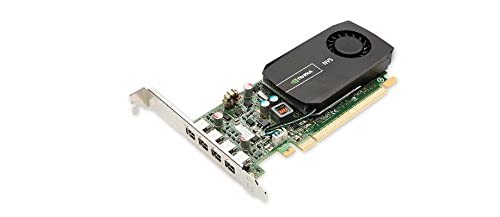
Cards like the ASRock Intel Arc Pro B60 Creator with 160 XMX engines excel in AI-enhanced tasks, while the PNY NVS 510 with 192 CUDA cores remains a reliable choice for legacy multi-monitor setups. For a deeper dive into GPU architectures, see our previous guide on workstation GPUs.
Memory Capacity and Bandwidth
CAD models with high polygon counts and large textures demand significant VRAM. A minimum of 4GB is advisable for basic 2D and light 3D work, but 8GB or more is recommended for complex assemblies and rendering. The ASRock Intel Arc Pro B60 offers a massive 24GB of GDDR6 memory on a 192-bit bus, providing 456 GB/s bandwidth for demanding projects.
For budget-conscious users, the SOYO GeForce GT 740 provides 4GB of DDR3 memory, sufficient for older CAD suites and dual-monitor productivity. Memory bandwidth directly impacts viewport smoothness when rotating or zooming into large models.
Display Outputs and Multi-Monitor Support
CAD professionals often rely on multiple displays for tool palettes, reference images, and model views. The PNY NVS 510 supports up to four monitors via Mini DisplayPort with multi-streaming, making it ideal for financial or design workstations. Newer cards like the ASRock Intel Arc B580 offer DisplayPort 2.1 and HDMI 2.1a, supporting high refresh rates and 4K resolutions.
When setting up a multi-monitor rig, ensure the card’s output ports match your monitors. VGA legacy support is still available on the SOYO GT 740, which can be useful for older projectors or secondary displays. For more on display configurations, refer to our multi-monitor setup guide.
Compatibility and Cooling
Before purchasing, verify that the card fits your chassis and power supply. The ASRock Intel Arc Pro B60 is a 2-slot card requiring a single 8-pin power connector and 200W TDP, while the ASRock Arc B580 needs a 650W PSU. Low-profile cards like the SOYO GT 740 are perfect for slim desktop PCs. Cooling is also critical: blower-style coolers are ideal for dense workstation builds, while dual-fan designs with 0dB silent operation suit quiet offices.
For additional tips on building a CAD workstation, check out our workstation build guide.
Final Thoughts
When selecting a graphics card for CAD, balance your budget against the complexity of your projects. For professionals handling large assemblies and AI-driven design, the ASRock Intel Arc Pro B60 Creator 24GB Graphics offers exceptional memory and compute power. If you need a cost-effective upgrade for lighter CAD work or multi-monitor productivity, the ASRock Intel Arc B580 Challenger 12GB OC Graphics delivers solid performance and modern connectivity. Both cards are excellent choices for 2026 and will serve you well for years to come.
Related Guides
Frequently Asked Questions
What GPU do I need for AutoCAD?
For AutoCAD, a dedicated GPU with at least 4GB VRAM is recommended. The SOYO GeForce GT 740 is a budget-friendly option for 2D drafting, while the ASRock Intel Arc B580 handles 3D modeling more efficiently. For more details, see our related guide on hardware upgrades.
Is an Intel Arc GPU good for CAD in 2026?
Yes, Intel Arc GPUs like the B580 and Pro B60 are certified for professional software and offer strong performance in CAD applications. Their Xe2-HPG architecture provides excellent compute power and AI acceleration, making them viable alternatives to NVIDIA options.
How much VRAM do I need for CAD?
For basic 2D CAD, 2-4GB is sufficient. For 3D modeling and rendering, aim for 8GB or more. The ASRock Intel Arc Pro B60 with 24GB is ideal for large assemblies and simulation tasks.
Can I use a gaming GPU for CAD?
Gaming GPUs can work for CAD, but professional workstation cards often have certified drivers and ECC memory for stability. The ASRock Intel Arc B580 is a gaming card that also performs well in CAD, while the Pro B60 is a dedicated workstation card.


