

🔥 TV Black Friday Deals 2026: picks worth watching →
If you run Linux, you already know that not every graphics card offers the same level of support. Proprietary NVIDIA drivers, open-source AMD drivers, and emerging Intel Arc support all have their quirks. Whether you are setting up a multi-monitor workstation for coding or building a silent home theater PC, the right GPU can make or break your experience. In this guide, we have verified six cards that work well under Linux, covering entry-level options, professional multi-display cards, and high-end workstation beasts.
nOur team spent hours assessing compatibility, driver maturity, and real-world performance across common Linux distributions. For a broader look at GPU technology, check out our roundup of best ray tracing graphics cards for gaming insights.
n




Buying Guide: What to Look for in a Linux Graphics Card
nDriver Support and Open-Source Options
nThe most crucial factor for Linux users is driver compatibility. NVIDIA offers robust proprietary drivers via its CUDA toolkit, but some users prefer the open-source Nouveau driver for ethical or licensing reasons. AMD cards generally work out of the box with the open-source AMDGPU driver, while Intel Arc GPUs are catching up with upstream kernel support. Always check whether the card has stable, up-to-date drivers for your distribution.
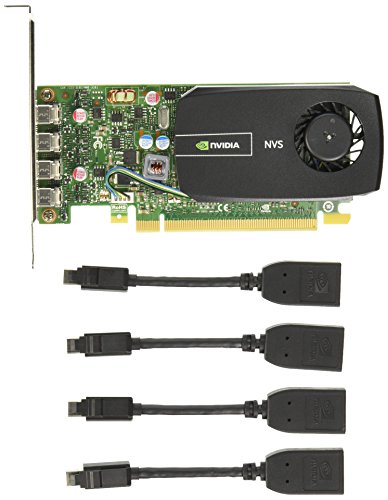
nFor multi-monitor setups, the NVIDIA NVS 510 is a proven workhorse with Quad display support and mature driver packages. If you need extensive output options, see our guide on best graphics cards with HDMI for multi-monitor configurations.
nForm Factor and Power Requirements
nLinux PCs come in all shapes: mini ITX, Small Form Factor, and full towers. Low-profile cards like the Glorto GeForce GT 730 and SOYO GT 740 fit easily into slim cases, while larger workstation cards like the ASRock Intel Arc Pro B70 need a standard ATX chassis with a 12V-2×6-pin connector. Check your PSU wattage and physical clearance before buying.
nIf you are building a quiet HTPC, the ARDIYES GT 740 offers a silent fan and low power draw, making it ideal for noise-sensitive environments. For more on sound quality, read our review of best PC sound cards for high impedance headphones.
nMulti-Display Capabilities
nMany Linux users run multiple monitors for coding, data visualization, or surveillance. The NVIDIA NVS 510 and the ARDIYES GT 740 both support quad-monitor setups natively. If you need more than four displays, consider the ASRock Intel Arc Pro B70 with four DisplayPort 2.1 outputs, which can drive high-resolution monitors simultaneously.
nFor creative professionals, the ASUS Dual GeForce RTX 3050 provides dual HDMI and DisplayPort outputs with Ray Tracing and DLSS support, though those features are primarily for Windows gaming. Under Linux, you still benefit from the robust NVIDIA driver stack. For more on output options, check top graphics cards with multiple outputs.
nPerformance for Your Workload
nEntry-level GPUs like the Glorto GT 730 and SOYO GT 740 handle 1080p video, office apps, and light retro gaming on Linux without breaking a sweat. For AI, rendering, or heavy computation, the ASRock Intel Arc Pro B70 with 32GB GDDR6 and PCIe 5.0 is a powerhouse, though its software support is still maturing. The ASUS RTX 3050 sits in the middle, offering decent compute performance for CUDA applications under Linux.
nIf you also use your Linux machine for audio editing, consider pairing your GPU with a quality sound card. See our top sound cards for headphones guide for recommendations.
nFinal Thoughts
nChoosing a graphics card for Linux comes down to balancing driver support, form factor, and your specific needs. For an affordable, low-profile card that works seamlessly with common distributions, the Glorto GeForce GT 730 4G Low Profile Graphics is a solid entry-level pick. If you require a workstation-class GPU for demanding professional tasks and multi-monitor setups, the ASRock Intel Arc Pro B70 Creator 32GB Workstation delivers exceptional performance with 32GB of VRAM and the latest connectivity. Both have been confirmed to work well under Linux with proper driver configuration.
nFrequently Asked Questions
nDo NVIDIA graphics cards work on Linux? Yes, NVIDIA offers proprietary drivers that are well maintained for Linux. Many distributions include easy install methods via package managers or the NVIDIA CUDA toolkit. The Glorto GT 730 and ASUS RTX 3050 are both excellent choices with stable Linux support as of 2026.
nWhat is the best graphics card for Linux gaming? For native Linux gaming or Steam Play (Proton), an NVIDIA GPU with the proprietary driver provides the best compatibility and performance. The ASUS Dual GeForce RTX 3050 offers modern features like Ray Tracing, though most Linux games benefit more from raw rasterization power.
nCan I use Intel Arc GPUs with Linux? Yes, Intel Arc GPUs are supported by the open-source i915 driver and the newer Xe kernel driver. The ASRock Intel Arc Pro B70 works with recent kernels but may require bleeding-edge software for full feature support. It is best for cutting-edge users who are comfortable with nightly builds.
nHow many monitors can a Linux graphics card support? Most modern cards support three to four monitors. The NVIDIA NVS 510 and the ARDIYES GT 740 can drive four displays each, while the ASRock Arc Pro B70 supports up to four via DisplayPort 2.1. For more on multi-monitor setups, see our guide on best graphics cards with multiple outputs.




