

🔥 TV Black Friday Deals 2026: picks worth watching →
You’re deep in your creative flow, your 3D scene is almost finished, and then you hit render. The familiar spinner appears, and what should be a quick preview turns into an agonizing wait. For 3D artists, architects, and engineers, a laptop that can handle complex rendering without grinding to a halt isn’t a luxury, it’s a necessity. This guide breaks down the top mobile workstations for 3D rendering, focusing on the HP ZBook series, so you can invest in a machine that keeps pace with your creativity. We’ll cover the key specs to look for and compare the latest models to help you make an informed decision.
Whether you’re a professional animator, a freelance product designer, or a student learning the ropes of CAD and visual effects, your laptop is your creative lifeline. We’ve evaluated three powerful HP ZBook models, each with its own strengths, to help you find the perfect balance of performance, portability, and price. Let’s dive in and find the machine that will turn your rendering time into creative time.



Buying Guide: What to Look for in a 3D Rendering Laptop
GPU Power: The Heart of Rendering
The graphics card is the single most important component for 3D rendering. It determines how quickly you can viewport interactively and how fast your final frames render. Look for dedicated professional GPUs like the NVIDIA RTX series, which are optimized for the heavy lifting required by software like Blender, Autodesk Maya, and Cinema 4D. A GPU with at least 8GB of dedicated VRAM is a good starting point for complex scenes, but more is always better.
For example, the best laptops for 3D modeling often pair high-end CPUs with the most powerful mobile GPUs. When comparing, pay close attention to the GPU generation and its TGP (Total Graphics Power), as this affects real-world performance. A higher TGP means the GPU can run at higher clock speeds for longer, which translates to faster render times.
CPU and RAM: Handling the Complexities
While the GPU handles the heavy lifting during rendering, the CPU is crucial for scene preparation, physics simulations, and tasks like UV unwrapping. A powerful processor, such as the latest Intel Core Ultra 7 or AMD Ryzen 9 series, will keep your entire workflow responsive. For RAM, 32GB is the sweet spot for most 3D professionals, but 64GB is a wise investment if you work with extremely large scenes or multitask heavily.
Consider this: having enough memory prevents your system from swapping to the SSD, which can cause significant slowdowns. If you’re also into video editing, you might want to check out our best laptops for content creators guide, as it covers similar performance needs. Ultimately, a balanced CPU and RAM configuration ensures a smooth, lag-free creative process.
Display Quality and Color Accuracy
You’ll be spending hours looking at your screen, so its quality matters. For 3D rendering, you need a display that accurately represents colors and has good brightness. Look for panels with 100% sRGB or DCI-P3 coverage, which ensures the colors you see are the ones you’ll get in your final output. An anti-glare, matte finish is also a plus, as it reduces reflections and eye strain during long working sessions.
While a 4K display is nice for viewing details, it can put extra load on your GPU. A high-quality WUXGA or FHD+ panel often strikes the best balance between clarity and performance. For graphic design work, color accuracy is paramount, so you might also find our top laptops for graphic design guide useful. Always check the display’s color gamut and factory calibration before making a purchase.
Connectivity and Expandability
Your laptop should easily connect to your existing peripherals. Thunderbolt 4 is essential for high-speed data transfer and connecting external monitors or GPU docks. A full-size HDMI port is also important for plugging into a 4K monitor directly. Having multiple USB-A and USB-C ports ensures you can connect your mouse, tablet, and external drives without needing a hub.
Being able to connect to multiple displays can significantly improve your productivity, allowing you to have your 3D viewport on one screen and your reference materials on another. If you plan to use your laptop as a desktop replacement, make sure it offers the right combination of ports. For more general laptop advice, check out our laptops category for a wider range of options.
Final Thoughts
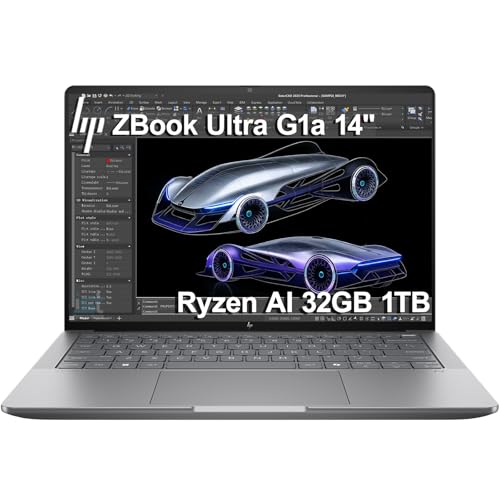
Choosing the right laptop for 3D rendering comes down to your specific needs: if you require maximum GPU muscle and a larger screen for a workstation-replacement experience, the HP ZBook X G1i Laptop, NVIDIA RTX PRO 1000 is an outstanding choice with its top-tier RTX PRO graphics and 64GB of RAM. For those who prioritize portability without sacrificing professional-grade performance, the HP ZBook Ultra G1a Laptop, 14″ FHD offers a compelling blend of power and mobility in a sleek aluminum chassis. Both are excellent investments that will serve you well for years to come.
Related Guides
Frequently Asked Questions
What is the most important spec for a 3D rendering laptop?
The GPU is the most critical component for 3D rendering. It directly affects how quickly your scenes render and how smoothly you can work in the viewport. Look for a dedicated professional GPU like an NVIDIA RTX series with ample VRAM, as this will have the biggest impact on your render times.
How much RAM do I need for 3D rendering in 2026?
For most 3D work, 32GB of RAM is the sweet spot in 2026, allowing you to handle complex scenes and multitask efficiently. If you work with very large assets or use multiple applications simultaneously, consider 64GB or more. This ensures your system won’t slow down when memory demands peak.
Is a dedicated GPU necessary for 3D rendering?
Yes, a dedicated GPU is absolutely necessary for serious 3D rendering. Integrated graphics are not designed for the intensive computations required by rendering engines. A dedicated NVIDIA RTX or AMD Radeon Pro GPU offers the specialized cores and VRAM needed to handle these workloads efficiently, and we recommend the HP ZBook series for this purpose.
Can I do 3D rendering on a gaming laptop?
Yes, you can, as gaming laptops often have powerful GPUs. However, professional workstations like the HP ZBook are certified for ISV applications, ensuring stability and performance with software like SolidWorks or AutoCAD. They also offer features like ECC memory and better thermal management, which are beneficial for long, intense render sessions.








