

You have a powerful gaming rig or a home theater PC, yet your audio still feels flat. The built-in sound on most motherboards is decent for basic tasks, but it often lacks the clarity, channel separation, and true surround sound that a dedicated sound card provides. Whether you are chasing footsteps in competitive shooters, immersing yourself in a cinematic score, or producing music, upgrading to a 5.1 sound card transforms your listening experience. In this guide, we review six of the top models available in 2026, covering internal PCIe cards and versatile USB external adapters. Our goal is to help you choose the right option for your specific needs, from high-resolution audio enthusiasts to budget-conscious upgraders.
If you are also exploring other audio upgrades, our roundup of the top USB sound cards for music production offers additional insights for recording and studio work.



How to Choose the Best 5.1 Sound Card
Before diving into individual models, it helps to understand the key factors that set these cards apart. Here are the most important criteria to evaluate when shopping for a 5.1 sound card in 2026.
Audio Quality and Sampling Rate
The heart of any sound card is its digital-to-analog converter (DAC) and its supported sampling rates. Higher rates, such as 192 kHz or 384 kHz, deliver clearer high frequencies and more detailed soundscapes. For true 5.1 surround, look for cards that support discrete multi-channel output rather than virtualized stereo. The signal-to-noise ratio (SNR) also matters: a rating above 100 dB ensures minimal background hiss, especially important when using sensitive headphones or speakers.
Connectivity and Compatibility
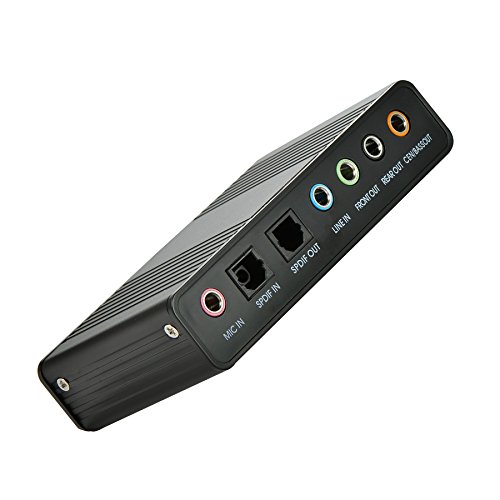
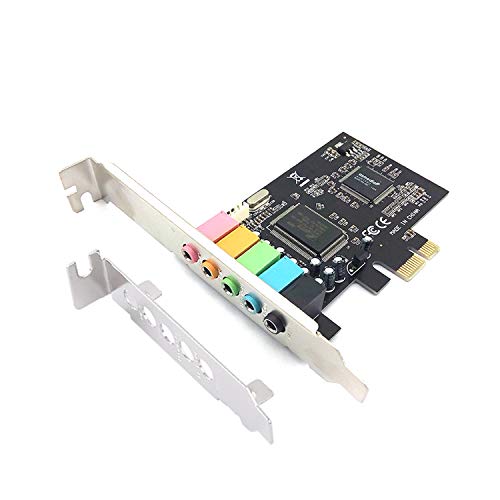
Think about how you will connect your sound card to your system. Internal PCIe cards require an available slot on your motherboard and are best for desktop desktops where you want a permanent, high-bandwidth solution. External USB sound cards, on the other hand, work with laptops, desktops, and even some consoles. They are truly plug-and-play, making them ideal for portable setups. Most external models also include SPDIF optical outputs for connecting to home theater receivers. If you record audio, check for dedicated line-in and microphone inputs with decent preamps. For more on recording-focused models, check out our guide to the best USB sound cards for recording.
Form Factor: Internal vs. External
Internal sound cards typically offer lower latency and higher maximum audio quality because they use the PCIe bus directly. They also free up USB ports. However, they are not an option for laptop users or those with small-form-factor PCs where space is tight. External USB adapters trade some potential bandwidth for versatility. Many modern external cards now support 7.1 channels and high-resolution audio, closing the gap significantly. If you are building a compact system, you might also consider our recommendations for single slot graphics cards to maximize internal space.
Additional Features and Software
Look for extras that enhance your experience: dedicated headphone amplifiers, virtual surround sound processing, and equalizer software. Some cards, like the Creative Sound Blaster Audigy Fx Pro, offer an app for AutoEQ headphone calibration – a huge plus for gamers and audio enthusiasts. Others include hardware volume knobs or mute buttons for quick adjustments. SPDIF digital output is essential if you plan to connect an external DAC or AV receiver for true 5.1 decoding. Also consider the operating system compatibility: some older cards do not support Windows 11 or macOS. Always verify driver support for your OS before purchasing.
Final Thoughts
After evaluating all six models, two stand out as excellent choices for different users. If uncompromising audio quality and immersive surround are your priorities, the Creative Sound Blaster Audigy Fx Pro Hi-Res PCIe delivers stunning 32-bit/384 kHz playback, discrete 7.1 output, and a compact low-profile design that fits even small cases. For those who need a portable, hassle-free solution for laptops or desktops, the StarTech 7.1 USB Audio Adapter offers reliable plug-and-play performance with 7.1 analog outputs, SPDIF digital, and easy volume controls. Both cards elevate your audio dramatically, but your choice ultimately depends on whether internal performance or external flexibility matters more to you.
Related Guides
Frequently Asked Questions
What is a 5.1 sound card?
A 5.1 sound card is an audio device that processes and outputs sound in six discrete channels: front left, front right, center, surround left, surround right, plus a subwoofer channel (the .1). This creates a true surround sound experience for movies, games, and music.
Do I need a dedicated sound card for 5.1 surround sound?
Most modern motherboards include built-in audio that can output 5.1 or 7.1 channels, but the quality is often limited. A dedicated sound card typically offers better DACs, higher signal-to-noise ratios, and lower latency, making it a worthwhile upgrade for audiophiles, gamers, and home theater enthusiasts.
Can a USB external sound card deliver true 5.1 sound?
Yes, many USB external sound cards now support true 5.1 or even 7.1 discrete channel output through multiple 3.5 mm jacks or SPDIF optical connections. Models like the StarTech 7.1 USB Audio Adapter and the Cubilux 7.1 USB card provide genuine multi-channel audio for compatible speakers and receivers.
Which is better: internal PCIe or external USB sound card?
Internal PCIe cards generally offer lower latency and higher potential audio quality, making them ideal for desktop gaming and professional audio work. External USB cards provide greater flexibility, working with laptops and small desktops, and are easier to install. Your choice depends on your system type and whether portability matters. For more, see our full category guide on audio cards.