

You have a high-end gaming rig or a music production PC, yet the audio crackles, hisses, or lacks depth. That is a clear sign your onboard sound chip is holding you back. A dedicated internal sound card bypasses the motherboard’s noisy electrical interference and delivers pristine, high-resolution audio. In this guide, we review the best internal sound cards for 2026, focusing on models from Creative and Padarsey that suit different budgets and use cases. Whether you need immersive surround sound for gaming, studio-grade fidelity for recording, or a simple budget-friendly upgrade, we have you covered. For more tailored advice, see our roundup of the best sound cards for home studio setups.




Buying Guide: What to Look for in an Internal Sound Card
Audio Quality and DAC
The digital-to-analog converter (DAC) is the heart of any sound card. A higher signal-to-noise ratio (SNR) and support for 32-bit / 384 kHz playback ensure you hear every detail without background noise. Cards like the Creative Sound Blaster AE-7 use an ESS SABRE-class DAC for audiophile-grade clarity. If you are serious about recording, also check our best sound cards for recording guide.
Connectivity and Channel Support
Consider how many speakers or headphones you plan to use. Discrete 5.1 or 7.1 analog outputs give you true surround sound for gaming and movies. Some cards also include optical or coaxial SPDIF outputs for connecting to external DACs or AV receivers. The Creative Sound Blaster Audigy Fx Pro offers versatile 7.1 output plus line-in and mic inputs.
Headphone Amplifier Power
If you own high-impedance studio headphones (300Ω or more), a built-in headphone amplifier is essential. The Creative Sound Blaster AE-7 features a Xamp discrete bi-amp that drives up to 600Ω headphones with separate amplification for each earcup. For demanding planar-magnetic cans, the Creative Sound Blaster AE-X delivers up to 350mW per channel.
Form Factor and Compatibility
Most internal sound cards use a PCIe x1 slot, but physical size varies. Compact low-profile cards like the Creative Sound Blaster Audigy Fx Pro fit small-form-factor cases with a half-height bracket. Always verify your motherboard has a free PCIe slot and that the card’s bracket matches your case. For a broader look at PC expansion cards, visit our Cards category page.
Final Thoughts
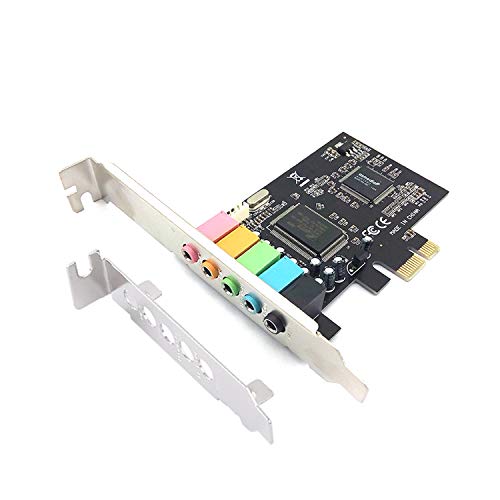
After evaluating the top contenders, the Creative Sound Blaster AE-7 Hi-Res PCIe stands out as the best all-rounder for audiophiles and gamers who want reference-quality sound with powerful headphone amplification. For budget-conscious users who simply need a reliable upgrade from onboard audio, the Padarsey PCIe 5.1 Internal Sound Card for PC delivers solid 5.1 surround performance at an entry-level price. Both options will breathe new life into your PC audio experience, so choose based on your headphone demands and feature requirements.
Frequently Asked Questions
Do I really need an internal sound card in 2026?
Modern motherboards have improved onboard audio, but they still suffer from electrical interference and limited DAC quality. If you notice static, latency, or a lack of detail with your headphones or speakers, an internal sound card provides a clean, dedicated audio path. It is especially beneficial for gaming, music production, and high-resolution listening.
What is the difference between PCIe and USB sound cards?
PCIe internal sound cards connect directly to the motherboard, offering lower latency and no external clutter. USB sound cards are portable and easy to swap between computers, but they may introduce slightly higher latency and rely on USB controller quality. For desktop setups, PCIe cards generally provide better stability and performance.
Can I use an internal sound card for surround sound gaming?
Yes. Many internal sound cards support discrete 5.1 or 7.1 analog outputs for multi-speaker setups, as well as virtual surround sound for headphones. The Creative Sound Blaster series includes hardware-accelerated surround virtualization that works with any pair of headphones, giving you accurate positional audio in games.
How do I install an internal sound card?
Installation is straightforward: power down your PC, open the case, insert the card into an available PCIe x1 slot, secure it with a screw, and close the case. After booting, install the driver software from the manufacturer’s website. Most cards are plug-and-play on Windows 10 and 11. For detailed steps, refer to our guide on best sound cards for home studio which covers installation tips.
