

If your PC’s onboard audio is leaving you underwhelmed with crackling or flat sound, it might be time to consider a dedicated sound card. Whether you’re a competitive gamer needing precise audio cues, a content creator demanding accurate monitoring, or just someone who loves crisp music and movies, the right sound card can make a huge difference. We’ve assessed several models across different form factors and budgets to help you find the perfect upgrade for your rig. For a deeper look at gaming-specific options, check out our dedicated guide on best sound cards for gaming.



Buying Guide
Audio Quality and Resolution
The most important factor is how clean and detailed the audio sounds. Look for high signal-to-noise ratios (SNR) and support for high bit depths and sample rates. The Creative Sound Blaster Audigy Fx Pro, for example, delivers up to 120 dB SNR and 32-bit / 384 kHz playback, ensuring studio-grade clarity. Even budget USB adapters with built-in DAC chips can dramatically improve over integrated audio, reducing noise and distortion.
Surround sound support also matters, especially for gaming. Discrete 7.1-channel output like that on the Audigy Fx Pro provides positional audio that helps you pinpoint footsteps and environmental cues. For more on gaming audio, see our best sound cards for gaming.
Connectivity and Compatibility
Consider what ports you need: traditional PCIe internal cards offer multiple analog jacks and often SPDIF output, but require an available slot on your motherboard. USB external sound cards, like the biaze USB Audio Adapter and the SABRENT adapter, are plug-and-play and work with laptops and desktops that have damaged audio jacks. Ensure the card supports your operating system, most work with Windows, macOS, and Linux, but always confirm.
For gamers, compatibility with consoles like PS5 and PS4 can be a bonus. The biaze adapter explicitly supports those platforms, while internal cards typically only work with PCs. Also check if the card handles both headphone output and microphone input, especially for headsets with a single 3.5mm plug.
Form Factor: Internal vs. External
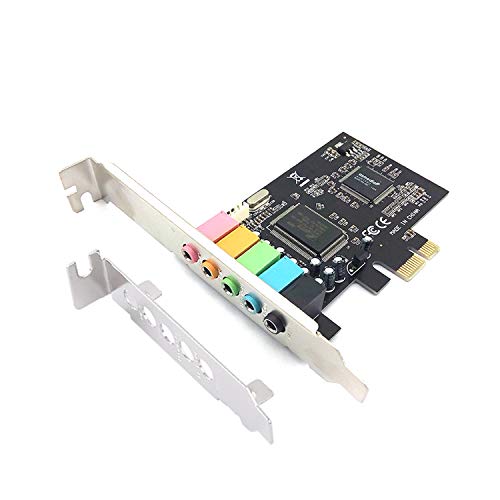
Internal PCIe sound cards are ideal for desktop users who want the best performance and lowest latency. They sit inside your case and often include additional features like hardware acceleration and shielding from electrical noise. The Padarsey PCIe 5.1 Internal Sound Card is a budget-friendly option that adds surround sound without breaking the bank.
External USB sound cards are portable and perfect for laptops or systems where you cannot open the case. They are also a quick fix for broken headphone jacks. The SABRENT USB External Stereo Sound Card is a compact, driverless solution that works in seconds. If you need a versatile option for both desktop and mobile use, an external adapter might be your best bet.
Final Thoughts
Choosing the right sound card depends on your specific needs: for uncompromising audio fidelity and immersive surround sound, we recommend the Creative Sound Blaster Audigy Fx Pro Hi-Res PCIe; for a no-fuss, portable fix that restores audio to any device, the SABRENT USB External Stereo Sound Card Adapter delivers exceptional value. Both options will breathe new life into your PC’s sound without breaking your budget.
Related Guides
Frequently Asked Questions
Do I really need a dedicated sound card in 2026?
If your motherboard’s integrated audio is noisy, lacks surround sound support, or you want higher fidelity for music production or gaming, yes. A dedicated sound card bypasses the electrical interference inside your case and provides cleaner, more powerful audio output.
What is the difference between a PCIe sound card and a USB audio adapter?
A PCIe sound card installs inside your desktop and typically offers more channels, lower latency, and better shielding. A USB audio adapter is external, portable, and works with any device that has a USB port, ideal for laptops or fixing broken jacks. For gamers, internal cards often provide better surround sound; for everyday use, a USB adapter is simpler.
Will a USB sound card improve audio quality on my laptop?
Yes, especially if your laptop’s built-in audio jack is faulty or produces static. USB sound cards like the biaze or SABRENT have built-in DAC chips that process audio outside the laptop, resulting in cleaner sound. They also add separate microphone input, which can improve voice clarity for calls and recording.
Can I use a PCIe sound card with a modern motherboard?
Most modern motherboards still include PCIe x1 slots, so internal sound cards like the Padarsey or Creative Audigy Fx Pro work fine. Always check your motherboard’s available slots and clearance near the GPU. Low-profile brackets are included with many cards to fit smaller cases.
